
grabbing info from wikipedia
Started by quant
on 11/5/2008
quant
11/5/2008 11:02 am
How do you grab websites from wikipedia? When I do it through ScrapBook to UR, there is a wasted space on the left which I don't know how to get rid of, see example
http://img253.imageshack.us/img253/1088/0439ey0.jpg
Do you have the same problem with WR, Surfulater, or other more web-oriented PIM? If so, how do you get around it?
Thanks for your help
http://img253.imageshack.us/img253/1088/0439ey0.jpg

Do you have the same problem with WR, Surfulater, or other more web-oriented PIM? If so, how do you get around it?
Thanks for your help
Pierre Paul Landry
11/5/2008 1:09 pm
$Bill
11/5/2008 3:27 pm
Pierre Paul Landry wrote:
InfoQube grabs it perfectly. Example here:
http://sites.google.com/site/infoqube/screenshots-1
I have managed to grab a copy in InfoQube but the copy does not have "live" hyperlinks which I would like. (Although with some effort I could edit the HTML and find them..)
I need to manually make a Wiki entry to have the Item in the grid link to the page I copied, right?
I am hoping that I missing something.
As I work around my limitations (and perhaps InfoQubes), I am linking from items in InfoQube to items in UltraRecall using the URL syntax Wikipedia. Does Webresearch or Surfulator offer similar functionality?
quant
11/5/2008 3:30 pm
Pierre Paul Landry wrote:
InfoQube grabs it perfectly. Example
here:
http://sites.google.com/site/infoqube/screenshots-1
UR with ScrapBook grabs it perfectly as well. The thing is that I want to save only part of the website, the one that contains "meat", I don't want the panel on the left side. But if I choose only part of the web, the empty space on the left side is still there (and on top as well), taking valuable space, and the extracted page then looks horrible in my PIM (because there is not enough space if I have my explorer open on the left side):
http://img26.picoodle.com/img/img26/3/11/5/f_0440m_b1ce642.jpg

I suppose it's some css style, so I was wondering how other programs deal with it. Most of other pages I've come across don't have this "problem", but as wikipedia is a great source of information, it's quite annoying.
$Bill
11/5/2008 3:34 pm
Oops, I'll try again...
$Bill wrote:
As I work around my limitations (and perhaps InfoQubes), I am linking
from items in InfoQube to items in UltraRecall using the URL syntax (ie ur://D:/DataStore/UltraRecall/test.urd?item=1052). Does
Webresearch or Surfulator offer similar functionality?
Pierre Paul Landry
11/5/2008 4:00 pm
$Bill wrote:
I have
managed to grab a copy in InfoQube but the copy does not have "live" hyperlinks which I
would like. (Although with some effort I could edit the HTML and find them..)
I need
to manually make a Wiki entry to
have the Item in the grid link to the page I copied, right?
All I did, was
1- copy the main wikipedia url to the clipboard
2- Hit the IQ hotkey (mine is Win-N)
3- Enter some item description (in this case Wiki test)
4- Paste into the URL textbox
5- Check Copy Content (if not already checked). I also like to capture in MHT format, though HTML is another option. There are more options you can choose (where it goes, give it a due date, etc)
6- Click Add Item
All hyperlinks work, including the show/hide in the top-right corner!
@quant
What exactly did you select? I selected the 4 main information boxes and it clipped correctly (in IQ)
quant
11/5/2008 4:37 pm
Pierre Paul Landry wrote:
Today's featured article
@quant
What exactly did you select? I selected the 4 main information
boxes and it clipped correctly (in IQ)
Today's featured article
Pierre Paul Landry
11/5/2008 5:19 pm
I updated the screenshots page to include one with just a section of the page:
http://sites.google.com/site/infoqube/screenshots-1
http://sites.google.com/site/infoqube/screenshots-1
Chris Thompson
11/5/2008 5:47 pm
Selecting just the main part of a Wikipedia page and capturing it works in Together (and probably most Mac PIMs since they share a common engine):
http://i481.photobucket.com/albums/rr174/cthomp777/Wikipediacapture.png
-- Chris
quant wrote:
http://i481.photobucket.com/albums/rr174/cthomp777/Wikipediacapture.png
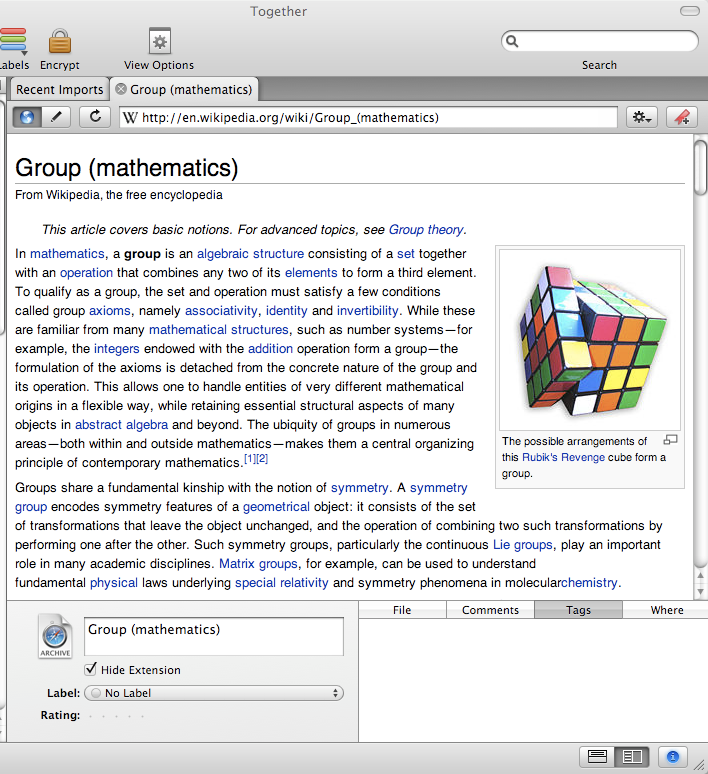
-- Chris
quant wrote:
The thing is that I want to save only part of the
website, the one that contains "meat", I don't want the panel on the left side. But if I
choose only part of the web, the empty space on the left side is still there (and on top as
well), taking valuable space, and the extracted page then looks horrible in my PIM
(because there is not enough space if I have my explorer open on the left
side):
http://img26.picoodle.com/img/img26/3/11/5/f_0440m_b1ce642.jpg
quant
11/5/2008 6:50 pm
Pierre Paul Landry wrote:
ok, I tried it myself, does it very nicely indeed
I updated the screenshots page to include one with just a section of the
page:
http://sites.google.com/site/infoqube/screenshots-1
ok, I tried it myself, does it very nicely indeed
$Bill
11/6/2008 11:12 pm
Oh browsing mode...thats what I needed to find in InfoQube .....now it works.
Pierre Paul Landry wrote:
$Bill wrote:
>but the copy does not have "live" hyperlinks
Pierre Paul Landry wrote:
All I did, was
1- copy the main wikipedia url to
the clipboard
2- Hit the IQ hotkey (mine is Win-N)
3- Enter some item description (in
this case Wiki test)
4- Paste into the URL textbox
5- Check Copy Content (if not
already checked). I also like to capture in MHT format, though HTML is another option.
There are more options you can choose (where it goes, give it a due date, etc)
6- Click
Add Item
All hyperlinks work, including the show/hide in the top-right
corner!
Pierre Paul Landry
11/13/2008 6:00 am
In the latest version (0.9.24 pre-rel 3) InfoQube now includes a FireFox extension (toolbar buttons and context menus).
So grabbing content is now a single-click.
Details here: http://sqlnotes.wikispaces.com/WebClipper
Pierre
So grabbing content is now a single-click.
Details here: http://sqlnotes.wikispaces.com/WebClipper
Pierre
Cassius
11/13/2008 6:49 am
Pierre Paul Landry wrote:
I'll have to try it again.
But can IQ export all info to standard formats?
-c
In the latest version (0.9.24 pre-rel 3) InfoQube now includes a FireFox extension
(toolbar buttons and context menus).
So grabbing content is now a
single-click.
I'll have to try it again.
But can IQ export all info to standard formats?
-c
Pierre Paul Landry
11/13/2008 12:54 pm
But can IQ export all info to standard formats?
Is there a standard format for PIMs?
1- Data is stored in JET so visible to Access
2- Rich text is stored in HTML format, to ease Import / Export (not RTF)
3- All grid and cell content is accessible through ODBC, so Word, Excel can view grid content
4- Copy / paste has XML mode copy which copies all item info in XML format
5- Copy / paste has tab-delimited mode to paste grid content
6- An of course, more I/O to come upon user request and available time.