
Outliner for nonfiction book
Started by Stephen R. Diamond
on 10/27/2018
22111
11/22/2018 10:06 pm
(https works fine now, again!)
"Unfortunately, there are a lot of developers of word processers who do not see a need for outlining - Textmaker (part of the German Softmaker Office) is one example."
That's a chicken-and-egg question. The implementation of outlining into text processors is so abysmally bad that users play a little bit around with it, then never touch it again, or, if they really, desperately need it, they use it in a minimalistic way and with horror; not even in MS Word, it's been implemented in a half-way accetable way.
To give just one example, when I last tried it out in "Atlantis", clicking on some outliner item didn't display the title line of that item within the first upper line of the window, but in any which line, so the navigational use of the ((sub-)title-driven) "outline" is severely hampered; let alone greying out following parts; perhaps they do it now with them greying out non-pertinent parts (current other thread here, not very informative though).
Thus, users don't ask for it since they abhor the existing implementations, and thus, developers don't see much interest in ((further) developing) them. Btw., it's not evident for a text processor to put the outline into a second pane (or more precisely, first of two panes), so we often see hybrid constructions, somewhere between 1- and 2-pane outlining, for outlining in text processors.
Then, please bear in mind that for most generic "users", the sheer existence of outliners as we know them, is not even known, except perhaps for some little iPad et al. things, not really suited for serious work: the term "outline" stays a synonym for a 1-page indented (sub)title list next to their text body in their minds: that what they will have learned in school.
Then, "our" outliners often appear overwhelming to prospects, e.g. "I'm also feeling no love for the more complex and complete writing programs such as Scrivener et al. The complexity feels that they will reduce productivity without any compensating advantage." here: http://www.donationcoder.com/forum/index.php?topic=45540.75 - of course, this is a blatant misconception; you just leave any functionality which you don't need, aside, and benefit from the additional functionality of which you're in need (I'll do a backlink there, too).
Elsewhere, here, a fellow contributor having read mathematical and philosophical oeuvres with 2-digit titling indentation levels, oh well! I would very much like to be given at least one single such title from each mentioned fields, in order to have a look myself, and to ponder if the fellow contributor is right in his conception that such be necessary indeed, or if his examples are just ones of blatant misconstruction.
Another citation from my link above: "Let's say you are doing a practical non-fiction book that will have planned out chapters, and you have a lot of source material with which to work. (In my case I have the info and many pictures on a special forum as well as urls in Linkman.) (...) Then I think the de minimis need would be like this: Good RTF and picture capture is nice. Export to book formats would be nice, but not necessary. When the time comes, you can cut-and-paste and tweak."
It goes without saying that this is the worst approach to it when it's lots of pages, lots of links, lots of pics / formulas / videos...
Thus, in complement to my 3 consecutive contributions here on pages 4 bottom and 5 top, let me say that, in order to have immediate access to such material, be it just for your own reference or for publication, you'll do of course links within the outliner tree, as sub-items of different formatting (e.g. in orange for your future reference (i.e. to be dealt with), in red for your past reference (i.e. already dealt with), and in green for publication (pics and formulas, etc. which you also reference in your text body).
Even in some quite crappy 2-pane outliner like AO this is perfectly possible: You use a macro doing alt-ins in your file manager for copying the path, then alt-tab for going back to your work horse, ^k for "insert a link as child", alt-d for "Disk file", alt-a for "Address", ^v for "insert the link", and "enter" to close the dialog again: This is a lot of ugly visuals, and there's certainly better ways to do it, but that's just an example how to do it even in the most basic of outliners; any of your material then is always at hand, without any search time, without de-synch between "material" and "target text" (a large screen or 2 screens, and a simple ^enter (or mouseclick) will suffice), and it's completely automatable upon export, all (relative or absolute) links will be automatically resolved in no time, and the text body remains neat; a simple filter will discard any "material" item which is not intended for publication, by its title's formatting. Craftsmen do work preparation; authors of big non-fiction literature should do, too.
"Unfortunately, there are a lot of developers of word processers who do not see a need for outlining - Textmaker (part of the German Softmaker Office) is one example."
That's a chicken-and-egg question. The implementation of outlining into text processors is so abysmally bad that users play a little bit around with it, then never touch it again, or, if they really, desperately need it, they use it in a minimalistic way and with horror; not even in MS Word, it's been implemented in a half-way accetable way.
To give just one example, when I last tried it out in "Atlantis", clicking on some outliner item didn't display the title line of that item within the first upper line of the window, but in any which line, so the navigational use of the ((sub-)title-driven) "outline" is severely hampered; let alone greying out following parts; perhaps they do it now with them greying out non-pertinent parts (current other thread here, not very informative though).
Thus, users don't ask for it since they abhor the existing implementations, and thus, developers don't see much interest in ((further) developing) them. Btw., it's not evident for a text processor to put the outline into a second pane (or more precisely, first of two panes), so we often see hybrid constructions, somewhere between 1- and 2-pane outlining, for outlining in text processors.
Then, please bear in mind that for most generic "users", the sheer existence of outliners as we know them, is not even known, except perhaps for some little iPad et al. things, not really suited for serious work: the term "outline" stays a synonym for a 1-page indented (sub)title list next to their text body in their minds: that what they will have learned in school.
Then, "our" outliners often appear overwhelming to prospects, e.g. "I'm also feeling no love for the more complex and complete writing programs such as Scrivener et al. The complexity feels that they will reduce productivity without any compensating advantage." here: http://www.donationcoder.com/forum/index.php?topic=45540.75 - of course, this is a blatant misconception; you just leave any functionality which you don't need, aside, and benefit from the additional functionality of which you're in need (I'll do a backlink there, too).
Elsewhere, here, a fellow contributor having read mathematical and philosophical oeuvres with 2-digit titling indentation levels, oh well! I would very much like to be given at least one single such title from each mentioned fields, in order to have a look myself, and to ponder if the fellow contributor is right in his conception that such be necessary indeed, or if his examples are just ones of blatant misconstruction.
Another citation from my link above: "Let's say you are doing a practical non-fiction book that will have planned out chapters, and you have a lot of source material with which to work. (In my case I have the info and many pictures on a special forum as well as urls in Linkman.) (...) Then I think the de minimis need would be like this: Good RTF and picture capture is nice. Export to book formats would be nice, but not necessary. When the time comes, you can cut-and-paste and tweak."
It goes without saying that this is the worst approach to it when it's lots of pages, lots of links, lots of pics / formulas / videos...
Thus, in complement to my 3 consecutive contributions here on pages 4 bottom and 5 top, let me say that, in order to have immediate access to such material, be it just for your own reference or for publication, you'll do of course links within the outliner tree, as sub-items of different formatting (e.g. in orange for your future reference (i.e. to be dealt with), in red for your past reference (i.e. already dealt with), and in green for publication (pics and formulas, etc. which you also reference in your text body).
Even in some quite crappy 2-pane outliner like AO this is perfectly possible: You use a macro doing alt-ins in your file manager for copying the path, then alt-tab for going back to your work horse, ^k for "insert a link as child", alt-d for "Disk file", alt-a for "Address", ^v for "insert the link", and "enter" to close the dialog again: This is a lot of ugly visuals, and there's certainly better ways to do it, but that's just an example how to do it even in the most basic of outliners; any of your material then is always at hand, without any search time, without de-synch between "material" and "target text" (a large screen or 2 screens, and a simple ^enter (or mouseclick) will suffice), and it's completely automatable upon export, all (relative or absolute) links will be automatically resolved in no time, and the text body remains neat; a simple filter will discard any "material" item which is not intended for publication, by its title's formatting. Craftsmen do work preparation; authors of big non-fiction literature should do, too.
washere
11/23/2018 3:57 am
My friend, some here have said what you punch out on your keyboard is simply incoherent mumbling, others that tis symptomatic of English as a second language.
At first I thought it could be either stream of consciousness à la James Joyce. Or akin to William Burroughs' Cut-up technique. But now I see it is not these either.
I think you could really consult those around who know you in person, if you should seek out some expert opinion and possible help. This is my honest opinion and trying to be genuinely helpful. All the best.
At first I thought it could be either stream of consciousness à la James Joyce. Or akin to William Burroughs' Cut-up technique. But now I see it is not these either.
I think you could really consult those around who know you in person, if you should seek out some expert opinion and possible help. This is my honest opinion and trying to be genuinely helpful. All the best.
22111
11/24/2018 2:13 pm
From the previous post, I conclude there probably is no serious nonfiction book out there which uses 2-digit (sub-) title numbering (which makes it 1...up to 10 in case, 10 being coded as 0); this reasonable limitation is not to be mixed up with the number of siblings which of course should possibly exceed 10 items wherever needed.
By chance, I just got the (almost-1-year-old) info that "Chrome apps" are doomed or such: " https://www.amazon.com/Programming-Chrome-Apps-Develop-Cross-Platform-ebook/dp/B00R3MR6W8/ref=sr_1_1?s=books&ie=UTF8&qid=1543065990&sr=1-1&keywords=programming+chrome+apps
: Ken in Denver (...) but Google just announced that they're killing off Chrome apps, so it's a moot point. Don't buy this book, because it won't be useful in your career, business, or job anymore."
My point of view re Chromebooks is no secret, cf. MS Windows RT, and lately Windows S, anything non-standard (euphemism for "crippled", and that's a fact for RT and S) OS not really being justified anymore in an age where, as I said above, you get full functionality (incl. keyboard, which is not Chromebook's problem indeed) at around 1 kg, i.e. largely portable.
We also know that Chromebooks compete with iPads (and perhaps other devices) in the U.S. school system, in order to hopefully make future paying customers; Apple seems to be quite successful in this, many students' laptops in higher education then being Macbooks, and I could clearly observe that Macbooks vs (mostly) Acer/Asus (/etc, expensive MS hardware ("Surface") being extremely rare) is in function of wealth (apparel; accessories for the girls), whilst on the other hand, I didn't see a single Chromebook, looking out at several occasions in the (non-U.S., I must say) libraries.
I don't fully understand what "they're killing off Chrome apps" means, since the OS is one thing, and the apps are another one, to be curated by independent developers, besides some possible google's-own apps.
But at the very least, my second thoughts about Chromebooks have now be amplified, (and altogether leaving out my opinions about web storage and web access as further Chromebook problems,) reading the above, and considering that this forum bears quite a lot of Chromebook "advertising"/embracing, I justed wanted to mention this info as-is; since if it has escaped me, from semi-official sources, that could be somebody else's mileage, too, for whom that could possibly be pertinent info... or should I say, rumor instead?
Btw, Win S seems to indicate that MS isn't willing to learn from mistakes. On the other hand, and à propos rumors, I also read (well, these are allegations, but perfectly persuasive ones) that Apple's going to integrate iOS with its Mac system or vice versa, hence their decision to discard Intel processors soon.
Thus, I think MS has copious homework to do, fully-functional-Windows-wise (memory and speed for lesser, cheaper hardware than their own), instead of trying to educate people to adopt minor "apps", a lesson both Apple (iPad) and google seem to have learned in-between.
By chance, I just got the (almost-1-year-old) info that "Chrome apps" are doomed or such: " https://www.amazon.com/Programming-Chrome-Apps-Develop-Cross-Platform-ebook/dp/B00R3MR6W8/ref=sr_1_1?s=books&ie=UTF8&qid=1543065990&sr=1-1&keywords=programming+chrome+apps
: Ken in Denver (...) but Google just announced that they're killing off Chrome apps, so it's a moot point. Don't buy this book, because it won't be useful in your career, business, or job anymore."
My point of view re Chromebooks is no secret, cf. MS Windows RT, and lately Windows S, anything non-standard (euphemism for "crippled", and that's a fact for RT and S) OS not really being justified anymore in an age where, as I said above, you get full functionality (incl. keyboard, which is not Chromebook's problem indeed) at around 1 kg, i.e. largely portable.
We also know that Chromebooks compete with iPads (and perhaps other devices) in the U.S. school system, in order to hopefully make future paying customers; Apple seems to be quite successful in this, many students' laptops in higher education then being Macbooks, and I could clearly observe that Macbooks vs (mostly) Acer/Asus (/etc, expensive MS hardware ("Surface") being extremely rare) is in function of wealth (apparel; accessories for the girls), whilst on the other hand, I didn't see a single Chromebook, looking out at several occasions in the (non-U.S., I must say) libraries.
I don't fully understand what "they're killing off Chrome apps" means, since the OS is one thing, and the apps are another one, to be curated by independent developers, besides some possible google's-own apps.
But at the very least, my second thoughts about Chromebooks have now be amplified, (and altogether leaving out my opinions about web storage and web access as further Chromebook problems,) reading the above, and considering that this forum bears quite a lot of Chromebook "advertising"/embracing, I justed wanted to mention this info as-is; since if it has escaped me, from semi-official sources, that could be somebody else's mileage, too, for whom that could possibly be pertinent info... or should I say, rumor instead?
Btw, Win S seems to indicate that MS isn't willing to learn from mistakes. On the other hand, and à propos rumors, I also read (well, these are allegations, but perfectly persuasive ones) that Apple's going to integrate iOS with its Mac system or vice versa, hence their decision to discard Intel processors soon.
Thus, I think MS has copious homework to do, fully-functional-Windows-wise (memory and speed for lesser, cheaper hardware than their own), instead of trying to educate people to adopt minor "apps", a lesson both Apple (iPad) and google seem to have learned in-between.
22111
11/24/2018 2:14 pm
(Oh, and I forgot, the https problem is back again, and, as always, just for outlinersoftware, nowhere else.)
washere
11/24/2018 11:12 pm
Chips, OSes & Tech giants? there are chips, devices and OSes already in the works that will replace ecosystems we have now. Could go into this for each tech giant OS/chips/apps emerging strategies, plus disruptor new device concepts already out, but like most of the long penultimate post above, would be off-topic.
As to desired DEPP OUTLINE LEVELS not needed? I don't know what "serious" non fiction books not needing deeper levels than 9 means. It doesn't matter either. There are books that do. Most people don't use "serious" outlining software either, but a few of us do.
Secondly much of report/manual/tech writing industry goes well into deep levels subsections. So such users & uses do exist even if we just cared about ourselves and did not give a damn about others. It is as if saying "not my problem, whatever, talk to the hand". A need as pointed out by some on this thread too.
Thirdly, in the creative stage, deep levels can be used, for various purposes such as notes, interconnected sections, mindmap tags, refs etc. The final text then can have those deeper levels amalgamated into lesser levels or do away with in the final polish or completely hide them from the reader. Anyway, deeper levels than 9 is what some need as they said here. Dismissing them is just one person's POV, as if someone went into most specific threads here and said "I don't care, this is not my problem". I can sympathize with those comments about MS Word deficiency on this. AND OTHER desirable features.
Finally this thread's topic so far shows how a powerful fully featured app for non-fiction, such as scrivener for fiction, with a powerful outliner, refs/notes/biblio features, tags/flags etc, advanced search panels, etc. would be really useful if it existed for non-fiction writers, academics, tech/science industry etc. Would probably sell much more than Scriv does. So not a silly thread at all, but very apt IMHO.
As to desired DEPP OUTLINE LEVELS not needed? I don't know what "serious" non fiction books not needing deeper levels than 9 means. It doesn't matter either. There are books that do. Most people don't use "serious" outlining software either, but a few of us do.
Secondly much of report/manual/tech writing industry goes well into deep levels subsections. So such users & uses do exist even if we just cared about ourselves and did not give a damn about others. It is as if saying "not my problem, whatever, talk to the hand". A need as pointed out by some on this thread too.
Thirdly, in the creative stage, deep levels can be used, for various purposes such as notes, interconnected sections, mindmap tags, refs etc. The final text then can have those deeper levels amalgamated into lesser levels or do away with in the final polish or completely hide them from the reader. Anyway, deeper levels than 9 is what some need as they said here. Dismissing them is just one person's POV, as if someone went into most specific threads here and said "I don't care, this is not my problem". I can sympathize with those comments about MS Word deficiency on this. AND OTHER desirable features.
Finally this thread's topic so far shows how a powerful fully featured app for non-fiction, such as scrivener for fiction, with a powerful outliner, refs/notes/biblio features, tags/flags etc, advanced search panels, etc. would be really useful if it existed for non-fiction writers, academics, tech/science industry etc. Would probably sell much more than Scriv does. So not a silly thread at all, but very apt IMHO.
Adrian
11/25/2018 12:31 am
One-pane outliner with deep levels...for Windows...Outliner for nonfiction book
That's what Visual Outliner is for!
I'm the co-author of Visual Outliner, and I'm currently using it to write a book on Deep Learning Neural Nets (about 300 pages).
It currently supports 40 sub-levels, but we can add more if you really need it. Just send us a formal request.
https://www.visualoutliner.com/
Stephen R. Diamond wrote:
That's what Visual Outliner is for!
I'm the co-author of Visual Outliner, and I'm currently using it to write a book on Deep Learning Neural Nets (about 300 pages).
It currently supports 40 sub-levels, but we can add more if you really need it. Just send us a formal request.
https://www.visualoutliner.com/
Stephen R. Diamond wrote:
Strange to be looking for something so basic, but it's still hard to
find an excellent one-pane outliner with deep levels.
It seems Inspiration 9 is the only real alternative for book-length
writing. Am I wrong?
Stephen Diamond
11/25/2018 6:50 am
Hi Adrian,
Have you considered these two features: 1) multiple selection of items (to aid reorganization); and 2) Undo (preferably unlimited but 10 or 20 would suffice for me).
(Other potential users may need more, but 40 hierarchical levels suffices for my needs.)
Have you considered these two features: 1) multiple selection of items (to aid reorganization); and 2) Undo (preferably unlimited but 10 or 20 would suffice for me).
(Other potential users may need more, but 40 hierarchical levels suffices for my needs.)
tightbeam
11/25/2018 12:17 pm
Does it have word wrap? Longer lines seem to truncate with ellipses.
Can I do a traditional outline, e.g.,
A.
1.
i.
etc.? That seems missing as well.
Otherwise, a very nice piece of software.
Adrian wrote:
Can I do a traditional outline, e.g.,
A.
1.
i.
etc.? That seems missing as well.
Otherwise, a very nice piece of software.
Adrian wrote:
One-pane outliner with deep levels...for Windows...Outliner for
nonfiction book
That's what Visual Outliner is for!
I'm the co-author of Visual Outliner, and I'm currently using it to
write a book on Deep Learning Neural Nets (about 300 pages).
It currently supports 40 sub-levels, but we can add more if you really
need it. Just send us a formal request.
https://www.visualoutliner.com/
Stephen R. Diamond wrote:
Strange to be looking for something so basic, but it's still hard to
>find an excellent one-pane outliner with deep levels.
>
>It seems Inspiration 9 is the only real alternative for book-length
>writing. Am I wrong?
Adrian
11/25/2018 4:38 pm
Hi Stephen,
You can see a screenshot of the 40 level deep outline created by Visual Outliner here:
http://www.visualoutliner.com/l40opml.png
Regarding unlimited "undo" and multiple selection, yes, it's on the roadmap.
However, you can select multiple items right now, maybe we need to improve it/explain it better:
- Hit Shift+Space bar
- Then hit Shift+Up Arrow (or Down Arrow)
You should see a multi-selection marker on the left edge of the outliner.
- Shift+Backspace will deselect the items
You can do the same with the mouse. Check "Multiple Line Selection" at:
https://www.visualoutliner.com/help.html
Is that what you mean? I'll definitely add some videos to explain it better.
Right now there is "undelete" under the "Edit" menu, but we will also add a complete "Undo" action.
Adrian
Stephen Diamond wrote:
You can see a screenshot of the 40 level deep outline created by Visual Outliner here:
http://www.visualoutliner.com/l40opml.png
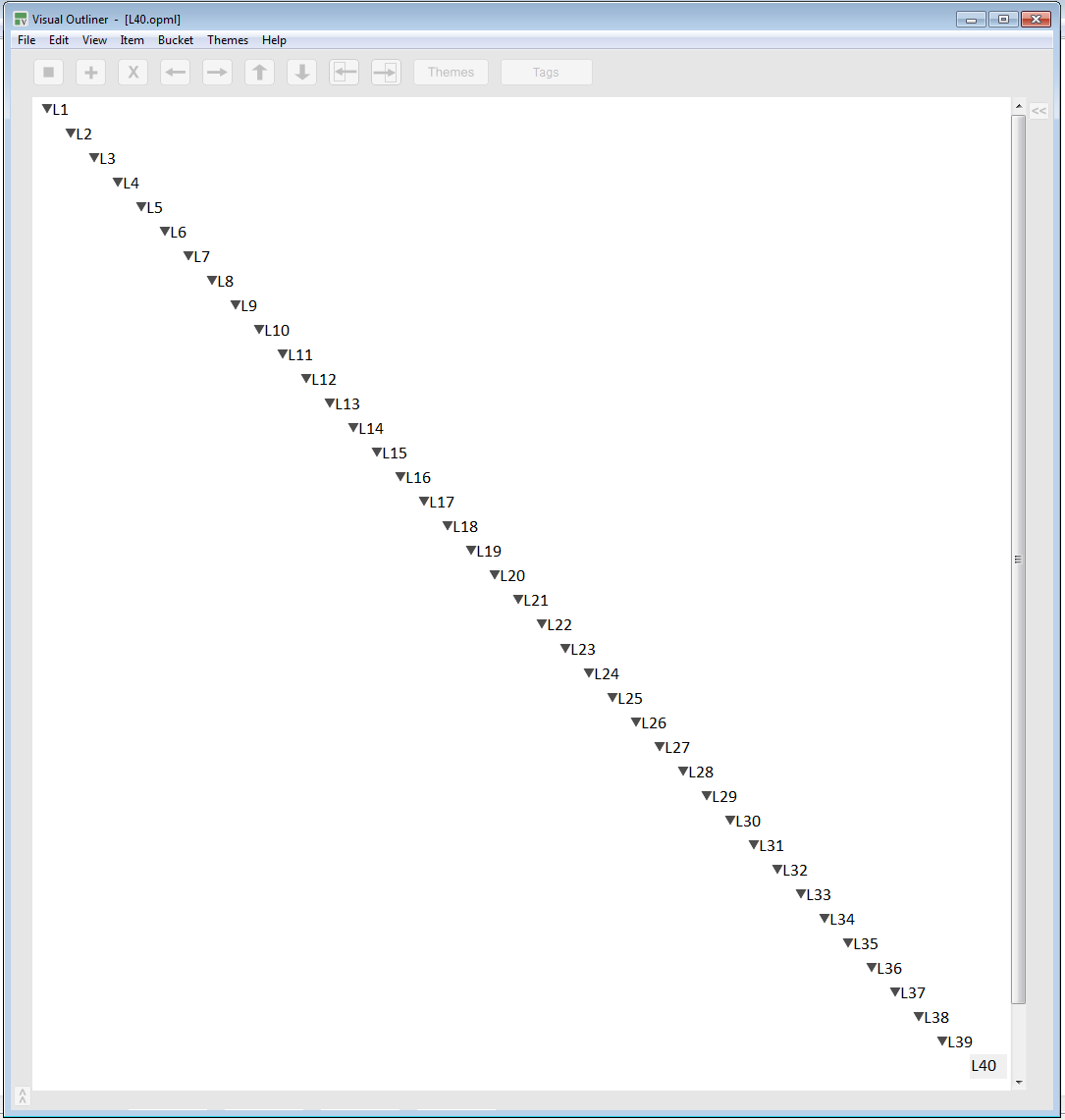
Regarding unlimited "undo" and multiple selection, yes, it's on the roadmap.
However, you can select multiple items right now, maybe we need to improve it/explain it better:
- Hit Shift+Space bar
- Then hit Shift+Up Arrow (or Down Arrow)
You should see a multi-selection marker on the left edge of the outliner.
- Shift+Backspace will deselect the items
You can do the same with the mouse. Check "Multiple Line Selection" at:
https://www.visualoutliner.com/help.html
Is that what you mean? I'll definitely add some videos to explain it better.
Right now there is "undelete" under the "Edit" menu, but we will also add a complete "Undo" action.
Adrian
Stephen Diamond wrote:
Hi Adrian,
Have you considered these two features: 1) multiple selection of items
(to aid reorganization); and 2) Undo (preferably unlimited but 10 or 20
would suffice for me).
(Other potential users may need more, but 40 hierarchical levels
suffices for my needs.)
Franz Grieser
11/25/2018 5:04 pm
Adrian wrote:
You're talking about selecting consecutive lines. What about non-consecutive lines? (In Windows Explorer you can select non-consecutive files by pressing CTRL and clicking the files with the mouse).
However, you can select multiple items right now, maybe we need to
improve it/explain it better:
You're talking about selecting consecutive lines. What about non-consecutive lines? (In Windows Explorer you can select non-consecutive files by pressing CTRL and clicking the files with the mouse).
tightbeam
11/26/2018 12:37 pm
Given the lack of a response by the developer to my question about whether his "Visual Outliner" has word wrap and a traditional outline structure, I assume it has neither. The software can outline to 40 levels, but it can't word wrap. I'll be passing on this one...