
Any Known Alternatives to DEVONthink for Linux or Windows?
Started by Witty-Euphemisms
on 7/3/2018
Witty-Euphemisms
7/3/2018 5:52 pm
I emailed the developers of DEVONthink and they said they don't see a point in developing DEVONthink for either Linux or Windows platforms, which is very disappointing. To date, I have found similar software but none that are "easy to learn", "aesthetically pleasing", or still actively developed. To be honest, I really like the concept of Water-Ship Planner but I don't think it's maintained and is arguably priced too high. I am not opposed to spending money but one needs to be able to trust in the developers that the product will live on. All 32 products listed are great and have tried but in my opinion are not as clean cut and streamlined like DEVONThink.
Has anyone come across a viable alternative to DEVONThink for Linux and/or Windows?
0 Water-Ship Planner
1 Treegonizer
2 MindJet MindManager
3 MindView
4 myBase
5 Notecase Pro
6 Thinking Rock
7 Standard Note
8 Joplin
9 Cylix
10 Dynalist
11 MyTetra
12 AllMyNotes Organizer
13 Outwiker
14 TreeDB Notes
15 Knowte
16 Info Base
17 Thinking Rock
18 SortingThoughts
19 UltraRecall
20 ZuluPad
21 Xoot XT
22 MyNoteX
23 Personal KnowBase
24 KnowFox
25 SimpleNote
26 QBase
27 Inspire-Writer
28 TreeNotes
29 TagSpaces
30 WikidPad
31 TheBrain
Has anyone come across a viable alternative to DEVONThink for Linux and/or Windows?
0 Water-Ship Planner
1 Treegonizer
2 MindJet MindManager
3 MindView
4 myBase
5 Notecase Pro
6 Thinking Rock
7 Standard Note
8 Joplin
9 Cylix
10 Dynalist
11 MyTetra
12 AllMyNotes Organizer
13 Outwiker
14 TreeDB Notes
15 Knowte
16 Info Base
17 Thinking Rock
18 SortingThoughts
19 UltraRecall
20 ZuluPad
21 Xoot XT
22 MyNoteX
23 Personal KnowBase
24 KnowFox
25 SimpleNote
26 QBase
27 Inspire-Writer
28 TreeNotes
29 TagSpaces
30 WikidPad
31 TheBrain
satis
7/3/2018 8:08 pm
What specific functions from DEVONthink are you looking to replicate on Windows/Linux? The Pro version offers so many disparate features, from bookmarking to document/mail archiving to pdf import/reading, to scanning/OCR, to note & document creation. The first step is clearly articulating what are you looking for... and what are you willing to forgo.
There are lots of alternatives that work on Windows/web to do many of the same things, albeit in different ways. Alternatives include Evernote Premium, MyInfo, ZenKit, or one of the many, many Wiki systems. Features vary, and prices range from free to $100/yr. Some of those offer web access/sync, but the DEVONthink iOS app has become a pretty nifty partner to the Mac app that most Windows alternatives can't quite duplicate.
As-new refurb Macbooks (with 1-yr warranty) start at Apple.com at $1100 (and little desktop Mac minis for $420, if you have your own monitor/keyboard/mouse), so if the software is sufficiently (in)valuable to you, the hardware cost could be reasonably factored in... especially if there's no Windows alternative you like ... and more so if the option is something like Evernote/ZenKit at 80-$100/year.
There are lots of alternatives that work on Windows/web to do many of the same things, albeit in different ways. Alternatives include Evernote Premium, MyInfo, ZenKit, or one of the many, many Wiki systems. Features vary, and prices range from free to $100/yr. Some of those offer web access/sync, but the DEVONthink iOS app has become a pretty nifty partner to the Mac app that most Windows alternatives can't quite duplicate.
As-new refurb Macbooks (with 1-yr warranty) start at Apple.com at $1100 (and little desktop Mac minis for $420, if you have your own monitor/keyboard/mouse), so if the software is sufficiently (in)valuable to you, the hardware cost could be reasonably factored in... especially if there's no Windows alternative you like ... and more so if the option is something like Evernote/ZenKit at 80-$100/year.
Chris Thompson
7/3/2018 8:09 pm
There isn't, unfortunately -- I wish there was. One app that's not on your list that is "kind of" close to DevonThink is Lucion's FileCenter Professional. You might want to look at it -- if you don't use the automated document classification features of DevonThink, then it might meet your needs. But for me the ability to intelligently classify to multiple locations in an existing taxonomy is kind of the main reason to DevonThink is useful.
Another option is to keep an old Mac around in a closet to host DevonThink and then access it from Windows or Linux through DevonThink Pro's web interface. It does a pretty good job of simulating the native interface.
--Chris
Another option is to keep an old Mac around in a closet to host DevonThink and then access it from Windows or Linux through DevonThink Pro's web interface. It does a pretty good job of simulating the native interface.
--Chris
Chris Thompson
7/3/2018 9:23 pm
Another alternative you might consider is Zotero. It's billed as an academic reference manager, but it allows much the same style of organization as DevonThink, including both one-to-many logical topic hierarchies and document-specific tags. (As a bonus, version 4 also can sometimes be installed on locked-down corporate networks if your IT admin has greenlit some old versions of Firefox.) It also supports children of documents, which DevonThink doesn't. However, still no automatic classification.
--Chris
--Chris
Listerene
7/4/2018 11:08 pm
Here are a bunch of alternatives not on your list https://alternativeto.net/software/devonthink/
Witty-Euphemisms
7/13/2018 3:34 pm
Thanks for responding.
I am currently looking into Lucion’s FileCenter Professional and other software alike. Your point about the automated processes of DEVONthnk is valid and I agree with 100%. Intelligently classify documents and make connections is one critical feature I like about DEVONthink. If I can't find a solution, I will consider purchasing a macbook of some sort.
I am currently looking into Lucion’s FileCenter Professional and other software alike. Your point about the automated processes of DEVONthnk is valid and I agree with 100%. Intelligently classify documents and make connections is one critical feature I like about DEVONthink. If I can't find a solution, I will consider purchasing a macbook of some sort.
Witty-Euphemisms
7/13/2018 4:10 pm
satis wrote:
What specific functions from DEVONthink are you looking to replicate on
Windows/Linux? The Pro version offers so many disparate features, from
bookmarking to document/mail archiving to pdf import/reading, to
scanning/OCR, to note & document creation. The first step is clearly
articulating what are you looking for... and what are you willing to
forgo.
There are lots of alternatives that work on Windows/web to do many of
the same things, albeit in different ways. Alternatives include Evernote
Premium, MyInfo, ZenKit, or one of the many, many Wiki systems. Features
vary, and prices range from free to $100/yr. Some of those offer web
access/sync, but the DEVONthink iOS app has become a pretty nifty
partner to the Mac app that most Windows alternatives can't quite
duplicate.
As-new refurb Macbooks (with 1-yr warranty) start at Apple.com at $1100
(and little desktop Mac minis for $420, if you have your own
monitor/keyboard/mouse), so if the software is sufficiently (in)valuable
to you, the hardware cost could be reasonably factored in... especially
if there's no Windows alternative you like ... and more so if the option
is something like Evernote/ZenKit at 80-$100/year.
Thanks for responding.
What I'm looking for may not exist yet (to my knowledge) and is more than likely a figment of my imagination. I am looking for an "all-in-one" information organizer and planner that runs on windows or Linux. An example would be a cross between three products. DEVONthink for it's intelligent classify things across multiple locations, import and fully search pdf files. DoogiePIM because of all of its features it incorporates (encryption, web browser, send/receive emails, budgeting, password generator, etc.). Lastly, some version of planning capabilities that Amazing Marvin and/or Watership-Planner offer. If any product offered all of these things, I imagine it'd cost a pretty penny. If this imaginary product did exist I wouldn't be opposed to paying for it...
The closest product I have found that attempts to be all of those things listed above (excluding DEVONthink, DoogiePIM, Amazing Marvin) is Treegonizer. It is a great product overall. However, it lacks the ability to intelligently classify items across multiple locations like DEVONthink can. It, for the most part, has the same features of DoogiePIM. Excluding a calendar, it doesn't make planning your day/week/month a priority like Amazing Marving does. Also, its ui seems a bit dated - no, it's not the most important thing. A clean UI is important but likely something sacrificed given the multitude of abilities. I will take another look at MyInfo and ZenKit.
If all else fails, I will probably look into purchasing a macbook. A while ago, I used to be a "cheerleader" for apple but began to feel as if innovation was stalling, products were overpriced, and I didn't like being trapped in the "apple ecosystem". Those were my reasons to switch to android, windows, and linux. Anyway, I will take another look at MyInfo and ZenKit. and go from there
Thanks
Dellu
7/13/2018 5:24 pm
If all else fails, I will probably look into purchasing a macbook.
If you are going to buy a mac just for Devonthink, I think you have overestimated the value of Devonthink.
It just organizing and tagging system; it’s not going to do a magic.
I use the mac, and I have the app. I find the good searching tools (like DtSearch in the windows, Foxtrot in the mac) much valuable than Devonthink.
Macbooks are generally good: not bothering about antivirus has been a great experience for me. But, I won't bother to spend a lot of money just for the sake of Devonthink, or Tinderbox. After using them for many years now, I am realizing that they are really not that as important for "my success" as I used to think.
DoogiePIM seems a great information manager.
( I also have windows machine--I will check it out soon)
Alexander Deliyannis
7/13/2018 5:29 pm
Witty-Euphemisms wrote:
As the saying goes, "be careful what you wish for, you may just get it". Is a combination of a lawnmower and a SUV really a good idea?
My understanding is that Zoot (Windows only) should cover the first two points; however, the reviews are not so positive, though the lack of documentation may be the main issue: http://www.outlinersoftware.com/topics/viewt/8308/0/zoot
Thanks for the heads up on Treegonizer, looks very interesting and I'm surprised it hasn't been mentioned here before. The fact that it runs on all three main desktop platforms is for me very important.
What I'm looking for may not exist yet (to my knowledge) and is more
than likely a figment of my imagination. I am looking for an
"all-in-one" information organizer and planner that runs on windows or
Linux. An example would be a cross between three products. DEVONthink
for it's intelligent classify things across multiple locations, import
and fully search pdf files. DoogiePIM because of all of its features it
incorporates (encryption, web browser, send/receive emails, budgeting,
password generator, etc.). Lastly, some version of planning capabilities
that Amazing Marvin and/or Watership-Planner offer.
As the saying goes, "be careful what you wish for, you may just get it". Is a combination of a lawnmower and a SUV really a good idea?
My understanding is that Zoot (Windows only) should cover the first two points; however, the reviews are not so positive, though the lack of documentation may be the main issue: http://www.outlinersoftware.com/topics/viewt/8308/0/zoot
Thanks for the heads up on Treegonizer, looks very interesting and I'm surprised it hasn't been mentioned here before. The fact that it runs on all three main desktop platforms is for me very important.
Paul Korm
7/13/2018 8:12 pm
I agree. Absolutely. DEVONthink is good but not essential.
(I say this after once being a very active user, with close to 7,000 posts in their forums, and contributing hundreds of scripts to enhance DEVONthink. It's not worth it. I've all but abandoned using it after realizing the file system and a few useful low-cost utilities gets more done than fiddling with databases.)
Dellu wrote:
(I say this after once being a very active user, with close to 7,000 posts in their forums, and contributing hundreds of scripts to enhance DEVONthink. It's not worth it. I've all but abandoned using it after realizing the file system and a few useful low-cost utilities gets more done than fiddling with databases.)
Dellu wrote:
If you are going to buy a mac just for Devonthink, I think you have
overestimated the value of Devonthink.
Alexander Deliyannis
7/13/2018 8:21 pm
Paul Korm wrote:
Can you mention some of these utilities?
I've all but abandoned using it after
realizing the file system and a few useful low-cost utilities gets more
done than fiddling with databases.)
Can you mention some of these utilities?
Paul Korm
7/14/2018 10:40 am
Finder searches are far more adaptable and configurable than any DEVONthink search
Tembo for quick on-the-fly searching
Ammonite for tag searching
Apple Notes or Curiota for on-the-fly note taking
Forklift 3 -- lots of nice features for folder and document management
For me, the above replace 99% of what DEVONthink does. I don't need a database to store documents. I don't need fancy sync -- iCloud is adequate. The See Also & Classify feature is interesting but I rarely use it. The amount of time spent on managing and curating folders in the file system is no different than the same task in a database. And every macOS app is integrated with the file system by default, but none of them are integrated with DEVONthink -- if you use DEVONthink to store documents you are 95% locked into using DEVONthink to launch them for editing.
Don't get me wrong -- it is a nice product, well engineered and reliable. But for me it is also overhead with little payback.
Alexander Deliyannis wrote:
Tembo for quick on-the-fly searching
Ammonite for tag searching
Apple Notes or Curiota for on-the-fly note taking
Forklift 3 -- lots of nice features for folder and document management
For me, the above replace 99% of what DEVONthink does. I don't need a database to store documents. I don't need fancy sync -- iCloud is adequate. The See Also & Classify feature is interesting but I rarely use it. The amount of time spent on managing and curating folders in the file system is no different than the same task in a database. And every macOS app is integrated with the file system by default, but none of them are integrated with DEVONthink -- if you use DEVONthink to store documents you are 95% locked into using DEVONthink to launch them for editing.
Don't get me wrong -- it is a nice product, well engineered and reliable. But for me it is also overhead with little payback.
Alexander Deliyannis wrote:
Can you mention some of these utilities?
nathanb
7/14/2018 1:56 pm
Paul Korm wrote:
Finder searches are far more adaptable and configurable than any
DEVONthink search
Tembo for quick on-the-fly searching
Ammonite for tag searching
Apple Notes or Curiota for on-the-fly note taking
Forklift 3 -- lots of nice features for folder and document management
For me, the above replace 99% of what DEVONthink does. I don't need a
database to store documents. I don't need fancy sync -- iCloud is
adequate. The See Also & Classify feature is interesting but I rarely
use it. The amount of time spent on managing and curating folders in
the file system is no different than the same task in a database. And
every macOS app is integrated with the file system by default, but none
of them are integrated with DEVONthink -- if you use DEVONthink to store
documents you are 95% locked into using DEVONthink to launch them for
editing.
Don't get me wrong -- it is a nice product, well engineered and
reliable. But for me it is also overhead with little payback.
Alexander Deliyannis wrote:
>Can you mention some of these utilities?
I'm on Windows so don't know the specifics here, but am assuming that storing files in the file system vs a database are roughly the same.
I've long wrestled with this issue about where the metadata for a file should live. I agree that far and away the best place to store document metadata (tags) SHOULD BE in the file itself so the user isn't depending on a separate index (database or not) for curation. Lots of file types have their own metadata standards built in (incompatible with each other, of course). Like adobe pdf tags, exif info in photos, and MS Office Docs even has their own group of tags which you can get file explorer to show....
...ah that specifically brings me back a couple years when I was trying to migrate a bunch of my company files to Sharepoint. I was surprised to find that ALL that embedded metadata for Office files beyond the filename was completely ignored upon import.... Sharepoint even ignored the basic created/modified dates. I was quite perplexed that Microsoft regarded what seems to be a fairly good metadata scheme on it's own documents as not worth bothering to preserve. I mean, if MS is going to ignore this info upon migrating to a 'more modern' platform, then who IS using these tags? Que the MS jokes about abandoning a good thing for stupid corporate reasons (RIP OneNote) but this particular example is typical of the whole industry. Picasa being another good example. I use AutoCAD too , a horrific Frankenstein of 3 decades of different embedded metadata schemes that inexplicably still 'coexist' within the most recent version.
Examples like that over the years have made me cynical about relying on file-based proprietary metadata for ANYTHING large or long-term. Is this situation generally more stable in Mac-world?
Besides the trouble with changing metadata standards and maintaining a mixed file system of different standards, isn't the other main benefit to use a database is to browse the scope of your metadata (push) instead of just blind search (pull)?
Take tagging pdfs inside the pdf (using the Adobe standard). If I copy a directory of those pdfs to a different pc, is there any software that scans those to show how many of each tag exist or do you need to explicitly (get lucky) search for them? Maybe I'm just missing a whole category of software. I'm not an academic but I've always had this impression that a solid granular metadata situation exists in the Adobe world that I've never been able to leverage because in the business and engineering world not enough people care about or even recognize document metadata as being useful.
The thing is, when I curate my own collection, I want to create a dashboard to it beyond 'powerful search'. I want to be able to see the scope of my category and tagging scheme to help guide how I label the newest item but also to remind me what my whole library looks like and about the connections I've made in the past. My recall memory is garbage but my recognition memory is pretty good. So I need my collection to remind me about stuff I filed for a good reason a year ago that I've completely forgotten about today. Let's say I ran across a great white paper "What Entomology can Teach Us About Information Theory" a year ago. If I file it in folders, the best I can do (i think) is to tag it with a bunch of keywords so it'll be more likely to pop up in search. If I file/index it in a database then I can associate it with various knowledge graphs/maps and have it show up in a few different branches of tag/category trees. For me to rediscover it the first way, I'd have to one day actually search my own stuff for 'ants and knowledge' or something like that...which will NEVER happen because my recall memory is garbage. I'll remember that article IF I run across it again and then the old idea connections it spawned then would spring up again with hopefully new insight today. But the only way...well, the most likely way...I'll run across it again will not be upon search discovery, it'll be through navigating a curated knowledge graph/tree.
Am I way off that it's not possible to have the freedom of just files in folders AND a useful knowledge graph of those files? If I'm wrong, please point me in the right direction!
Paul Korm
7/14/2018 3:30 pm
As with anything to do with "metadata" -- it depends. Including the definition of "metadata". The way Windows or macOS handles tags varies, and the way third party software on those platforms recognizes tags varies by developer. Tags are not the only form of metadata, either, just the one that most people are familiar with and like to chat about. In theory, a database can support the metadata managed by the file system and augment it with custom metadata, either defined by the developer or the end user or both. In practice, on macOS, that doesn't happen much. DEVONthink has no user-defined metadata, and a few developer-defined attributes. macOS and Windows support additional attributes in the file system but these are not easily accessed by the end user.
nathanb wrote:
nathanb wrote:
I'm on Windows so don't know the specifics here, but am assuming that
storing files in the file system vs a database are roughly the same.
Chris Murtland
7/14/2018 7:12 pm
The ability to apply metadata across diverse files and information types has always been the draw for me for database approaches like Ultra Recall. In UR, I can set up shared fields that are used on notes, PDF files, email messages, etc., and then use those fields in searches (and those saved searches are items like any other, with metadata also applied to them).
That said, the approach of something like Notebooks, which is entirely dependent on the filesystem, is also highly appealing to me. Not being locked in and being able to operate on the data using various other tools seems more sensible in a lot of ways. Unfortunately, tools based on the file system rarely provide any real metadata capabilities (at least on Windows), and therefore prevent much in the way of slicing and dicing.
I've never really resolved this tension to my satisfaction; wish I could have both. UR slightly wins out though, in that it can synchronize to external folders, so there is a possibility of getting the best of both worlds to some degree.
However, there is also a cost to maintaining fields/attributes/metadata on a lot of items. It pays off sometimes, but the file system approach seems to have less overhead.
That said, the approach of something like Notebooks, which is entirely dependent on the filesystem, is also highly appealing to me. Not being locked in and being able to operate on the data using various other tools seems more sensible in a lot of ways. Unfortunately, tools based on the file system rarely provide any real metadata capabilities (at least on Windows), and therefore prevent much in the way of slicing and dicing.
I've never really resolved this tension to my satisfaction; wish I could have both. UR slightly wins out though, in that it can synchronize to external folders, so there is a possibility of getting the best of both worlds to some degree.
However, there is also a cost to maintaining fields/attributes/metadata on a lot of items. It pays off sometimes, but the file system approach seems to have less overhead.
Dellu
7/14/2018 10:15 pm
Paul Korm wrote:
Finder searches are far more adaptable and configurable than any
I don't need a
database to store documents. I don't need fancy sync -- iCloud is
adequate. The See Also & Classify feature is interesting but I rarely
use it. The amount of time spent on managing and curating folders in
the file system is no different than the same task in a database. And
every macOS app is integrated with the file system by default, but none
of them are integrated with DEVONthink -- if you use DEVONthink to store
documents you are 95% locked into using DEVONthink to launch them for
editing.
Don't get me wrong -- it is a nice product, well engineered and
reliable. But for me it is also overhead with little payback.
Thank you Paul. It also took me long time to realize that I actually use more time configuring and tinkering with my files in Devonthink than actually working on them (editing, or writing). I am also surprised to learn (probably about myself) that I rarely use the AI; the main reason that first persuaded me to adopt Devonthink. I find myself using more and more of the proximity search in Foxtrot to find bits of information from my collection (of pdf files, largely) than the AI or the search in Devonthink.
satis
7/14/2018 10:42 pm
I remain supportive of the features and the continued development of Devonthink, but I too was not using it to its full potential: I wasn't using the scanning/OCR or the AI analysis.
For my uses Notebooks (which I own) could have done *most* of what I needed, and is iOS/Mac cross-platform. However I settled on EagleFiler because Notebooks doesn't handle images and other formats but EagleFiler takes on just about any format you throw at it: PDF, Word, Excel, Pages, Keynote, images, videos, Web archives, and anything that can be viewed with Quick Look plug-ins.
https://c-command.com/eaglefiler/help/what-can-be-imported
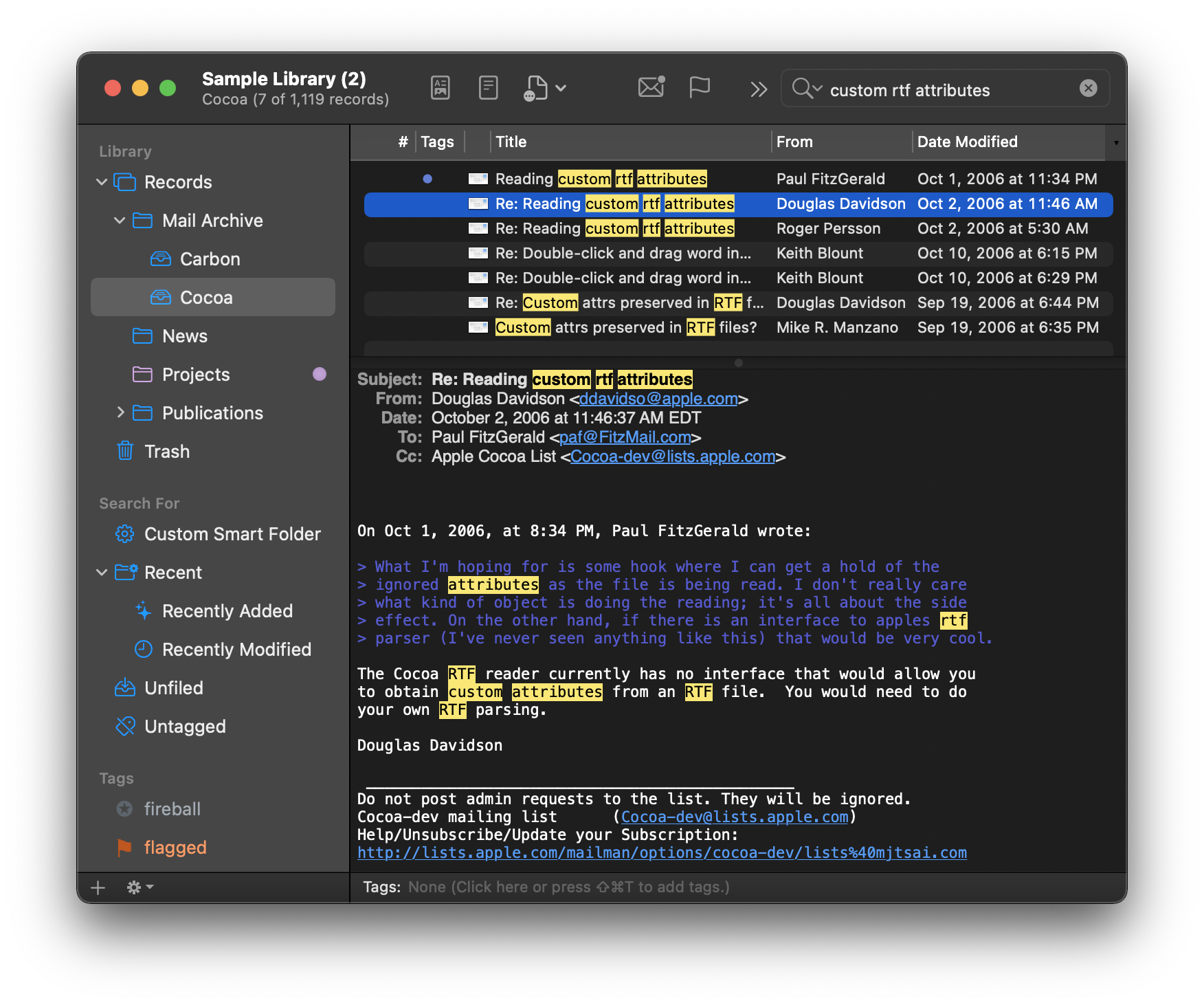
Search is acceptable: https://c-command.com/eaglefiler/images/search-sources@2x.png
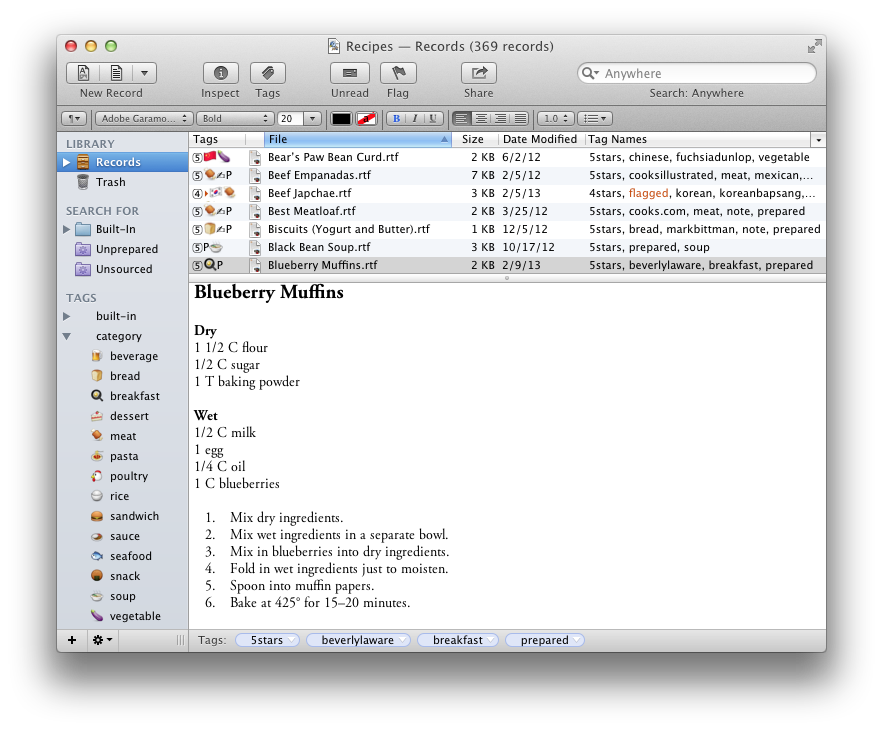
And UI is close enough to be familiar after years in Devonthink: https://c-command.com/eaglefiler/images/recipes.png
Main issue I have with it is slowness when editing large rich text files from within the app. For some reason an 872k rtfd file containing passwords & screenshots started bogging down recently when adding new data, and I needed to create a new part-2 file for new passwords. No biggie, but I feel it shouldn't have happened, and it's the main issue I've had worth mentioning.
And the biggest quibble is the dearth of an iOS app, and apparently no plans to offer one. It's possible to put files in Dropbox and access most files from iOS apps:
https://c-command.com/eaglefiler/help/how-can-i-put-my-librar
as long as one does not rename files (which will confuse the Mac app).
For my uses Notebooks (which I own) could have done *most* of what I needed, and is iOS/Mac cross-platform. However I settled on EagleFiler because Notebooks doesn't handle images and other formats but EagleFiler takes on just about any format you throw at it: PDF, Word, Excel, Pages, Keynote, images, videos, Web archives, and anything that can be viewed with Quick Look plug-ins.
https://c-command.com/eaglefiler/help/what-can-be-imported
Search is acceptable: https://c-command.com/eaglefiler/images/search-sources@2x.png
And UI is close enough to be familiar after years in Devonthink: https://c-command.com/eaglefiler/images/recipes.png
Main issue I have with it is slowness when editing large rich text files from within the app. For some reason an 872k rtfd file containing passwords & screenshots started bogging down recently when adding new data, and I needed to create a new part-2 file for new passwords. No biggie, but I feel it shouldn't have happened, and it's the main issue I've had worth mentioning.
And the biggest quibble is the dearth of an iOS app, and apparently no plans to offer one. It's possible to put files in Dropbox and access most files from iOS apps:
https://c-command.com/eaglefiler/help/how-can-i-put-my-librar
as long as one does not rename files (which will confuse the Mac app).
MadaboutDana
7/15/2018 7:39 am
But Notebooks *does* handle images, and treats PDFs as embedded files (i.e. you can search and view them seamlessly).
However, I have to say that for me (i.e. working on macOS), FoxTrot is one of the best all-round search apps available.
I do use DEVONthink, but strictly as a database manager for large-scale document management. This is something it does extremely well (I generally use dual-language documents created as PDF bi-texts, i.e. with German-English pages interleaved so you can view them side by side - DEVONthink searches such documents at blinding speed, highlights the search results, and allows you to skip from one result to another at speed; the only slight slowdown is actually opening [very] large documents).
But you can use FoxTrot in exactly the same way...
However, I have to say that for me (i.e. working on macOS), FoxTrot is one of the best all-round search apps available.
I do use DEVONthink, but strictly as a database manager for large-scale document management. This is something it does extremely well (I generally use dual-language documents created as PDF bi-texts, i.e. with German-English pages interleaved so you can view them side by side - DEVONthink searches such documents at blinding speed, highlights the search results, and allows you to skip from one result to another at speed; the only slight slowdown is actually opening [very] large documents).
But you can use FoxTrot in exactly the same way...
Dellu
7/15/2018 6:37 pm
MadaboutDana wrote:
FoxTrot is one of the best all-round search apps available
Totally agree. My life relied on it.
One great feature of Devonthink I highly benefited from Devonthink is the duplicate finder (smart search based on the instance of the file). There are many dedicated duplicate finder applications out there. They all rely on file checksum, rather than content. Devonthink does an amazing job of tracking duplicate pdf files based on their content.
Alexander Deliyannis
7/15/2018 7:54 pm
Thank you! I'm on Windows and Linux, but will check the functionality of the tools you mention and see what similar is available for me.
Paul Korm wrote:
Paul Korm wrote:
Finder searches are far more adaptable and configurable than any
DEVONthink search
Tembo for quick on-the-fly searching
Ammonite for tag searching
Apple Notes or Curiota for on-the-fly note taking
Forklift 3 -- lots of nice features for folder and document management
For me, the above replace 99% of what DEVONthink does.