
Hyper Plan now has dependencies between cards
Started by Andy Brice
on 10/10/2017
Andy Brice
10/10/2017 12:29 pm
One of the most requested features for Hyper Plan is the ability to add connections between cards. For example 'A must happen before B' or 'C is related to D'. Hyper Plan can now do this using 'connections'.
I just put out a beta version of Hyper Plan Professional Edition, which now allows connections between cards. If you are interested you can find out more and try it here:
http://www.hyperplan.com/newsletters/newsletter_19.html
I also plan to add layout by connectivity (e.g. place every card to the right of its predecessors) and propagation by connectivity (e.g. propagate effort or budget values up a hierarchy of cards).
Any feedback is very welcome.
Andy Brice
I just put out a beta version of Hyper Plan Professional Edition, which now allows connections between cards. If you are interested you can find out more and try it here:
http://www.hyperplan.com/newsletters/newsletter_19.html
I also plan to add layout by connectivity (e.g. place every card to the right of its predecessors) and propagation by connectivity (e.g. propagate effort or budget values up a hierarchy of cards).
Any feedback is very welcome.
Andy Brice
Stephen Zeoli
10/10/2017 5:00 pm
Thanks, Andy. Just looking at your info this appears to be a wonderful addition to your very useful software.
Steve Z.
Steve Z.
Paul Korm
10/10/2017 5:27 pm
Great features, Andy. Hyperplan is certainly continuing to evolve.
I'm curious about how these links get orchestrated in the real world. Probably like other folk, the calendar is my overall guide for what comes next and when. Do you plan to eventually give us a feature to move the scenario built into hyperplan into a calendar as events and/or reminders. (I'm not sure which is best.) My iCloud calendars are ubiquitous -- on every device I use -- and guide my working days -- so I need to keep calendars as a hub of activity.
I'm curious about how these links get orchestrated in the real world. Probably like other folk, the calendar is my overall guide for what comes next and when. Do you plan to eventually give us a feature to move the scenario built into hyperplan into a calendar as events and/or reminders. (I'm not sure which is best.) My iCloud calendars are ubiquitous -- on every device I use -- and guide my working days -- so I need to keep calendars as a hub of activity.
Andy Brice
10/10/2017 10:01 pm
Paul,
It would be nice to be able to select a card and choose 'add this to my calendar'. Ideally I would like to do this in a way it can be easily extended to integrate with lots of other applications. I have done a bit of research on this and have some ideas, but haven't reached any definite conclusion about the best approach. For now I need to concentrate on getting the connections feature working correctly - there is still quite a bit more to do.
--
Andy Brice
http://www.hyperplan.com
It would be nice to be able to select a card and choose 'add this to my calendar'. Ideally I would like to do this in a way it can be easily extended to integrate with lots of other applications. I have done a bit of research on this and have some ideas, but haven't reached any definite conclusion about the best approach. For now I need to concentrate on getting the connections feature working correctly - there is still quite a bit more to do.
--
Andy Brice
http://www.hyperplan.com
Andy Brice
10/31/2017 9:57 am
Just an update. Hyper Plan can now layout cards automatically by their connectivity. It can lay out a directed graph of 1000 cards and 2000 connections so that the connections go left to right, in around a second. Cycles are handled (e.g. A->B->C->A). Getting this working involved reading a lot of papers on graph theory and some fairly 'hairy chested' programming!
Being able to clearly visualize dependencies between cards opens up all sorts of new ways in which Hyper Plan can be used, for example modelling hierarchy (such as organization charts).
To find out more and try the new release please see:
http://www.hyperplan.com/hyperplan_v281.html
--
Andy Brice
http://www.hyperplan.com
Being able to clearly visualize dependencies between cards opens up all sorts of new ways in which Hyper Plan can be used, for example modelling hierarchy (such as organization charts).
To find out more and try the new release please see:
http://www.hyperplan.com/hyperplan_v281.html
--
Andy Brice
http://www.hyperplan.com
Andy Brice
11/24/2017 3:15 pm
We've put out 2 more updates.
In v2.8.2 we added the ability to propogate values along connections. This allow you do to PERT style charts, calculations of the minimum time to complete a task and the critical path:
http://www.hyperplan.com/hyperplan_v282.html
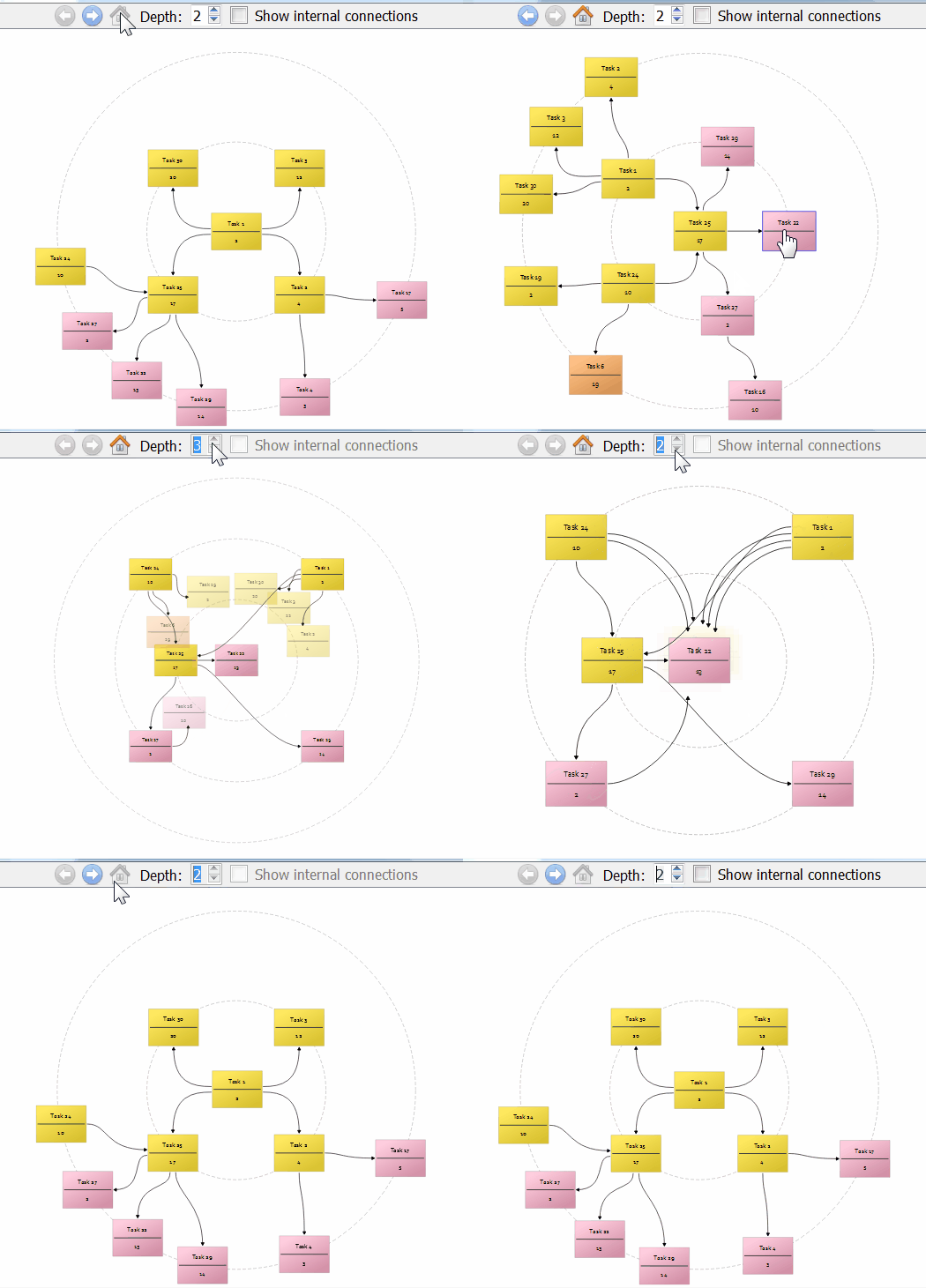
In v2.8.3 we added a dynamic radial visualization of card connectivity (similar to some mindmap tools).
http://www.hyperplan.com/hyperplan_v283.html
There is an animated gif of the new visualization mode here:
http://www.hyperplan.com/assets/images/explore-connections-v283.gif
You can try the latest beta free for the next 31 days here:
http://www.hyperplan.com/hyperplan_v283.html
Would love to get some feedback.
Andy Brice
In v2.8.2 we added the ability to propogate values along connections. This allow you do to PERT style charts, calculations of the minimum time to complete a task and the critical path:
http://www.hyperplan.com/hyperplan_v282.html
In v2.8.3 we added a dynamic radial visualization of card connectivity (similar to some mindmap tools).
http://www.hyperplan.com/hyperplan_v283.html
There is an animated gif of the new visualization mode here:
http://www.hyperplan.com/assets/images/explore-connections-v283.gif
You can try the latest beta free for the next 31 days here:
http://www.hyperplan.com/hyperplan_v283.html
Would love to get some feedback.
Andy Brice
Stephen Zeoli
11/25/2017 12:54 pm
That's impressive, Andy. Looking forward to trying it out.
Steve Z.
Steve Z.
Andy Brice
11/25/2017 8:13 pm
Thanks. Looks like there is a bug in the new connection visualization. I hope to investigate and fix that soon.
Andy Brice
11/26/2017 1:45 pm
I have a fix for that bug. I believe it only occurs when you have more connection types than connections. The fix be in v2.8.4 soon.
Andy Brice
12/8/2017 10:01 am
Hyper Plan Professional Edition is now out of beta. The new Professional Edition has full support for connections/dependencies between cards. This give Hyper Plan a lot more expressive power and allows it to be used in lots of new ways, including:
-visualization of complex networks of connections/dependencies
-scheduling based on dependencies (like a PERT chart) including critical path analysis
If you are interested you can find out more at:
http://www.hyperplan.com/newsletters/newsletter_25.html
Andy Brice
-visualization of complex networks of connections/dependencies
-scheduling based on dependencies (like a PERT chart) including critical path analysis
If you are interested you can find out more at:
http://www.hyperplan.com/newsletters/newsletter_25.html
Andy Brice
washere
12/8/2017 11:54 am
I've already been working with the beta Pro on some of my files. I can do virtually any layout with it. Also many multi semi-intelligent sorted views on complex files using stored views & elaborate filter conditions. It can be very powerful in the right hands when going through complex multi stored views on a file's cards, varying card orders, connections, which cards or fields to show for each view, multi layouts, multi color allocations, multi connections etc. for each view. It's full potential is yet untapped.
Not to mention propagating values which is not exactly even a basic Neural Network architectures (one of the areas of my academic research) feature but very impressive feature for a virtual board.
I rarely recommend anything but this Pro version is really indispensable for outlining maniacs, nvm those who need the best tools for brainstorming and planning complex work in areas of: creative, scientific, authorship, organisational, projects etc. What's more, the work is going in the right direction though could do with more features suggestions from the right people who will probably be too busy unfortunately. This is a must buy for outlining fanatics or people needing the best tools for thinking up and creating complex works.
Congratulations to Andy and his team.
Not to mention propagating values which is not exactly even a basic Neural Network architectures (one of the areas of my academic research) feature but very impressive feature for a virtual board.
I rarely recommend anything but this Pro version is really indispensable for outlining maniacs, nvm those who need the best tools for brainstorming and planning complex work in areas of: creative, scientific, authorship, organisational, projects etc. What's more, the work is going in the right direction though could do with more features suggestions from the right people who will probably be too busy unfortunately. This is a must buy for outlining fanatics or people needing the best tools for thinking up and creating complex works.
Congratulations to Andy and his team.
washere
12/8/2017 4:31 pm
Another new feature in the Pro I didn't mention is the explore connections. It's very useful and not just in OR/CP but many disciplines. However often the cards are too small or immobile in that view. That view needs:
Other features and suggestions are possible too, but they can be added to a few other software apps too, horses for courses.
zoom in / out
Pan across by dragging
Less distance between cards, least possible really as it wastes crucial screen acreage making cards even smaller and often the fields can't be read in most levels, except the lowest
Other features and suggestions are possible too, but they can be added to a few other software apps too, horses for courses.
washere
12/8/2017 5:00 pm
Also for the explore connections view:
Much more easily implemented features possible in the main view, but alas life is too short.
If the panning feature is added in explore connections view, the rest of the board can be set visible in a new highest level (6?) too. So one can pan across the whole board by dragging the mouse pointer. Moving away from the selected inner selected circles completely to explore the board freely
The outer cards beyond level 5 can be greyed out or the 5 inner levels can have a special border outline to distinguish them or even A ring around them in level 6 only
A toolbar icon and right-mouse click option to re-center the view on the selected inner cards, if moved away too far, like GPS map re-centering
right-mouse click option on any card beyond level 5 to make it the new Center of the explore connections view
Much more easily implemented features possible in the main view, but alas life is too short.
Andy Brice
12/8/2017 7:31 pm
washere wrote:
Not to mention propagating values which is not exactly even a basic
Neural Network architectures (one of the areas of my academic research)
feature but very impressive feature for a virtual board.
It wasn't actually all the hard to add once we had done all the other stuff relating to connections (which was hard!).
I rarely recommend anything but this Pro version is really indispensable
for outlining maniacs, nvm those who need the best tools for
brainstorming and planning complex work in areas of: creative,
scientific, authorship, organisational, projects etc. What's more, the
work is going in the right direction though could do with more features
suggestions from the right people who will probably be too busy
unfortunately.
We have had a lot of great feedback and that has definitely helped to shape the product.
This is a must buy for outlining fanatics or people
needing the best tools for thinking up and creating complex works.
Congratulations to Andy and his team.
Thank you. A lot of hard work went it so the positive feedback is much appreciated.
Now we need to do a much better job on the marketing (which is more difficult and less interesting than the programming).
--
Andy Brice
http://www.hyperplan.com
Andy Brice
12/8/2017 7:43 pm
washere wrote:
OR/CP?
There is certainly plenty of room for improvement in this feature. But we thought we would put out a first version and see what the feedback was.
The problem at the moment is the layout is too sparse - lots of unused space, which means small cards. We should be able to improve on that with a smarter and more compact layout algorithm. E.g. giving more radial space to cards with more 'children'. Also better balancing the radial 'tree'.
We might also add zoom/pan or a the magnifying feature. Possibly both. We haven't decided yet.
--
Andy Brice
http://www.hyperplan.com
Another new feature in the Pro I didn't mention is the explore
connections. It's very useful and not just in OR/CP
OR/CP?
but many
disciplines. However often the cards are too small or immobile in that
view. That view needs:
There is certainly plenty of room for improvement in this feature. But we thought we would put out a first version and see what the feedback was.
The problem at the moment is the layout is too sparse - lots of unused space, which means small cards. We should be able to improve on that with a smarter and more compact layout algorithm. E.g. giving more radial space to cards with more 'children'. Also better balancing the radial 'tree'.
We might also add zoom/pan or a the magnifying feature. Possibly both. We haven't decided yet.
--
Andy Brice
http://www.hyperplan.com
Pierre Paul Landry
12/8/2017 7:45 pm
Andy Brice wrote:
Yeah, you can say that again...
I'm in the same group as you... desperately needing help on the marketing side of things :-((
Pierre
(...) Now we need to do a much better job on the marketing (which is more difficult and less interesting than the programming).
Yeah, you can say that again...
I'm in the same group as you... desperately needing help on the marketing side of things :-((
Pierre
washere
12/8/2017 8:24 pm
@Andy
OR/CP usage, Operational Research & Critical Path usage. But the explore connections view has immense potential specially in research or creative block building of massive structures. I can write a lot why and how but do not have time nor is it relevant here. The current implementation si very classy. It can be even more useful if one can explore beyond the 5 levels across the whole board and set new cards as centre for that view. Then extremely complex structures can be build with amazing ease by roaming and examining connections and switching back & forth to Create/editing. One step at a time though as you have your hands full, but one day it will become clear how this unlimited roaming & re-centering within explore connections can be.
Screen Space Acreage in Explore Connections: Basically the space usage / wastage is not linear there but non-linear or more precisely geometrical. Basically means a disproportional huge area is wasted. Like comparing Appearance: Cell Padding = 120 to = 0 ! So instead of about 80% wasted space as background in that view with lets say 20% for miniature cards, can have 80% allocated to cards space usage. As you say this is the first step and you have your hands full and it is already a very good implementation as the first version. Also why I do not want to talk about other novel potential features. One day a time.
PR being important? Is it? Lets see. Just over 7 years ago in July 2010 you could have bought 12.5 BitCoins for $1 at 8 cents. Or 12,500 BitCoins for a thousand dollars. In January this year each BitCoin reached a thousand dollars, in the last 48 hours it increased by nearly 40% alone before the derivative futures bidding on it is regulated and commences this weekend. Each Bitcoin reaching $17,000+ today before dropping to $15,000+ now. So if you bought a thousand dollars worth of Bitcoins in 2010, today it would have reached over $212 millions at market peak today ($187 million right now) and just over five thousands dollars spent in 2010 would be worth over a Billion dollars. There are other crypto currencies, but bitcoin has established it's brand at the top. Is PR important in this day and age? I'd dare say Yes.
Alexander Deliyannis
1/7/2018 7:55 pm
Andy Brice wrote:
First of all, kudos for the excellent work with Hyper Plan's development. As per Washere's earlier comments, my impression is that it delves into territory of very specialised --and expensive-- software, while remaining very flexible, relatively straightforward to use, and affordable.
Re this latter point, I should note that I've recently upgraded the licenses for both organisations I work with. I consider it a no-brainer given the amount of work it can save along the way.
That said, I only had the time to test the functionality during the festive season and, by then, the promotional upgrade sale was gone. While I was more than happy to pay full price, I would note that one week for an upgrade promotion is probably too short a time. I very much doubt that licensed software users read the newsletters on the day the receive them, and are just waiting with their money ready to upgrade.
In respect to the broader promotion of the software, I believe that some Youtube videos with real examples of interesting professional applications can work brilliantly. Some collaboration may be needed for these, e.g. with business consultants, researchers, possibly even writers and lawyers.
Now we need to do a much better job on the marketing (which is more
difficult and less interesting than the programming).
First of all, kudos for the excellent work with Hyper Plan's development. As per Washere's earlier comments, my impression is that it delves into territory of very specialised --and expensive-- software, while remaining very flexible, relatively straightforward to use, and affordable.
Re this latter point, I should note that I've recently upgraded the licenses for both organisations I work with. I consider it a no-brainer given the amount of work it can save along the way.
That said, I only had the time to test the functionality during the festive season and, by then, the promotional upgrade sale was gone. While I was more than happy to pay full price, I would note that one week for an upgrade promotion is probably too short a time. I very much doubt that licensed software users read the newsletters on the day the receive them, and are just waiting with their money ready to upgrade.
In respect to the broader promotion of the software, I believe that some Youtube videos with real examples of interesting professional applications can work brilliantly. Some collaboration may be needed for these, e.g. with business consultants, researchers, possibly even writers and lawyers.
Andy Brice
1/8/2018 9:10 am
@Alexander Deliyannis
Thank you.
If you make a discount period too long, people think "I will do it next week" and then they forget. So it is better (for the vendor!) to make it reasonably short and inject a little bit of urgency. That said, if someone missed the discount by a few days and sends me a nice email, I will usually send them a discount token.
It is high on my todo list to generate some articles and videos showing how Hyper Plan can be applied to different application areas.
--
Andy Brice
http://www.hyperplan.com
First of all, kudos for the excellent work with Hyper Plan's
development. As per Washere's earlier comments, my impression is that it
delves into territory of very specialised --and expensive-- software,
while remaining very flexible, relatively straightforward to use, and
affordable.
Thank you.
That said, I only had the time to test the functionality during the
festive season and, by then, the promotional upgrade sale was gone.
While I was more than happy to pay full price, I would note that one
week for an upgrade promotion is probably too short a time. I very much
doubt that licensed software users read the newsletters on the day the
receive them, and are just waiting with their money ready to upgrade.
If you make a discount period too long, people think "I will do it next week" and then they forget. So it is better (for the vendor!) to make it reasonably short and inject a little bit of urgency. That said, if someone missed the discount by a few days and sends me a nice email, I will usually send them a discount token.
In respect to the broader promotion of the software, I believe that some
Youtube videos with real examples of interesting professional
applications can work brilliantly. Some collaboration may be needed for
these, e.g. with business consultants, researchers, possibly even
writers and lawyers.
It is high on my todo list to generate some articles and videos showing how Hyper Plan can be applied to different application areas.
--
Andy Brice
http://www.hyperplan.com
Paul Korm
1/8/2018 9:30 am
Andy, congratulations on a major milestone. HyperPlan Pro is excellent and I'm happy I bought it.
The home page of your site needs to make a big deal about Pro, in my opinion. The video there doesn't even mention it? (As of today.) I'm sure it's on your list. The amount of detailed (smart) properties you can display on that relationship map in Pro sets HyperPlan apart from any other competitor -- except maybe Tinderbox -- so that's worth a lot of noise, I think.
The home page of your site needs to make a big deal about Pro, in my opinion. The video there doesn't even mention it? (As of today.) I'm sure it's on your list. The amount of detailed (smart) properties you can display on that relationship map in Pro sets HyperPlan apart from any other competitor -- except maybe Tinderbox -- so that's worth a lot of noise, I think.
Andy Brice
1/8/2018 6:30 pm
@Paul
Thanks. I am glad you like the new features. The layout algorithm side of it was challenging, but fun!
The whole web site needs a complete overhaul to:
-do a better job on the marketing
-cover the professional edition better
-be responsive
-use https
I hope to get around to that soon.
--
Andy Brice
http://www.hyperplan.com
Thanks. I am glad you like the new features. The layout algorithm side of it was challenging, but fun!
The whole web site needs a complete overhaul to:
-do a better job on the marketing
-cover the professional edition better
-be responsive
-use https
I hope to get around to that soon.
--
Andy Brice
http://www.hyperplan.com
washere
2/10/2019 12:13 am
In latest pro version update, does Andy or anyone else know how to disable the program launching that little page on the website every time we exit?
Using the .ini (not registry write) option, can we add something to ini file to stop this?
If not, will have to set hyperplan.com in Windows system log file to 127.0.0.1 to block the website completely.
Using the .ini (not registry write) option, can we add something to ini file to stop this?
If not, will have to set hyperplan.com in Windows system log file to 127.0.0.1 to block the website completely.
Andy Brice
2/11/2019 10:17 am
washere wrote:
In latest pro version update, does Andy or anyone else know how to
disable the program launching that little page on the website every time
we exit?
Using the .ini (not registry write) option, can we add something to ini
file to stop this?
If not, will have to set hyperplan.com in Windows system log file to
127.0.0.1 to block the website completely.
It should only show that page once for a new version of Hyper Plan. And then it should write into the registry (or .ini file) not to show it again. I tested it here and it worked fine.
The registry/.ini entry for v6.0.2 is:
'show_install_page_v294'
It should be set to 'false' to suppress the page being shown.
Are you sure your .ini file is writable? It probably won't be if it is a sub-folder of 'program files'.
BTW best to email hyperplan _at_ oryxdigital.com for support, as I don't check this forum anything like as frequently as I check my support email.
--
Andy Brice
http://www.hyperplan.com
Andy Brice
2/11/2019 10:19 am
NB/ You should get an error message if the .ini file is read-only.
--
Andy Brice
http://www.hyperplan.com
--
Andy Brice
http://www.hyperplan.com
1
2