
Hyper Plan update
Started by Andy Brice
on 7/6/2016
Andy Brice
7/6/2016 1:41 pm
A few people here asked to be kept up to date with Hyper Plan improvements.
I put out Hyper Plan v2.3 yesterday for Windows and Mac. That is the 7th release since since March. Improvements since the v2.0 release now include:
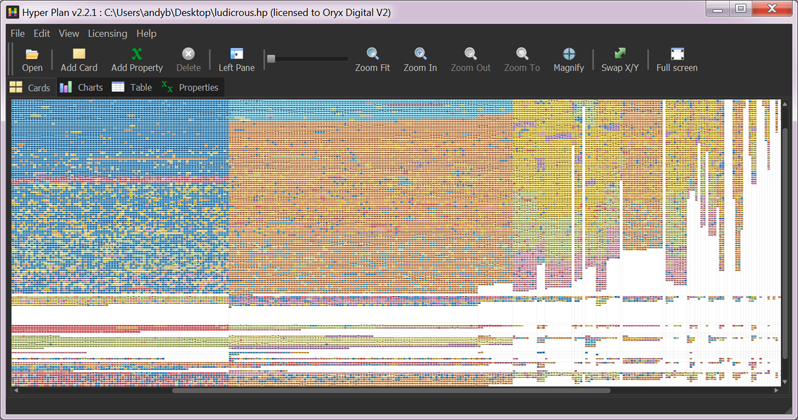
-Performance improvements (here is Hyper Plan displaying over 40,000 cards: http://www.hyperplan.com/assets/images/44000_cards.png ! I don't recommend it, but it is possible.)
-Store preferences in a .ini file. This is useful when you are using Hyper Plan on a portable device (e.g. a USB memory stick).
-Merge CSV files into existing plans.
-Charts pane filtering.
-Alt+Click to add cards.
-Access hyperlinks directly by right-clicking on a card.
-A Properties pane for easy access to properties.
-The option to color rows or cells by property value in the Table pane.
-A new Edit>Replace feature.
-Customizable toolbar.
-Add Property and Add Link buttons in the Add Card and Edit Cards windows.
-Export to SVG format for editing and displaying on web browsers.
-The ability to display some cards properties as bold or italic.
-More control over header font sizing in the Cards pane.
-Other minor usability improvements.
-Bug fixes.
Andy Brice
http://www.hyperplan.com
I put out Hyper Plan v2.3 yesterday for Windows and Mac. That is the 7th release since since March. Improvements since the v2.0 release now include:
-Performance improvements (here is Hyper Plan displaying over 40,000 cards: http://www.hyperplan.com/assets/images/44000_cards.png ! I don't recommend it, but it is possible.)
-Store preferences in a .ini file. This is useful when you are using Hyper Plan on a portable device (e.g. a USB memory stick).
-Merge CSV files into existing plans.
-Charts pane filtering.
-Alt+Click to add cards.
-Access hyperlinks directly by right-clicking on a card.
-A Properties pane for easy access to properties.
-The option to color rows or cells by property value in the Table pane.
-A new Edit>Replace feature.
-Customizable toolbar.
-Add Property and Add Link buttons in the Add Card and Edit Cards windows.
-Export to SVG format for editing and displaying on web browsers.
-The ability to display some cards properties as bold or italic.
-More control over header font sizing in the Cards pane.
-Other minor usability improvements.
-Bug fixes.
Andy Brice
http://www.hyperplan.com
Stephen Zeoli
7/6/2016 3:32 pm
Thank you, Andy. It's helpful to get these kinds of summary updates from developers.
Steve Z.
Steve Z.
Paul Korm
9/30/2016 3:50 pm
Hyper Plan continues to evolve nicely.
Would be helpful if (on OS X) it would sync tasks and events with Reminders and Calendar. And if there were an iOS version.
Just a couple tiny requests -- LOL
Would be helpful if (on OS X) it would sync tasks and events with Reminders and Calendar. And if there were an iOS version.
Just a couple tiny requests -- LOL
Andy Brice
10/2/2016 6:48 pm
Hyper Plan continues to evolve nicely.
Thanks! I am mostly concentrating on polishing off some of the rough edges at present. But I also have some ideas for significant new features.
Would be helpful if (on OS X) it would sync tasks and events with
Reminders and Calendar.
How would you see that working? Would you drag a task from Calendar to create a card in Hyper Plan? or something else? Do you have an example of another application that does this well?
And if there were an iOS version.
It is tough for indie developers to make any money in the app store:
-30% commission
-lack of discoverability
-downward pressure on prices
-no paid upgrades
-no free trial
...I could go on.
Its really not a very attractive proposition.
Just a couple tiny requests -- LOL
Feedback is always welcome.
Paul Korm
10/5/2016 9:42 am
You could drag an ics file into Hyper Plan. But I was thinking of it the other way - select a card and pop open a widget to create an event (something with a begin and end date/time) or a reminder (something with just one date and no time of day). Curio does this. The NotePlan app (mentioned in another thread) proposes doing that. IThoughtsX, MindManager, and the now-defunct NovaMind do that. OmniFocus to. The usual case is that the user creates a specific calendar for earnest and one for reminders, and the app syncs only to those calendars, and only events or tasks that were created by the app. Doing calendar sync from the other direction has too many challenges.
Andy Brice wrote
Andy Brice wrote
How would you see that working? Would you drag a task from Calendar to create a card in Hyper Plan? or something else? Do you have an example of another application that does this well?
Paul Korm
10/5/2016 9:46 am
"a specific calendar for earnest" ---> "a specific calendar for events"
I've asked several times -- why does this forum prevent us from editing our posts? Such a basic function. The list owner never responds to requests so I assume there's no one there.
I've asked several times -- why does this forum prevent us from editing our posts? Such a basic function. The list owner never responds to requests so I assume there's no one there.
Andy Brice
10/5/2016 6:28 pm
Thanks Paul. I hadn't thought of doing that way round. I have made a note and will revisit it when I get time.
Ken
11/9/2016 12:08 am
Hi Andy,
Didn't really want to highjack a thread, but I do have a questions about HP as it has crossed my mind in a few conversations recently. Is there any way to handle subtasks in HP? Even if not formally, does the program allow some types of nested checklists or something similar? Any reply would be greatly appreciated.
Thanks,
--Ken
Didn't really want to highjack a thread, but I do have a questions about HP as it has crossed my mind in a few conversations recently. Is there any way to handle subtasks in HP? Even if not formally, does the program allow some types of nested checklists or something similar? Any reply would be greatly appreciated.
Thanks,
--Ken
Andy Brice
11/10/2016 7:10 pm
Ken wrote:
Didn't really want to highjack a thread, but I do have a questions about
HP as it has crossed my mind in a few conversations recently. Is there
any way to handle subtasks in HP? Even if not formally, does the
program allow some types of nested checklists or something similar? Any
reply would be greatly appreciated.
Ken
I have considered adding hierarchy to Hyper Plan (e.g. each card can contain more cards, like folders in an operating system). But this would be a big change that would effect everything else, and I haven't made any definite decision on it yet.
As a workaround a card can contain a hyperlink to another Hyper Plan file.
You could also add a simple text checklist to the 'notes' field of a card. Or hyperlink to a checklist in another application or on the web.
Andy Brice
http://www.hyperplan.com
Mark_in_Bangkok
12/24/2016 4:48 am
I bought Hyper Plan today.
Spent much of yesterday moving my personal "To Do" list into Hyper Plan (from a spreadsheet).
I'm very impressed.
The visual interface made priorities clear to me in ways that a spreadsheet or conventional outliner never did.
So, this morning, I got out my credit card and paid full price to the developer.
I did not want to wait for a sale.
The interface moves little boxes around on a grid of rows and columns.
Totally customizable.
So easy (and fun, too) that it motivated me to carefully refine my plans.
In a similar vein, mind-maping software motivates me to think and analyze by moving little boxes around on the screen.
So now, I'm wondering:
What other varieties of planning/organizing software use an interface of moving boxes, like that?
Especially want to know about any spreadsheets that use a similar interface?
(I'm on a Mac.)
(Side note: The developer of Hyper Plan offers a similar interface in a program to plan banquet seating, but I have no need for that.)
Spent much of yesterday moving my personal "To Do" list into Hyper Plan (from a spreadsheet).
I'm very impressed.
The visual interface made priorities clear to me in ways that a spreadsheet or conventional outliner never did.
So, this morning, I got out my credit card and paid full price to the developer.
I did not want to wait for a sale.
The interface moves little boxes around on a grid of rows and columns.
Totally customizable.
So easy (and fun, too) that it motivated me to carefully refine my plans.
In a similar vein, mind-maping software motivates me to think and analyze by moving little boxes around on the screen.
So now, I'm wondering:
What other varieties of planning/organizing software use an interface of moving boxes, like that?
Especially want to know about any spreadsheets that use a similar interface?
(I'm on a Mac.)
(Side note: The developer of Hyper Plan offers a similar interface in a program to plan banquet seating, but I have no need for that.)
Mark_in_Bangkok
1/15/2017 1:46 pm
.
I bought Hyper Plan a few weeks ago.
(No special deal. Three days of free trial convinced me to pay full price and get it immediately.)
Since then, using it every day; almost every hour.
One reason I selected Hyper Plan, was the helpful attitude of Andy Brice's posts on this forum.
I noticed that and expected his attitude to carry over into his software.
It has.
I moved my ToDo list of about 250 items from a spreadsheet into Hyper Plan.
At first, easy and fun.
Learning curve is very gentle.
But the "thinking curve" is not so gentle.
I didn't anticipate that the design concept of Hyper Plan would start me thinking in such depth about my ToDo priorities and organization.
But that was the result of multiple dimensions of visual position + color + movement + pivot tables + unlimited additional fields.
All that thinking wasn't so much fun, but the result has been vastly increased clarity about my priorities.
I'm very pleased with Hyper Plan and happy to recommend it to others.
If questions about getting started, as a new user, I can reply here.
I bought Hyper Plan a few weeks ago.
(No special deal. Three days of free trial convinced me to pay full price and get it immediately.)
Since then, using it every day; almost every hour.
One reason I selected Hyper Plan, was the helpful attitude of Andy Brice's posts on this forum.
I noticed that and expected his attitude to carry over into his software.
It has.
I moved my ToDo list of about 250 items from a spreadsheet into Hyper Plan.
At first, easy and fun.
Learning curve is very gentle.
But the "thinking curve" is not so gentle.
I didn't anticipate that the design concept of Hyper Plan would start me thinking in such depth about my ToDo priorities and organization.
But that was the result of multiple dimensions of visual position + color + movement + pivot tables + unlimited additional fields.
All that thinking wasn't so much fun, but the result has been vastly increased clarity about my priorities.
I'm very pleased with Hyper Plan and happy to recommend it to others.
If questions about getting started, as a new user, I can reply here.