
single-pane outliner with fields/columns
Started by jimspoon
on 1/18/2012
jimspoon
1/18/2012 6:03 am
I'm looking for other single-pane outliners with support for user-defined fields/columns - comparable to Ecco and Infoqube. Any ideas?
Stephen Zeoli
1/18/2012 2:05 pm
I can't think of any for Windows. On a Mac there are two choices, OmniOutliner and Neo. Also, the outliner in Scrivener supports custom columns... which the Windows version does not yet have.
It's shocking how few applications there are like this.
SZ
It's shocking how few applications there are like this.
SZ
Dr Andus
1/18/2012 3:03 pm
jimspoon wrote:
Noteliner can do tables, which might achieve the same effect:
http://web.me.com/hawksworth/i/Main.html
I'm looking for other single-pane outliners with support for user-defined
fields/columns - comparable to Ecco and Infoqube. Any ideas?
Noteliner can do tables, which might achieve the same effect:
http://web.me.com/hawksworth/i/Main.html
Stephen Zeoli
1/18/2012 3:12 pm
Also, Tinderbox or its little brother, Twig, can act as single-pane outliners with custom columns. Again, just for the Mac.
SZ
SZ
Thomas
1/19/2012 4:39 pm
MyInfo: http://www.milenix.com/images/main-feature-columns-large.png and next version of UltraRecall: http://www.kinook.com/Forum/showthread.php?t=3204
I don't know whether they can be switched to single pane mode, but if nothing else the document window can be minimized to the right side.
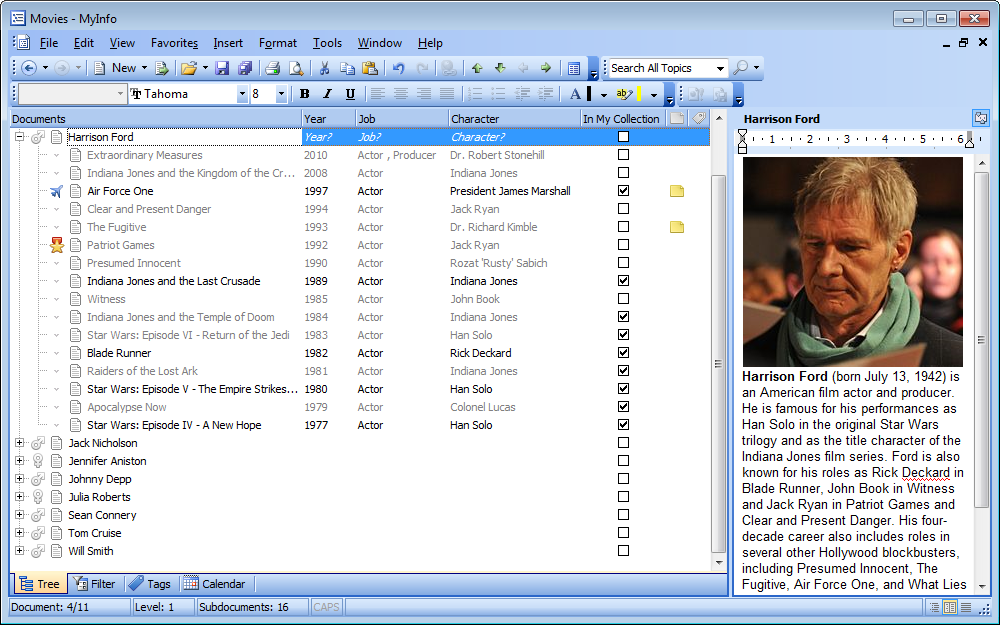
I don't know whether they can be switched to single pane mode, but if nothing else the document window can be minimized to the right side.
CRC
1/19/2012 5:50 pm
Depending on your definition of "User-Defined," Bonsai may meet your needs. It has a large selection of columns (everything from dates, to keywords, to links) and one "custom" column.
Charles
Charles
Lucas
1/19/2012 6:44 pm
This topic comes up periodically here. Beyond what has already been mentioned in this thread, another outliner that has been mentioned previously in this regard is UV Outliner:
uvoutliner.com
UV Outliner advertizes column support.
Other possibilities which don't quite fit the bill (for various reasons) include Excel (with its group/outline feature), Org-Mode (limited column support), ListPro, ADM (no longer available), INControl (no longer available), Mori (for Mac, barely in development), and TreeCells (no longer in development)
uvoutliner.com
UV Outliner advertizes column support.
Other possibilities which don't quite fit the bill (for various reasons) include Excel (with its group/outline feature), Org-Mode (limited column support), ListPro, ADM (no longer available), INControl (no longer available), Mori (for Mac, barely in development), and TreeCells (no longer in development)
Lucas
1/22/2012 4:58 pm
Lucas wrote:
Okay, I eat my words. Developer Alfonso Guerra has just released an update, which seems to address whatever was causing Mori not to work for me under Lion. Indeed, I still like Mori, and I recommend checking it out. Implemantation of columns is a plus, as is the implementation of Tag folders (or something like that --- need to refresh my memory).
Lucas
Mori (for Mac, barely in
development),
Okay, I eat my words. Developer Alfonso Guerra has just released an update, which seems to address whatever was causing Mori not to work for me under Lion. Indeed, I still like Mori, and I recommend checking it out. Implemantation of columns is a plus, as is the implementation of Tag folders (or something like that --- need to refresh my memory).
Lucas
MadaboutDana
1/22/2012 11:47 pm
... and of course Sam's just posted up the latest version of Noteliner (3.4), which can now import tables (in CSV or HTML format); he's also added a number of other new features which I'm still investigating. What a great new step forward! This makes Noteliner the ultimate one-pane outliner, in my view. Check it out at:
http://web.me.com/hawksworth/i/Main.html
Cheers,
Bill
http://web.me.com/hawksworth/i/Main.html
Cheers,
Bill
Dr Andus
1/23/2012 12:49 pm
MadaboutDana wrote:
I agree that Noteliner is brilliant. I took me a while to figure out though that you need to hold down the teeny button in the corner next to the Navigation Pane to resize the window with a mouse. But I'm very happy this feature has been implemented.
... and of course Sam's just posted up the latest version of Noteliner (3.4), which can
now import tables (in CSV or HTML format); he's also added a number of other new
features which I'm still investigating. What a great new step forward! This makes
Noteliner the ultimate one-pane outliner, in my view. Check it out
at:
http://web.me.com/hawksworth/i/Main.html
I agree that Noteliner is brilliant. I took me a while to figure out though that you need to hold down the teeny button in the corner next to the Navigation Pane to resize the window with a mouse. But I'm very happy this feature has been implemented.
Stephen Zeoli
1/23/2012 4:01 pm
Thanks for the heads up on the Noteliner update, Bill. A great program just keeps getting better. With the exception of namesakes, Noteliner seems to me to be the program I wish Brainstorm had been (and much more).
Steve Z
Steve Z
jimspoon
2/2/2012 7:57 am
Dr Andus wrote:
Noteliner can do tables, which might achieve the same
effect:
http://web.me.com/hawksworth/i/Main.html
Thanks Dr. Andus. I need to look at this more closely. For me, columns are mainly useful for the purpose of sorting and filtering items by the values that are contained within the columns. I'll be interest to see if and how this can be done with the tables.
jimspoon
2/2/2012 8:23 am
Thomas wrote:
MyInfo: http://www.milenix.com/images/main-feature-columns-large.png and
next version of UltraRecall:
http://www.kinook.com/Forum/showthread.php?t=3204
I don't know whether they
can be switched to single pane mode, but if nothing else the document window can be
minimized to the right side.
Thanks Thomas .. very enlightening indeed. I had to fumble around for awhile before I discovered how the MyInfo navigation pane can be expanded to show columns.
Too me it seems that separating the notes from the outline adds very little and just cripples the outliner. Ultra Recall has a navigation tree - essentially an outline of "item titles". MyInfo has a similar outline of "document titles". The actual text notes are contained in a separate pane, and they are not in outline format.
How much better to have the outline or "tree" consist of item text - as in Ecco and Infoqube, rather than just item titles. Each item text can be of any length; a mere heading, or a sentence, or a paragraph, or multiple paragraphs. It is possible to view the text of multiple items at the same time. Each item can be split or joined, and they can be rearranged freely. The items can readily be sorted and filtered by the values in the columns. If a bird's eye view is required, TLIs can be simple headers and the whole outline can be collapsed to the TLIs with a single keystroke. And in Infoqube - longer form content, e.g. a saved web page, etc. - that should be maintained as a unit and not split up into shorter outline items - can readily be associated with an item and displayed in a separate pane. To me this is the best use of that separate pane.
And yet - it would seem a very simple matter to restore the same functionality in UR and MyInfo. Both allow the "item titles" to be wordwrapped - it would seem to be easy to allow line breaks, and splitting and joining of the "item titles". In short, it would seem fairly easy to put the "notes" back into the outline, with full outlining functions, and leave the "item details" pane to include the longer content that doesn't fit well into the outline. And MyInfo has added the columns to its tree of "document titles" - it shouldn't be hard at all to include the same kind of filtering and sorting that Ecco and Infoqube have.
I would love to see UR have these things - especially since it has other features that seem compelling to me - like syncrhonization with external file system folders.
jim