
Academic Workflow - Any Suggestion for an Application/s?
Started by Darren McDonald
on 10/22/2019
Simon
11/19/2019 9:45 pm
Another thing I am trying to do is find an application that helps me
bring together the annotations and notes to find themes and decide where
I use them in a journal article. Any suggestions on what application to
use to do this?
Cheers! :)
Darren
If you're on the mac try Tinderbox
https://www.eastgate.com/Tinderbox/
Darren McDonald
11/23/2019 8:03 am
Thanks for @khalil reminding me about the power of QDA Software and considering it for use in the process of writing an academic paper. I all already have Atlas.ti. I am currently really interested in MAXQDA 2020, especially because it has a Japanese dictionary to handle the analysis of Japanese text. :)
khalil wrote:
khalil wrote:
Hi Darren,
If your workflow, read -->annotate --->write, i would strongly suggest
looking at Atlasti. It is a qualitative analyses software, but works
great for literature reviews. You can search for tutorials on doing
this. Hope this helps
Darren McDonald
11/23/2019 8:07 am
Hi Simon,
I have been toying for a long time with investing the time and my thoughts into Tinderbox.
It would be wonderful if there were videos other than by Beck and such that take you through use of the software. I need visual aids to guide me now. My brain just fogs over lots of texts in a manual.
I have been toying for a long time with investing the time and my thoughts into Tinderbox.
It would be wonderful if there were videos other than by Beck and such that take you through use of the software. I need visual aids to guide me now. My brain just fogs over lots of texts in a manual.
>Darren
>
If you're on the mac try Tinderbox
https://www.eastgate.com/Tinderbox/
Hugh
11/23/2019 4:07 pm
Darren McDonald wrote:
Hi Simon,
I have been toying for a long time with investing the time and my
thoughts into Tinderbox.
It would be wonderful if there were videos other than by Beck and such
that take you through use of the software. I need visual aids to guide
me now. My brain just fogs over lots of texts in a manual.
>>Darren
Two suggestions (neither of which may come as a surprise to you):
1. Start slowly, initially treating Tinderbox purely as an outliner and only later expanding your knowledge of what it can do;
2. Consult https://welcometosherwood.wordpress.com/tinderbox/ which includes several useful videos and which, though slightly out of date, is still as far as I'm concerned by far the best initial guide (and has of course been authored by Steve Zeoli of this parish).
Darren McDonald
11/29/2019 3:01 pm
Hello Hugh,
I think you finally convinced me to finally jump in and purchase Tinderbox. I can start learning and sculpturing it to the way I work from the New Year.
Also, thank you so much for pointing me to Steve Zeoli's website. It is very insightful and has provided me with great user tips for other software as well. I remember stumbling onto the site some years ago. It is now wonderful to read it again!
Cheers!:)
Hugh wrote:
I think you finally convinced me to finally jump in and purchase Tinderbox. I can start learning and sculpturing it to the way I work from the New Year.
Also, thank you so much for pointing me to Steve Zeoli's website. It is very insightful and has provided me with great user tips for other software as well. I remember stumbling onto the site some years ago. It is now wonderful to read it again!
Cheers!:)
Hugh wrote:
Darren McDonald wrote:
Hi Simon,
>
>I have been toying for a long time with investing the time and my
>thoughts into Tinderbox.
>
>It would be wonderful if there were videos other than by Beck and such
>that take you through use of the software. I need visual aids to guide
>me now. My brain just fogs over lots of texts in a manual.
>
>>>Darren
Two suggestions (neither of which may come as a surprise to you):
1. Start slowly, initially treating Tinderbox purely as an outliner and
only later expanding your knowledge of what it can do;
2. Consult https://welcometosherwood.wordpress.com/tinderbox/ which
includes several useful videos and which, though slightly out of date,
is still as far as I'm concerned by far the best initial guide (and has
of course been authored by Steve Zeoli of this parish).
Matthias Steffens
1/22/2020 11:49 pm
Darren McDonald wrote:
Like others in this thread, I can definitely recommend Citavi (https://citavi.com for this. It's a great product, made by fine people, and has oustanding support. But don't take my word for it, I'm probably biased since I've worked for them (I was once tasked to develop Citavi for Mac but this ultimately didn't work out, unfortunately). But I recommend to try it out yourself.
Users trying to implement an academic reading & notetaking workflow on the Mac usually have to combine apps from at least these three categories: PDF highlighting, note taking and reference management. Trying to integrate apps from these categories usually means a lot of back & forth or scripting/automation.
Trying to ease such an academic workflow on the Mac, I've started to develop my own app (https://keypoints.app for personal info & knowledge management. [It is my hope that this doesn't come across as pure self-promotion, but that participants in this thread may find it actually interesting, and may even offer some feedback on the app's intended workflow.]
My app tries to sit in between the three above mentioned categories and offer a little bit of all of them: While highlighting your PDF, the app extracts each highlight annotation as a self-standing plaintext/MultiMarkdown note, and can include bibliographic information.
In each note, the app includes the highlighted text as a quotation, adds page information and (if possible) fetches reference info (citekey, formatted reference & DOI) from your reference manager. You can then add your own title/summary/comments to the note, assign it a color label, tag or rate it, and link it with other notes (all via drag & drop or autocompletion). These structural elements get syntax colored and are clickable so you can easily navigate your network of notes. Note connections can be visualized in a network graph (which can also be used for navigation).
Since all your highlight annotations are self-contained plaintext notes, you can search and filter them freely, and gather them again in structure/overview notes. Selecting a note will also jump to its quoted text in the PDF. And clicking a highlight annotation in the PDF will select its note.
I plan to auto-export all notes to disk, which will help to avoid lock-in and should enable basic integration with other apps/services. The app is also highly scriptable, and I'd like to develop custom export/sync scripts to facilitate good integration with other scriptable apps such as DEVONthink, Tinderbox, OmniOutliner, Papers or Bookends etc.
The app is still in development and unfortunately not yet available as a (beta) release. But the Keypoints forums contain more info about its development progress (which could be faster). The latest status report (https://keypoints.app/forums/viewtopic.php?f=2&t=35 also offers a short screencast which shows the app in action.
I'm very interested to hear if an app like this could be part of your academic workflow. Thanks, Matthias
I am trying to decide on an application to use when reading PDFs,
making annotations and taking notes.
Another thing I am trying to do is find an application that helps me
bring together the annotations and notes to find themes and decide
where I use them in a journal article. Any suggestions on what application
to use to do this?
Like others in this thread, I can definitely recommend Citavi (https://citavi.com for this. It's a great product, made by fine people, and has oustanding support. But don't take my word for it, I'm probably biased since I've worked for them (I was once tasked to develop Citavi for Mac but this ultimately didn't work out, unfortunately). But I recommend to try it out yourself.
Users trying to implement an academic reading & notetaking workflow on the Mac usually have to combine apps from at least these three categories: PDF highlighting, note taking and reference management. Trying to integrate apps from these categories usually means a lot of back & forth or scripting/automation.
Trying to ease such an academic workflow on the Mac, I've started to develop my own app (https://keypoints.app for personal info & knowledge management. [It is my hope that this doesn't come across as pure self-promotion, but that participants in this thread may find it actually interesting, and may even offer some feedback on the app's intended workflow.]
My app tries to sit in between the three above mentioned categories and offer a little bit of all of them: While highlighting your PDF, the app extracts each highlight annotation as a self-standing plaintext/MultiMarkdown note, and can include bibliographic information.
In each note, the app includes the highlighted text as a quotation, adds page information and (if possible) fetches reference info (citekey, formatted reference & DOI) from your reference manager. You can then add your own title/summary/comments to the note, assign it a color label, tag or rate it, and link it with other notes (all via drag & drop or autocompletion). These structural elements get syntax colored and are clickable so you can easily navigate your network of notes. Note connections can be visualized in a network graph (which can also be used for navigation).
Since all your highlight annotations are self-contained plaintext notes, you can search and filter them freely, and gather them again in structure/overview notes. Selecting a note will also jump to its quoted text in the PDF. And clicking a highlight annotation in the PDF will select its note.
I plan to auto-export all notes to disk, which will help to avoid lock-in and should enable basic integration with other apps/services. The app is also highly scriptable, and I'd like to develop custom export/sync scripts to facilitate good integration with other scriptable apps such as DEVONthink, Tinderbox, OmniOutliner, Papers or Bookends etc.
The app is still in development and unfortunately not yet available as a (beta) release. But the Keypoints forums contain more info about its development progress (which could be faster). The latest status report (https://keypoints.app/forums/viewtopic.php?f=2&t=35 also offers a short screencast which shows the app in action.
I'm very interested to hear if an app like this could be part of your academic workflow. Thanks, Matthias
jbp
2/21/2020 1:11 am
I scanned this topic, but couldn't see anyone mention DEVONthink? Also, Highlights is coming to iOS soon. It has been in Beta for some time, but my understanding is it will be released soon.
Also, for anyone looking for academic workflows, I hope my site can be of use: https://appademic.tech
If you decide to use Zotero, I have some shortcuts available for citations on the iPad.
Also, for anyone looking for academic workflows, I hope my site can be of use: https://appademic.tech
If you decide to use Zotero, I have some shortcuts available for citations on the iPad.
Paul Korm
2/21/2020 3:13 pm
@Matthias Steffans -- Keypoint looks interesting, but is it different than Highlights?
@jbp good point about DEVONthink. There are lots of academic workflow blogs that incorporate DEVONthink. I like Beck Tench's (https://www.becktench.com/workflow#reading Jeff Taekman's (https://wippp.com/home/tag/Devonthink+Pro and Christopher Mayo's postings. Unfortunately, it looks like Mayo's blog has vanished, perhaps. Should be able to find it at Archive.org.
@jbp good point about DEVONthink. There are lots of academic workflow blogs that incorporate DEVONthink. I like Beck Tench's (https://www.becktench.com/workflow#reading Jeff Taekman's (https://wippp.com/home/tag/Devonthink+Pro and Christopher Mayo's postings. Unfortunately, it looks like Mayo's blog has vanished, perhaps. Should be able to find it at Archive.org.
MadaboutDana
2/22/2020 8:05 am
Dang, Keypoints looks very interesting - nice website already!
I’ve subscribed so I can get updates. Best of luck with that!
Cheers,
Bill
I’ve subscribed so I can get updates. Best of luck with that!
Cheers,
Bill
MadaboutDana
2/22/2020 8:11 am
Reading through your description, it looks friendlier than Highlights, too. I’ve used Highlights, but been underwhelmed.
Matthias Steffens
2/24/2020 3:18 pm
Paul Korm wrote:
The basic idea behind Keypoints is indeed similar to Highlights app, i.e. while highlighting text in a PDF, the app extracts these highlight annotations as Markdown text.
That said, there are a some major differences between the apps:
1. Keypoints stores all of its highlight notes as *individual* (Multi)Markdown notes, and each highlight note will be mirrored as an individual plaintext file on disk.
2. All notes are self-contained, i.e., for each note, Keypoints automatically adds a link to the associated PDF file, the PDF annotation info, creation date and (if possible) the bibliographic metadata from your reference manager.
3. Keypoints is a document-based app where each document can contain notes from many different PDF files. Since the generated notes are independent from each other, they can be filtered/gathered freely. When you select a note, its associated PDF file will be automatically opened in the app's PDF preview, and the PDF will be scrolled to the location containing the original highlight/quotation.
4. Each highlight note has its own unique ID and can thus be linked to other notes (e.g., via drag & drop).
5. Besides adding your own title & comments to a note, you can also assign (via drag & drop, autocompletion, or keyboard shortcut) any keyword(s), a named color label, and/or a rating. These elements help to organize/filter your notes.
6. The organizational note elements (like labels, keywords or links to other notes/files/publications) are hot-linked/clickable and can be used to form a browseable network of notes (which can also be visualized). The app also offers buttons (and swipe gestures) for easy back+forth navigation thru your history of searches & selections.
7. Keypoints parses all recognized elements (title, quotation, page & annotation info, label, creation date, rating, keywords, links to other notes/files/publications) from the plaintext notes, and populates its data model properties with these elements. This, for example, allows to search, filter or sort by just these elements. Plus:
8. Keypoints is heavily scriptable and exposes most of its data model properties via scripting. This means that you can form advanced queries or directly set a note's property like its title, label or rating etc (you can also do this for many notes at once). Keypoints will then automatically update the note's text accordingly.
9. Under the hood, Keypoints has the data model of a full-blown reference manager. While this helps with fine-grained metadata imports, this currently isn't used much. But it may allow for further bibliographic features in the future (like auto-fetching of academic PDFs), and sound integration with reference managers like Bookends, Papers or Bibdesk.
MadaboutDana wrote:
Many thanks, it's much appreciated!
Keypoints looks interesting, but is it different than Highlights?
The basic idea behind Keypoints is indeed similar to Highlights app, i.e. while highlighting text in a PDF, the app extracts these highlight annotations as Markdown text.
That said, there are a some major differences between the apps:
1. Keypoints stores all of its highlight notes as *individual* (Multi)Markdown notes, and each highlight note will be mirrored as an individual plaintext file on disk.
2. All notes are self-contained, i.e., for each note, Keypoints automatically adds a link to the associated PDF file, the PDF annotation info, creation date and (if possible) the bibliographic metadata from your reference manager.
3. Keypoints is a document-based app where each document can contain notes from many different PDF files. Since the generated notes are independent from each other, they can be filtered/gathered freely. When you select a note, its associated PDF file will be automatically opened in the app's PDF preview, and the PDF will be scrolled to the location containing the original highlight/quotation.
4. Each highlight note has its own unique ID and can thus be linked to other notes (e.g., via drag & drop).
5. Besides adding your own title & comments to a note, you can also assign (via drag & drop, autocompletion, or keyboard shortcut) any keyword(s), a named color label, and/or a rating. These elements help to organize/filter your notes.
6. The organizational note elements (like labels, keywords or links to other notes/files/publications) are hot-linked/clickable and can be used to form a browseable network of notes (which can also be visualized). The app also offers buttons (and swipe gestures) for easy back+forth navigation thru your history of searches & selections.
7. Keypoints parses all recognized elements (title, quotation, page & annotation info, label, creation date, rating, keywords, links to other notes/files/publications) from the plaintext notes, and populates its data model properties with these elements. This, for example, allows to search, filter or sort by just these elements. Plus:
8. Keypoints is heavily scriptable and exposes most of its data model properties via scripting. This means that you can form advanced queries or directly set a note's property like its title, label or rating etc (you can also do this for many notes at once). Keypoints will then automatically update the note's text accordingly.
9. Under the hood, Keypoints has the data model of a full-blown reference manager. While this helps with fine-grained metadata imports, this currently isn't used much. But it may allow for further bibliographic features in the future (like auto-fetching of academic PDFs), and sound integration with reference managers like Bookends, Papers or Bibdesk.
MadaboutDana wrote:
Dang, Keypoints looks very interesting - nice website already!
I’ve subscribed so I can get updates. Best of luck with that!
Many thanks, it's much appreciated!
Paul Korm
2/24/2020 3:25 pm
Thank you for the long and thoughtful reply, @Matthias Steffans.
I'm sold! Is there a beta? I'd love to get started.
I'm sold! Is there a beta? I'd love to get started.
Matthias Steffens
2/24/2020 4:06 pm
Paul Korm wrote:
I'm sold! Is there a beta? I'd love to get started.
Thanks! Unfortunately, there isn't a release yet, not even an alpha one. I still have some work to do, esp. on system compatibility, and there are a few bugs that I really should fix first. I'd love to offer a release today, but since this is a part-time effort for me, it still may take a bit until I get there. Sorry for that & thanks for your understanding!
That said, if you're really advantageous, I may be able to send you a private build. Note that this wouldn't be meant for productive use but rather as a means for initial testing and to give feedback. You can contact me via https://keypoints.app/contact/ if you're interested.
Thank you,
Matthias
Darren McDonald
2/25/2020 3:34 pm
Hello Matthias :)
Wow! Keypoints is exactly the application I am looking for! Thank you very much for posting to me the forum. It is wonderful to have you and your talents work on development for this application. :)
I would have responded earlier with a post, but I was working on a chapter for a book.
During the writing of the chapter, I put to the test the workflow I worked out and found that my biggest problem was finding the citations and my comments I had spent many, many hours collecting. I wasted a lot of valuable searching for the citations and comments which had me often losing my train of thought. The solution you have developed in Keypoints looks like the application I need!
Your explanation about how you have managed to link documents with citations/notes has me really excited:
The only thing that scares me is the use of markdown. I work with rich text because I have a hard time reading and mentally processing markup. I am trying to get over this, but at the moment I am using applications like Scrivener rather than Ulysses for writing. But don't try and accommodate me regarding this issue in your development at the moment. I do not want to slow development down.
I will give you more feedback on the information you have posted. However, it may be difficult without being able to try the application out.
For now, I just wanted to say a big thanks for developing Keynotes! :)
Cheers! :)
Darren
Wow! Keypoints is exactly the application I am looking for! Thank you very much for posting to me the forum. It is wonderful to have you and your talents work on development for this application. :)
I would have responded earlier with a post, but I was working on a chapter for a book.
During the writing of the chapter, I put to the test the workflow I worked out and found that my biggest problem was finding the citations and my comments I had spent many, many hours collecting. I wasted a lot of valuable searching for the citations and comments which had me often losing my train of thought. The solution you have developed in Keypoints looks like the application I need!
Your explanation about how you have managed to link documents with citations/notes has me really excited:
Since all your highlight annotations are self-contained plaintext notes,
you can search and filter them freely, and gather them again in
structure/overview notes. Selecting a note will also jump to its quoted
text in the PDF. And clicking a highlight annotation in the PDF will
select its note.
The only thing that scares me is the use of markdown. I work with rich text because I have a hard time reading and mentally processing markup. I am trying to get over this, but at the moment I am using applications like Scrivener rather than Ulysses for writing. But don't try and accommodate me regarding this issue in your development at the moment. I do not want to slow development down.
I will give you more feedback on the information you have posted. However, it may be difficult without being able to try the application out.
For now, I just wanted to say a big thanks for developing Keynotes! :)
Cheers! :)
Darren
Matthias Steffens
2/26/2020 11:12 pm
Hi Darren,
many thanks for the motivating feedback, it's much appreciated!
I see, and I understand that formatting markup can get distracting or make things more complex. However, in Keypoints, I choose plaintext as a base format for the notes since this is the most stable & future-proof format.
And adding some very simple Markdown markup (like # for the "title" heading, > for quoted text, or *emphasis*) may be all you need to write your note. In Keypoints, when you select some text in the PDF and create a new note from it, the note's title and quotation get already created for you (in Markdown syntax).
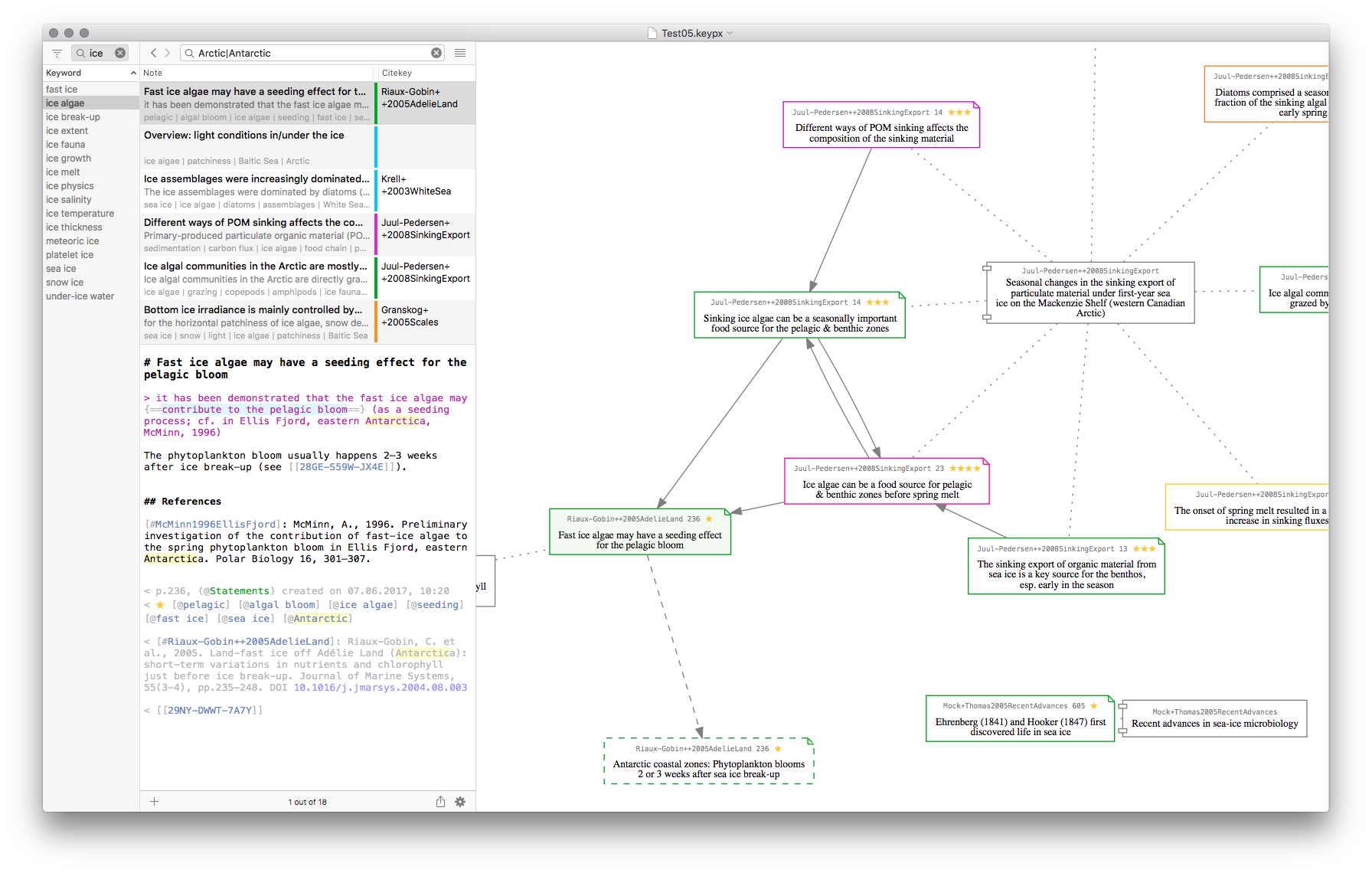
Other note elements can be added by drag & drop or a menu command / keyboard shortcut. As an example, take a look at the text note displayed in this scrrenshot:
The note contains some quoted text that was highlighted (the text with the light blue background), a link to another note, links to publications (linked via their cite keys), a green label, a (one star) rating, and some keywords. While it's true that all of these elements require some syntax, they can all be added via drag & drop and/or menu command / keyboard shortcut. And after insertion of an element, its markup is printed in light grey which helps to focus on the content instead.
This approach strives to have these elements both human readable AND machine readable (which I think is crucial). If the notes were only human readable instead, it would be very difficult for an app to add smart features on top of it (like, e.g., the visualization of note connections, or the direct manipulation of note elements via menu/scripting commands). IMO, the Markdown syntax is a good compromise which allows for notes that are both human readable and machine readable.
That said, I plan to offer rich text (RTF) as an export format. That way, one could push all notes to, say, DEVONthink or Scrivener and further work with the notes there.
Matthias
many thanks for the motivating feedback, it's much appreciated!
The only thing that scares me is the use of markdown. I work with rich text because I have a hard time reading and mentally processing markup.
I see, and I understand that formatting markup can get distracting or make things more complex. However, in Keypoints, I choose plaintext as a base format for the notes since this is the most stable & future-proof format.
And adding some very simple Markdown markup (like # for the "title" heading, > for quoted text, or *emphasis*) may be all you need to write your note. In Keypoints, when you select some text in the PDF and create a new note from it, the note's title and quotation get already created for you (in Markdown syntax).
Other note elements can be added by drag & drop or a menu command / keyboard shortcut. As an example, take a look at the text note displayed in this scrrenshot:
The note contains some quoted text that was highlighted (the text with the light blue background), a link to another note, links to publications (linked via their cite keys), a green label, a (one star) rating, and some keywords. While it's true that all of these elements require some syntax, they can all be added via drag & drop and/or menu command / keyboard shortcut. And after insertion of an element, its markup is printed in light grey which helps to focus on the content instead.
This approach strives to have these elements both human readable AND machine readable (which I think is crucial). If the notes were only human readable instead, it would be very difficult for an app to add smart features on top of it (like, e.g., the visualization of note connections, or the direct manipulation of note elements via menu/scripting commands). IMO, the Markdown syntax is a good compromise which allows for notes that are both human readable and machine readable.
That said, I plan to offer rich text (RTF) as an export format. That way, one could push all notes to, say, DEVONthink or Scrivener and further work with the notes there.
Matthias
Matthias Steffens
2/26/2020 11:19 pm
As an example, take a look at the text note displayed
in this scrrenshot:
Apologies, the screenshot URL seems to have been removed from my previous post, it's this one:
https://keypoints.app/blog/wp-content/uploads/2019/08/20190811-Keypoints-02-Visualization-A.png
Matthias
Matthias Steffens
4/26/2020 4:36 pm
Matthias Steffens wrote:
Apologies for the late follow-up to my own reply, but I wanted to share a little screencast which illustrates the above:
https://keypoints.app/blog/wp-content/uploads/2020/04/Keypoints-01-AddHighlightNote.mp4
In this 2-minute screen capture, I'm creating a new note from text highlighted in a PDF. Since the bibliographic metadata were already fetched for this PDF, upon creation the note automatically contains this info:
- the text quoted from the PDF
- the PDF page number of the quotation
- a default label (with a yellowish color)
- the note's creation date & time
- the bibliographic citekey, formatted reference, & DOI for the PDF article
- the file path to the PDF file on disk
- the PDF annotation info
- the note's ID
The title contains the first words from the quoted text (which are selected so that you can change the title right away).
In the screencast, I'm then adding the following info:
- a link to a related note
- some keywords
- a star rating
- a new label called "Next" (to group notes which contain tasks that I want to do next)
These elements all get added via interface actions (drag & drop, menu commands, or autocompletion), and Keypoints inserts the corresponding Markdown into the plaintext note (at the right position), syntax colors it & makes it clickable.
Hope this illustrates things a bit better.
Matthias
Darren McDonald wrote:
> The only thing that scares me is the use of markdown. I work with rich
> text because I have a hard time reading and mentally processing markup.
I see, and I understand that formatting markup can get distracting or
make things more complex. However, in Keypoints, I choose plaintext as a
base format for the notes since this is the most stable & future-proof
format.
[..] In Keypoints, when you select some text in the PDF and create
a new note from it, the note's title and quotation get already created
for you (in Markdown syntax).
Other note elements can be added by drag & drop or a menu command /
keyboard shortcut.
Apologies for the late follow-up to my own reply, but I wanted to share a little screencast which illustrates the above:
https://keypoints.app/blog/wp-content/uploads/2020/04/Keypoints-01-AddHighlightNote.mp4
In this 2-minute screen capture, I'm creating a new note from text highlighted in a PDF. Since the bibliographic metadata were already fetched for this PDF, upon creation the note automatically contains this info:
- the text quoted from the PDF
- the PDF page number of the quotation
- a default label (with a yellowish color)
- the note's creation date & time
- the bibliographic citekey, formatted reference, & DOI for the PDF article
- the file path to the PDF file on disk
- the PDF annotation info
- the note's ID
The title contains the first words from the quoted text (which are selected so that you can change the title right away).
In the screencast, I'm then adding the following info:
- a link to a related note
- some keywords
- a star rating
- a new label called "Next" (to group notes which contain tasks that I want to do next)
These elements all get added via interface actions (drag & drop, menu commands, or autocompletion), and Keypoints inserts the corresponding Markdown into the plaintext note (at the right position), syntax colors it & makes it clickable.
Hope this illustrates things a bit better.
Matthias
MadaboutDana
4/28/2020 8:49 am
Good grief - that’s actually very impressive. And the video is a very nice demonstration of what you’re aiming to achieve.
That’s going to be an amazing product (in the not-too-distant future?)
That’s going to be an amazing product (in the not-too-distant future?)
Paul Korm
4/28/2020 5:10 pm
Can I get Keypoints this afternoon or tomorrow morning? LOL
I would be more than happy to move from MarginNote to Keypoints.
MadaboutDana wrote:
I would be more than happy to move from MarginNote to Keypoints.
MadaboutDana wrote:
Good grief - that’s actually very impressive. And the video is a
very nice demonstration of what you’re aiming to achieve.
That’s going to be an amazing product (in the not-too-distant
future?)
Matthias Steffens
4/29/2020 7:42 pm
Hi MadaboutDana & Paul Korn,
many thanks for your feedback, it’s feedback like this that keeps me going!
Unfortunately, I cannot say yet when the app will be available for testing. I still have quite a few things to iron out first (some basic/required features are still missing, but also things like fixing remaining crashers & ensuring operating system support for newer system versions). But I’m very much dedicated to push this project forward as much as I can.
Thanks again, Matthias
many thanks for your feedback, it’s feedback like this that keeps me going!
Unfortunately, I cannot say yet when the app will be available for testing. I still have quite a few things to iron out first (some basic/required features are still missing, but also things like fixing remaining crashers & ensuring operating system support for newer system versions). But I’m very much dedicated to push this project forward as much as I can.
Thanks again, Matthias
J J Weimer
4/30/2020 1:16 am
I might hazard a guess that you have a line of other folks here who are waiting in the wings while jumping up and down in anticipation of a release happening yesterday. I count myself in this group.
I might also hazard a guess that many of those same folks would welcome a release with the features that have been demonstrated up to now (and with a basic level of stability of course) just to be able to move out of using apps that currently require them to kludge together a processing workflow that you offer with clear ease. I count myself in this latter group too.
In summary: Keypoints appears to be a very well-constructed app both in design and intent. I can't wait for its release; I anticipate that it will revolution my workflow as only a few other apps have until now.
Thanks for your hard work on it!
Matthias Steffens wrote:
I might also hazard a guess that many of those same folks would welcome a release with the features that have been demonstrated up to now (and with a basic level of stability of course) just to be able to move out of using apps that currently require them to kludge together a processing workflow that you offer with clear ease. I count myself in this latter group too.
In summary: Keypoints appears to be a very well-constructed app both in design and intent. I can't wait for its release; I anticipate that it will revolution my workflow as only a few other apps have until now.
Thanks for your hard work on it!
Matthias Steffens wrote:
Hi MadaboutDana & Paul Korn,
many thanks for your feedback, it’s feedback like this that keeps
me going!
Unfortunately, I cannot say yet when the app will be available for
testing. I still have quite a few things to iron out first (some
basic/required features are still missing, but also things like fixing
remaining crashers & ensuring operating system support for newer system
versions). But I’m very much dedicated to push this project
forward as much as I can.
Thanks again, Matthias
Matthias Steffens
5/1/2020 1:42 pm
Thank you very much, J J Weimer, for your kind and motivating reply! It's much appreciated!
J J Weimer wrote:
Yes, I fully agree! And I wish I'd be there already as much as you do. But, as you say, the app must have a basic level of stability. Otherwise it would only be a waste of everyone's time.
Although it may not look like it, I still have some stability issues to resolve. Then there's some bigger usability & compatibility issues, plus some essential functionality is still missing (which depending on your needs may be less of an issue). I don't think that the app must be feature complete to be released to testers, but I firmly believe that the things that are there should also work reliably.
Thanks again,
Matthias
J J Weimer wrote:
[…] many of those same folks would welcome
a release with the features that have been demonstrated
up to now (and with a basic level of stability of course) [...]
Yes, I fully agree! And I wish I'd be there already as much as you do. But, as you say, the app must have a basic level of stability. Otherwise it would only be a waste of everyone's time.
Although it may not look like it, I still have some stability issues to resolve. Then there's some bigger usability & compatibility issues, plus some essential functionality is still missing (which depending on your needs may be less of an issue). I don't think that the app must be feature complete to be released to testers, but I firmly believe that the things that are there should also work reliably.
Thanks again,
Matthias
1
2