
Write Mapper for Mac/Windows
Started by satis
on 5/21/2018
satis
5/21/2018 10:30 pm
I'm not sure this app has been discussed here.
I was wandering around Reddit today and searched for 'mind map' and came upon this thread from last fall
https://www.reddit.com/r/apple/comments/6xlas7/hi_i_made_a_mac_app_that_lets_you_turn_ideas_into/
that introduced a gorgeous-looking app for writing text drafts in a mind map format.
https://writemapper.com/
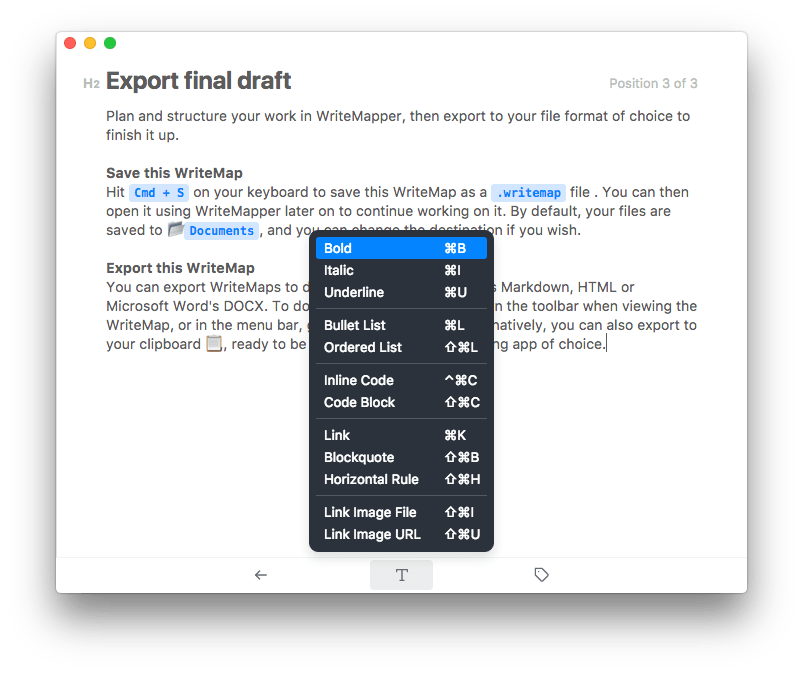
What I especially like about it is how each node expands into an editable document page that allows formatting, including bullet and ordered lists (no checkbox, cross-offs though). No editing in Markdown (yet), no pdf export (.dev recommends exporting as DOCX then printing to PDF in Pages or Word), no tags. Images can be inserted by linking but not embedding. TeX support "in the works". Saves as text, RTF, Word, HTML and Markdown.
https://writemapper.com/static/img/writemapper-landing-16.png
Lifetime license is $40 for one machine (was $27 in the Reddit thread last year), $50 for two, with 7-day free trial. (Annoyingly, it seems bound to a specific machine, not a license for use on *any* machine.) Currently Mac/Windows, with iOS/Android as possible but apparently not near.
An Electron app. (Sigh.)
I was wandering around Reddit today and searched for 'mind map' and came upon this thread from last fall
https://www.reddit.com/r/apple/comments/6xlas7/hi_i_made_a_mac_app_that_lets_you_turn_ideas_into/
that introduced a gorgeous-looking app for writing text drafts in a mind map format.
https://writemapper.com/
What I especially like about it is how each node expands into an editable document page that allows formatting, including bullet and ordered lists (no checkbox, cross-offs though). No editing in Markdown (yet), no pdf export (.dev recommends exporting as DOCX then printing to PDF in Pages or Word), no tags. Images can be inserted by linking but not embedding. TeX support "in the works". Saves as text, RTF, Word, HTML and Markdown.
https://writemapper.com/static/img/writemapper-landing-16.png
Lifetime license is $40 for one machine (was $27 in the Reddit thread last year), $50 for two, with 7-day free trial. (Annoyingly, it seems bound to a specific machine, not a license for use on *any* machine.) Currently Mac/Windows, with iOS/Android as possible but apparently not near.
An Electron app. (Sigh.)
bigspud
5/27/2018 4:02 am
looking at this reminds me of octopusnote.
I get why you like the concepts! Does anyone know if octopusnote went anywhere?
yeah, so many promising features moving into electron world. is the upside dev only??
I get why you like the concepts! Does anyone know if octopusnote went anywhere?
yeah, so many promising features moving into electron world. is the upside dev only??
satis
5/27/2018 12:04 pm
One of the last tweets at https://twitter.com/octopusnote (January 2017) referred to a new product, MarkdownTree:
https://twitter.com/MarkdownTree
But that Twitter acount hasn't posted since then, and the new website does not resolve either.
https://twitter.com/MarkdownTree
But that Twitter acount hasn't posted since then, and the new website does not resolve either.
satis
7/25/2019 3:14 pm
One step forward, one step back. Writemapper has increased its price to $50 (up from its initial $27 price a year ago), but at v2.6 it at least seems to be updating regularly.
"WriteMapper has had the ability to turn lines of words within a node's contents into children nodes since the app was launched. In this version, we're adding a new feature which allows you to do the reverse — turn nodes into contents."
"This helps with generating ideas for writing out the contents of a node's topic, by creating and ordering sub-points in the mind map interface before pulling them all into the parent node. From there, it's a matter of turning those points into complete sentences, and that's that node now taken care of!"
"You can check it out on your own copy of WriteMapper by right-clicking/long-pressing any node that has child nodes, and selecting the "Absorb Children" option. You can also select the node, and use the Cmd+Shift+A keyboard shortcut on macOS and iPad, or Ctrl+Shift+A on Windows."
"WriteMapper has had the ability to turn lines of words within a node's contents into children nodes since the app was launched. In this version, we're adding a new feature which allows you to do the reverse — turn nodes into contents."
"This helps with generating ideas for writing out the contents of a node's topic, by creating and ordering sub-points in the mind map interface before pulling them all into the parent node. From there, it's a matter of turning those points into complete sentences, and that's that node now taken care of!"
"You can check it out on your own copy of WriteMapper by right-clicking/long-pressing any node that has child nodes, and selecting the "Absorb Children" option. You can also select the node, and use the Cmd+Shift+A keyboard shortcut on macOS and iPad, or Ctrl+Shift+A on Windows."
Hugh
7/27/2019 11:29 am
I'm in the middle of a WriteMapper 2 trial. So far, I like its UI and the features it offers.
However, it faces competition from established rivals such as MindNode and iThoughts whose macOS editions cost much the same as WriteMapper, but which also offer useful iOS versions.
From my usage to this point, it's quite difficult to see what valuable-for-writing features it offers that they do not.
However, it faces competition from established rivals such as MindNode and iThoughts whose macOS editions cost much the same as WriteMapper, but which also offer useful iOS versions.
From my usage to this point, it's quite difficult to see what valuable-for-writing features it offers that they do not.
satis
7/27/2019 1:14 pm
Hugh wrote:
From my usage to this point, it's quite difficult to see what
valuable-for-writing features it offers that they do not.
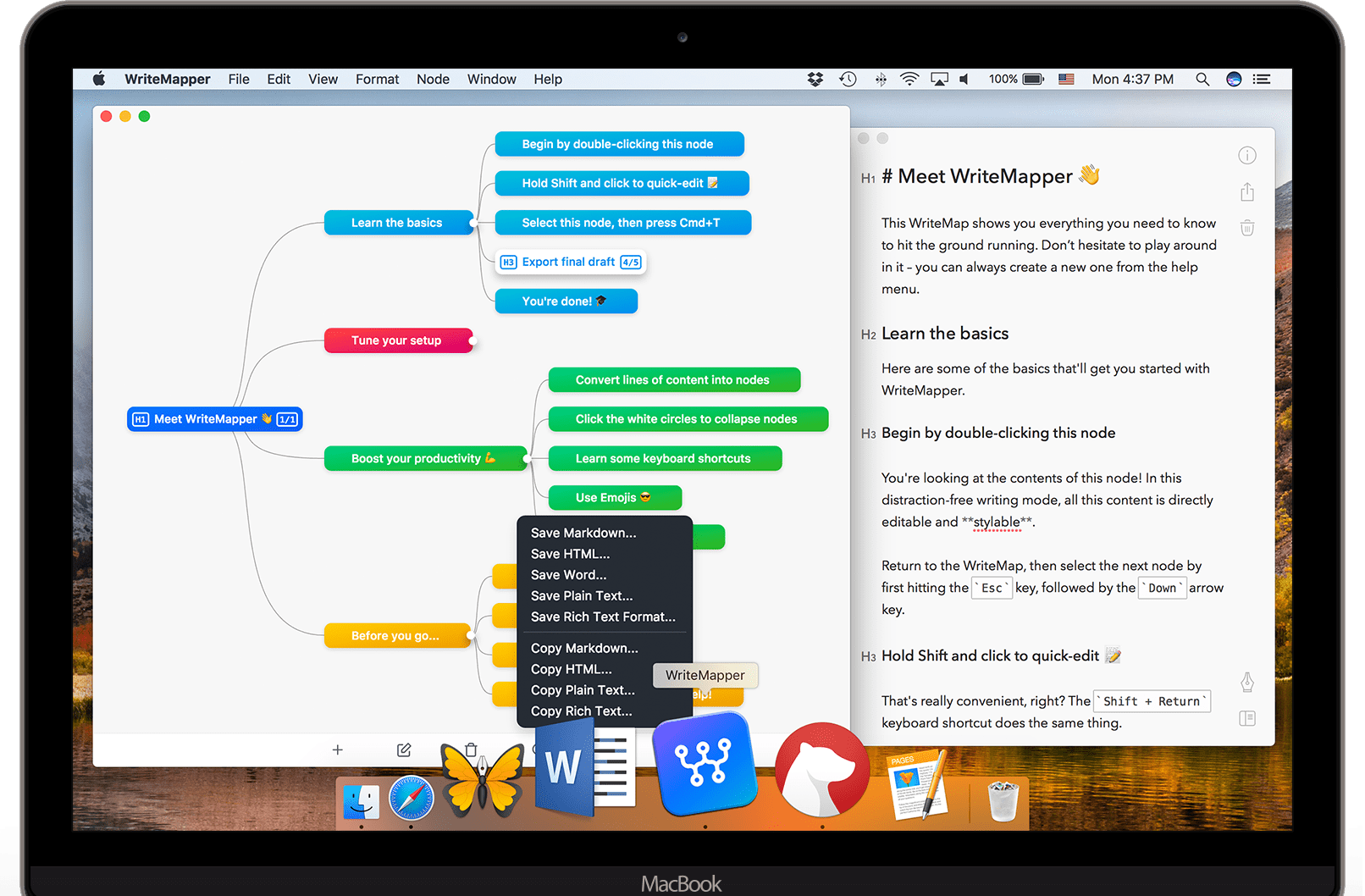
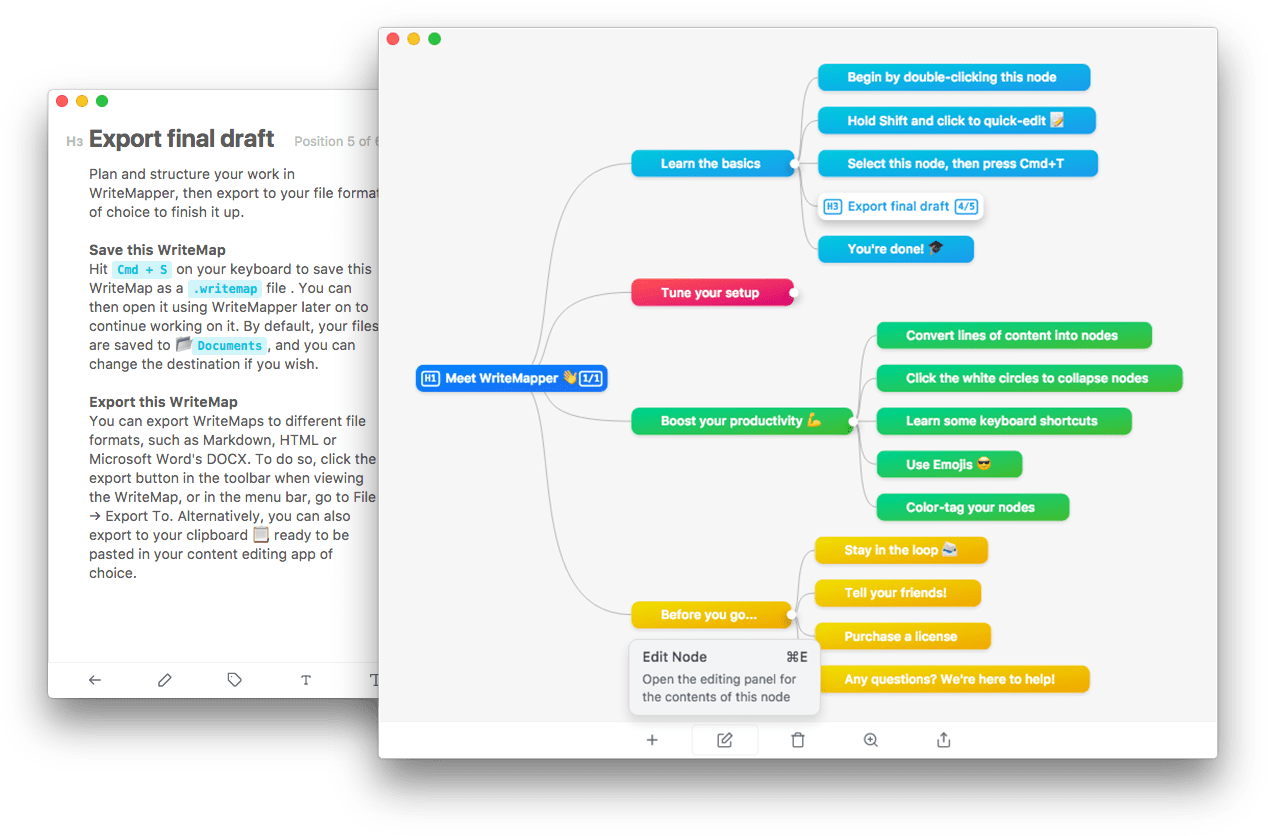
Writemapper seems to handle large blocks of text much better than typical mindmapping apps, making it better for writing in and later exporting to a word/text processor.
https://writemapper.com/static/img/writemapper-landing-footer.png
https://writemapper.com/static/img/writemapper-landing-19.png
tightbeam
7/27/2019 3:23 pm
Setting WriteMapper apart from MindNode and iThoughts: it has a Windows version.
Hugh wrote:
Hugh wrote:
I'm in the middle of a WriteMapper 2 trial. So far, I like its UI and
the features it offers.
However, it faces competition from established rivals such as MindNode
and iThoughts whose macOS editions cost much the same as WriteMapper,
but which also offer useful iOS versions.
From my usage to this point, it's quite difficult to see what
valuable-for-writing features it offers that they do not.
mathew
7/28/2019 12:19 am
tightbeam wrote:
Setting WriteMapper apart from MindNode and iThoughts: it has a Windows
version.
???? iThoughts is both Mac and Windows. iThoughts is also really good for including notes and longer text, then exporting.
Overall Writemapper presents a more pleasing writing environment (I think). But iThoughts will do more. It all depends on what you use mind maps for. I have both and am glad I do. But if I could only purchase one I'd probably lean towards iThoughts unless you are almost exclusively using mind mapping for organizing writing projects.
tightbeam
7/28/2019 11:06 am
Thank you, and sorry for being obtuse.
mathew wrote:
mathew wrote:
tightbeam wrote:
Setting WriteMapper apart from MindNode and iThoughts: it has a Windows
>version.
???? iThoughts is both Mac and Windows. iThoughts is also really good
for including notes and longer text, then exporting.
Overall Writemapper presents a more pleasing writing environment (I
think). But iThoughts will do more. It all depends on what you use mind
maps for. I have both and am glad I do. But if I could only purchase one
I'd probably lean towards iThoughts unless you are almost exclusively
using mind mapping for organizing writing projects.
Simon
7/28/2019 12:42 pm
Too expensive. $50 one computer, if you have a laptop it’s another $10 plus £29 for iPad. Those prices won’t even tempt me to test it.
MadaboutDana
7/30/2019 10:26 am
I like WriteMapper, it's very elegant. But I find it (much) too expensive for an app that doesn't have a competent search function (the quick search function only looks at topic names, which is pretty much useless if you're writing a long-form text). I've written to the developer suggesting they include one, but so far haven't seen any sign that this is on the roadmap.
Otherwise I might be tempted.
Cheers,
Bill
Otherwise I might be tempted.
Cheers,
Bill