
Publishing a database as website
Started by Tester
on 8/11/2015
Tester
8/11/2015 10:37 pm
As most of you will know, various outliners offer the possibility to publish the created data as a website. (As far as I have seen, it works always by exporting the existing data as html files.)
I have tested it with various programs (MyInfo, My Notes Keeper, Memo Book, Ultra Recall etc.) and the result with all of them seems to be more or less the same. That means: not bad, but there are always two weak points for which I could not find a solution:
1) The time delay: If you have a lot of data it takes quite a long time until the website will open (completely). (Obviously because of the big number and/or size of the created html files.)
2) The missing of a (good) search possibility: It seems that a website created (by exporting the html files) cannot offer a "built-in" search possibility (at least for the titles of the documents/items which would be sufficient for my purposes). So the visitor of the website must use the search facility of his browser respectively some add-on (as for example "FindBar Tweak" for Firefox). This works quite good as a workaround but it is by no means a satisfying compensation of a good built-in search facilty.
Please take a look at the following website. Of course it is not created with an outliner software. But as you can see there is a big similarity to the interface of such software and the way the website can be used would perfectly fulfill my needs.
I would like to ask you if you know an outliner software with which you can achieve such a result when exporting the database as a website:
http://woerterbuchnetz.de/DWB/
What you see is an old and famous German dictionary (from the 19th century). (Some technical details about the database – for those who understand German: http://dwb.uni-trier.de/de/die-digitale-version/datenbank/ )
The two weak points mentioned above do not exist here:
- The website opens without delay.
- You have a comfortable search possibilty (for the keywords of the dictionary): On the left you have (above the tree with the keywords) a search field. Type in there a (german) word and you will get immediately the result, for example: "Hund" (= dog) or "Sonne" (= sun).
I use MyInfo as outliner software and I told its developer (Petko) about this website. I am very happy because he told me that the user interface of MyInfo after the next main upgrade (to MyInfo 7) will have quite the same structure as it can be seen on the website (including the excellent search facility!).
So I can say that my needs presumably will be fully satisfied by the next generation of MyInfo concerning the structure/functionality of its interface on the DESKTOP. But I doubt if this structure/functionality will be kept when exporting the data(base) as a WEBSITE.
Of course I could ask Petko but I do not want to be impatient or demanding. ;-) So instead I would like to ask the experts here in the Forum if such a transfer of structure/functionality to the website version of an outliner database is technically possible at all and if there exists already such an outliner software.
Thanks for your interest.
I have tested it with various programs (MyInfo, My Notes Keeper, Memo Book, Ultra Recall etc.) and the result with all of them seems to be more or less the same. That means: not bad, but there are always two weak points for which I could not find a solution:
1) The time delay: If you have a lot of data it takes quite a long time until the website will open (completely). (Obviously because of the big number and/or size of the created html files.)
2) The missing of a (good) search possibility: It seems that a website created (by exporting the html files) cannot offer a "built-in" search possibility (at least for the titles of the documents/items which would be sufficient for my purposes). So the visitor of the website must use the search facility of his browser respectively some add-on (as for example "FindBar Tweak" for Firefox). This works quite good as a workaround but it is by no means a satisfying compensation of a good built-in search facilty.
Please take a look at the following website. Of course it is not created with an outliner software. But as you can see there is a big similarity to the interface of such software and the way the website can be used would perfectly fulfill my needs.
I would like to ask you if you know an outliner software with which you can achieve such a result when exporting the database as a website:
http://woerterbuchnetz.de/DWB/
What you see is an old and famous German dictionary (from the 19th century). (Some technical details about the database – for those who understand German: http://dwb.uni-trier.de/de/die-digitale-version/datenbank/ )
The two weak points mentioned above do not exist here:
- The website opens without delay.
- You have a comfortable search possibilty (for the keywords of the dictionary): On the left you have (above the tree with the keywords) a search field. Type in there a (german) word and you will get immediately the result, for example: "Hund" (= dog) or "Sonne" (= sun).
I use MyInfo as outliner software and I told its developer (Petko) about this website. I am very happy because he told me that the user interface of MyInfo after the next main upgrade (to MyInfo 7) will have quite the same structure as it can be seen on the website (including the excellent search facility!).
So I can say that my needs presumably will be fully satisfied by the next generation of MyInfo concerning the structure/functionality of its interface on the DESKTOP. But I doubt if this structure/functionality will be kept when exporting the data(base) as a WEBSITE.
Of course I could ask Petko but I do not want to be impatient or demanding. ;-) So instead I would like to ask the experts here in the Forum if such a transfer of structure/functionality to the website version of an outliner database is technically possible at all and if there exists already such an outliner software.
Thanks for your interest.
WSP
8/12/2015 7:32 am
Tester, I too am a longtime user of MyInfo, and your comments left me feeling slightly alarmed. Did Petko really say that the user interface of MyInfo 7 will resemble the online German dictionary you cite? (Or was he perhaps only talking about improved speed?) I looked at the website and was impressed by its clever use of columns, but I'm not at all sure that I would want MyInfo itself to resemble this on my computer screen.
--------------------------------------
Tester wrote:
--------------------------------------
Tester wrote:
As most of you will know, various outliners offer the possibility to
publish the created data as a website. (As far as I have seen, it works
always by exporting the existing data as html files.)
I have tested it with various programs (MyInfo, My Notes Keeper, Memo
Book, Ultra Recall etc.) and the result with all of them seems to be
more or less the same. That means: not bad, but there are always two
weak points for which I could not find a solution:
1) The time delay: If you have a lot of data it takes quite a long time
until the website will open (completely). (Obviously because of the big
number and/or size of the created html files.)
2) The missing of a (good) search possibility: It seems that a website
created (by exporting the html files) cannot offer a "built-in" search
possibility (at least for the titles of the documents/items which would
be sufficient for my purposes). So the visitor of the website must use
the search facility of his browser respectively some add-on (as for
example "FindBar Tweak" for Firefox). This works quite good as a
workaround but it is by no means a satisfying compensation of a good
built-in search facilty.
Please take a look at the following website. Of course it is not created
with an outliner software. But as you can see there is a big similarity
to the interface of such software and the way the website can be used
would perfectly fulfill my needs.
I would like to ask you if you know an outliner software with which you
can achieve such a result when exporting the database as a website:
http://woerterbuchnetz.de/DWB/
What you see is an old and famous German dictionary (from the 19th
century). (Some technical details about the database – for those
who understand German:
http://dwb.uni-trier.de/de/die-digitale-version/datenbank/ )
The two weak points mentioned above do not exist here:
- The website opens without delay.
- You have a comfortable search possibilty (for the keywords of the
dictionary): On the left you have (above the tree with the keywords) a
search field. Type in there a (german) word and you will get immediately
the result, for example: "Hund" (= dog) or "Sonne" (= sun).
I use MyInfo as outliner software and I told its developer (Petko) about
this website. I am very happy because he told me that the user interface
of MyInfo after the next main upgrade (to MyInfo 7) will have quite the
same structure as it can be seen on the website (including the excellent
search facility!).
So I can say that my needs presumably will be fully satisfied by the
next generation of MyInfo concerning the structure/functionality of its
interface on the DESKTOP. But I doubt if this structure/functionality
will be kept when exporting the data(base) as a WEBSITE.
Of course I could ask Petko but I do not want to be impatient or
demanding. ;-) So instead I would like to ask the experts here in the
Forum if such a transfer of structure/functionality to the website
version of an outliner database is technically possible at all and if
there exists already such an outliner software.
Thanks for your interest.
Tester
8/12/2015 1:03 pm
WSP wrote:
No, in this context we did not talk about speed.
WSP wrote:
Yes, that is exactly what I like too - in combination with the built-in search field above the tree. And without being able to speak on behalf of Petko, I think that he referred to these aspects (surely to the built-in search field). (That's the reason why I spoke about "structure" and "functionality" of the interface.)
WSP wrote:
If you mean the more aesthetic details like colours, fonts etc. of the cited German dictionary: I do *not* think that similarity will concern such details. ;-) At least this was not at all the subject we talked about.
(Or was he perhaps only talking about improved speed?)
No, in this context we did not talk about speed.
WSP wrote:
I looked at the website
and was impressed by its clever use of columns
Yes, that is exactly what I like too - in combination with the built-in search field above the tree. And without being able to speak on behalf of Petko, I think that he referred to these aspects (surely to the built-in search field). (That's the reason why I spoke about "structure" and "functionality" of the interface.)
WSP wrote:
but I'm not at all sure
that I would want MyInfo itself to resemble this on my computer screen.
If you mean the more aesthetic details like colours, fonts etc. of the cited German dictionary: I do *not* think that similarity will concern such details. ;-) At least this was not at all the subject we talked about.
PIMfan
8/12/2015 2:39 pm
Tester -
Another app you might want to investigate is RightNote (Pro version), which can be found at http://bauerapps.com/rightnote/
RightNote Pro includes an "Export to Webbook" function that turns a RightNote file into a mini-website, including top navigation (mapped to the RN "pages") and a "search as you type" search box in the bottom left side of the screen.
1) Time delay: I don't have any massive gigabyte RN databases to test, but I have always found RN (and the search function in particular) to have very snappy performance. How well that translates into the webbook version of a db I am unable to comment on....
2) The missing of a (good) search possibility: As noted above, RN search is quite efficient, and the underlying db is SQLite (which is generally regarded well for performance).
One limitation of the webbook format is that - unlike the RN desktop client - search is limited to the text of the content. The ability to search and leverage tags (which the desktop version supports) is not included in the webbook export.
But overall, not a bad choice to check out, and the 30-day eval available for download is the Pro version....
d
Tester wrote:
Another app you might want to investigate is RightNote (Pro version), which can be found at http://bauerapps.com/rightnote/
RightNote Pro includes an "Export to Webbook" function that turns a RightNote file into a mini-website, including top navigation (mapped to the RN "pages") and a "search as you type" search box in the bottom left side of the screen.
1) Time delay: I don't have any massive gigabyte RN databases to test, but I have always found RN (and the search function in particular) to have very snappy performance. How well that translates into the webbook version of a db I am unable to comment on....
2) The missing of a (good) search possibility: As noted above, RN search is quite efficient, and the underlying db is SQLite (which is generally regarded well for performance).
One limitation of the webbook format is that - unlike the RN desktop client - search is limited to the text of the content. The ability to search and leverage tags (which the desktop version supports) is not included in the webbook export.
But overall, not a bad choice to check out, and the 30-day eval available for download is the Pro version....
d
Tester wrote:
1) The time delay: If you have a lot of data it takes quite a long time
until the website will open (completely). (Obviously because of the big
number and/or size of the created html files.)
2) The missing of a (good) search possibility: It seems that a website
created (by exporting the html files) cannot offer a "built-in" search
possibility (at least for the titles of the documents/items which would
be sufficient for my purposes). So the visitor of the website must use
the search facility of his browser respectively some add-on (as for
example "FindBar Tweak" for Firefox).
Tester
8/12/2015 5:27 pm
Thanks for this suggestion, PIMfan. I just tested RightNote a little bit and this webbook feature is indeed very interesting.
I had already tested RightNote some time ago by using the (usual) feature of html export and was not satisfied at all because there were (and still are) massive problems with Unicode (html export does not work for notes with non-latin characters). But this webbook feature is something quite new (added in March 2015 according to the Release History) and it works without any problems concerning Unicode.
Especially the search function of the webbook is a fine thing. It is more or less what I would expect (or let's say dream of) when publishing a database (created by an outliner) in the web. :-)
About speed at the moment I cannot say too much beacuse I tested it only with about 10 (small) notes/documents. And of course with this small number and size all worked perfectly quickly.
Of course RightNote has also also some disadvantages or shortcomings (as every software compared to one's personal needs an prerences, I think). But in general my impression is now (with the webbook feature) very good.
I will keep an eye on RightNote, but a change (from MyInfo) would be a very difficult decision as my database at MyInfo contains already about 13.000 documents/notes and in general I am very satisfied with MyInfo. The ideal solution would be that the next version of MyInfo offers something similar as RightNote with its webbook. ;-)
Thanks again for your reply, PIMfan.
jperlman
8/12/2015 11:33 pm
Treepad X Enterprise, has a php based search engine in the web export feature of the web pages... I think you can choose whether you want that search feature in your exported pages from that version of TreePad.
I don't use treepad, though I have looked at it. But, that search feature in the web export is a nice feature.
Just passing along an observation.
-jperlman
I don't use treepad, though I have looked at it. But, that search feature in the web export is a nice feature.
Just passing along an observation.
-jperlman
Tester
8/13/2015 12:28 am
Thank you too, jperlman.
Yes, Treepad is one more program I had tested in the past. ;-) I liked the comfortable way in which you can arrange the appearance of the website. But overall Treepad was of no use for me, especially because it does not suppport Unicode. This applies to the X Enterprise version too.
They have also another project, called "TreePad UNI". There (obviously *only* there) they plan(ned) Unicode support (see http://www.treepad.com/treepaduni/ ). And they write there that "This program will be available in the course of 2014". Now we have August 2015 and "TreePad UNI" is still not available. ;-) And moreover they write: "Because we do not want to be overly ambitious, initial releases will not support the entire feature set of e.g. TreePad PLUS, such as images, tables, underlined hyperlinks, bullets, indents."
Some of these features (especially tables) are of vital importance for me.
So Treepad is not an appropriate program for my needs.
Concerning the search feature of the X Enterprise version, it can be seen and tested for example here: http://www.treepad.com/docs/tpp/manual/
That's their own Manual created with this version. The search field opens by clicking on the link "Search" at the bottom of the page.
Yes, Treepad is one more program I had tested in the past. ;-) I liked the comfortable way in which you can arrange the appearance of the website. But overall Treepad was of no use for me, especially because it does not suppport Unicode. This applies to the X Enterprise version too.
They have also another project, called "TreePad UNI". There (obviously *only* there) they plan(ned) Unicode support (see http://www.treepad.com/treepaduni/ ). And they write there that "This program will be available in the course of 2014". Now we have August 2015 and "TreePad UNI" is still not available. ;-) And moreover they write: "Because we do not want to be overly ambitious, initial releases will not support the entire feature set of e.g. TreePad PLUS, such as images, tables, underlined hyperlinks, bullets, indents."
Some of these features (especially tables) are of vital importance for me.
So Treepad is not an appropriate program for my needs.
Concerning the search feature of the X Enterprise version, it can be seen and tested for example here: http://www.treepad.com/docs/tpp/manual/
That's their own Manual created with this version. The search field opens by clicking on the link "Search" at the bottom of the page.
Donovan
8/15/2015 2:10 am
As per MyInfo, Rightnote and its webbook feature, etc...
These are all great ideas in concept. They sound interesting and I have been looking for something similar. I actually love Schmid's Notebook for Windows and wish there was a way to duplicate that look on the web. It seems it should be easy considering everything is its own file. But a programmer I am not.
My biggest question relating to the capabilities of all of these concepts is WHY don't they offer online examples?
Something like --- "See a sample Rightnote Webbook Live on the Web" type a thing.
Notefrog was one of the first with this capability but, unfortunately, never took it to the next level and it looks very dated. But they have always had a sample to access from their website. An example is shown here: http://notewindow.com/frog/x/demostack.html
But why not have examples of these capabilities from MyInfo and Rightnote and other note applications with this feature? I would LOVE to see them!
Does anybody here have some addresses they could post of sample sites created with MyInfo or the RN webbook?
Thanks!
These are all great ideas in concept. They sound interesting and I have been looking for something similar. I actually love Schmid's Notebook for Windows and wish there was a way to duplicate that look on the web. It seems it should be easy considering everything is its own file. But a programmer I am not.
My biggest question relating to the capabilities of all of these concepts is WHY don't they offer online examples?
Something like --- "See a sample Rightnote Webbook Live on the Web" type a thing.
Notefrog was one of the first with this capability but, unfortunately, never took it to the next level and it looks very dated. But they have always had a sample to access from their website. An example is shown here: http://notewindow.com/frog/x/demostack.html
But why not have examples of these capabilities from MyInfo and Rightnote and other note applications with this feature? I would LOVE to see them!
Does anybody here have some addresses they could post of sample sites created with MyInfo or the RN webbook?
Thanks!
Tester
8/15/2015 12:56 pm
Donovan wrote:
Yes, that's a good way to express it: a duplication of the desktop version's user interface would be fine.
Donovan wrote:
I miss it too for MyInfo and RightNote. Some other developers offer examples:
I already mentioned TreePad's own manual. And here you can find a list with "Examples of Websites created with TreePad": http://www.treepad.com/webgenerator/
There is an another software called "Web Idea Tree" (http://www.webideatree.com/ and they offer an extensive list with examples (not all are still active): http://www.webideatree.com/wit-websites/text/2a1a3a02-319.php
and
http://www.webideatree.com/wit-websites/text/Sites-plus-anciens.php
Maybe that "Web Idea Tree" is a good software but for me it looked a little bit too complicated (not so easy in handling as MyInfo, RightNote etc.). Moreover there were problems with Unicode when displaying sites (although they write that Unicode is supported). So I did not test this program more in detail.
Donovan wrote:
In the Internet I found one example for a website created with MyInfo:
http://naiadstudios.com/indexdf.html
(I did not really understand what it is about- ;-) But you can see the general structure of such a website.)
And what I can show you is my own website created with MyInfo. Essentially it is a German-Greek (and vice versa) dictionary.
At the moment I have published it in two versions with more or less the same content but in order to see some differences in speed and usability:
A) Here the conventional version with one document (= html file) for every keyword of the dictionary (at the moment about 13.000):
As you see, the site opens very slowly (about 30 seconds I would say) but then you have access to every keyword individually
http://enalexiko.bplaced.net/index.html/
B) In order to avoid the big delay I created a second version where all keywords are in only three documents (html files).
This site opens immediately but of course a delay will happen afterwards, when you try to open one of the three big documents (keywords with German letters A-K, with German letters L to Z and with Greek letters)
http://kompakt.bplaced.net/index.html/
Besides the delay the second shortcoming (in both versions) is the already discussed lack of a built-in search feature. Until now you have to use the search tools of your browser (e.g. via pressing F3). Hopefully this will change in the next upgrade of MyInfo but I do not know it.
Concerning RightNote I could not find specific examples in the Internet but you can get an idea how it looks like from this picture (I have taken it from http://alternativeto.net/software/rightnote/# The concept is quite good I think:
http://abload.de/img/wb1xsp4x.jpg
1. In the bar are the buttons with the "pages" of your File/notebook, let's the the chapters of what you would like to present (here: "Boot Camp", "Features", "More Features" etc.).
2. On the bottom of the tree you find a search field (filter) where you can search for the title of a certain note (= the items in the tree above). That's extremely important and useful when you publish for example a dictionary where every note (document / tree item) represents an individual keyword. It works as "Search as you type": When you start typing in the field, the appropriate notes appear in the tree above.
3. The big button "Search" in the bar offers you the possibility to make a full text search within all your notes and pages. (Not so important for someone who publishes a dictionary but surely quite useful for publishers or users with other needs.)
I have tested the webbook feature of RightNote by myself and can confirm that all looks and works as described above. This was the appearance of my own test webbook:
http://abload.de/img/wb29aqkb.jpg
The most important page in this case is called "Wörterbuch" (= Dictionary) with the list of the keywords in the tree. (I tested it only with a few keywords). And I created two other additional pages (called "Grammatik [= Grammar] and "Links").
There is again the search field (filter) for the keywords on the bottom of the tree (not shown on the picture) and of course the full search button in the bar.
Generally the webbook of RightNote is a nice concept I think, even with some shortcomings (which could be easily eliminated, I think).
[...] and wish there was a way to duplicate that look on the web.
Yes, that's a good way to express it: a duplication of the desktop version's user interface would be fine.
Donovan wrote:
My biggest question relating to the capabilities of all of these
concepts is WHY don't they offer online examples?
Something like --- "See a sample Rightnote Webbook Live on the Web" type
a thing.
I miss it too for MyInfo and RightNote. Some other developers offer examples:
I already mentioned TreePad's own manual. And here you can find a list with "Examples of Websites created with TreePad": http://www.treepad.com/webgenerator/
There is an another software called "Web Idea Tree" (http://www.webideatree.com/ and they offer an extensive list with examples (not all are still active): http://www.webideatree.com/wit-websites/text/2a1a3a02-319.php
and
http://www.webideatree.com/wit-websites/text/Sites-plus-anciens.php
Maybe that "Web Idea Tree" is a good software but for me it looked a little bit too complicated (not so easy in handling as MyInfo, RightNote etc.). Moreover there were problems with Unicode when displaying sites (although they write that Unicode is supported). So I did not test this program more in detail.
Donovan wrote:
But why not have examples of these capabilities from MyInfo and
Rightnote and other note applications with this feature? I would LOVE to
see them!
Does anybody here have some addresses they could post of sample sites
created with MyInfo or the RN webbook?
In the Internet I found one example for a website created with MyInfo:
http://naiadstudios.com/indexdf.html
(I did not really understand what it is about- ;-) But you can see the general structure of such a website.)
And what I can show you is my own website created with MyInfo. Essentially it is a German-Greek (and vice versa) dictionary.
At the moment I have published it in two versions with more or less the same content but in order to see some differences in speed and usability:
A) Here the conventional version with one document (= html file) for every keyword of the dictionary (at the moment about 13.000):
As you see, the site opens very slowly (about 30 seconds I would say) but then you have access to every keyword individually
http://enalexiko.bplaced.net/index.html/
B) In order to avoid the big delay I created a second version where all keywords are in only three documents (html files).
This site opens immediately but of course a delay will happen afterwards, when you try to open one of the three big documents (keywords with German letters A-K, with German letters L to Z and with Greek letters)
http://kompakt.bplaced.net/index.html/
Besides the delay the second shortcoming (in both versions) is the already discussed lack of a built-in search feature. Until now you have to use the search tools of your browser (e.g. via pressing F3). Hopefully this will change in the next upgrade of MyInfo but I do not know it.
Concerning RightNote I could not find specific examples in the Internet but you can get an idea how it looks like from this picture (I have taken it from http://alternativeto.net/software/rightnote/# The concept is quite good I think:
http://abload.de/img/wb1xsp4x.jpg
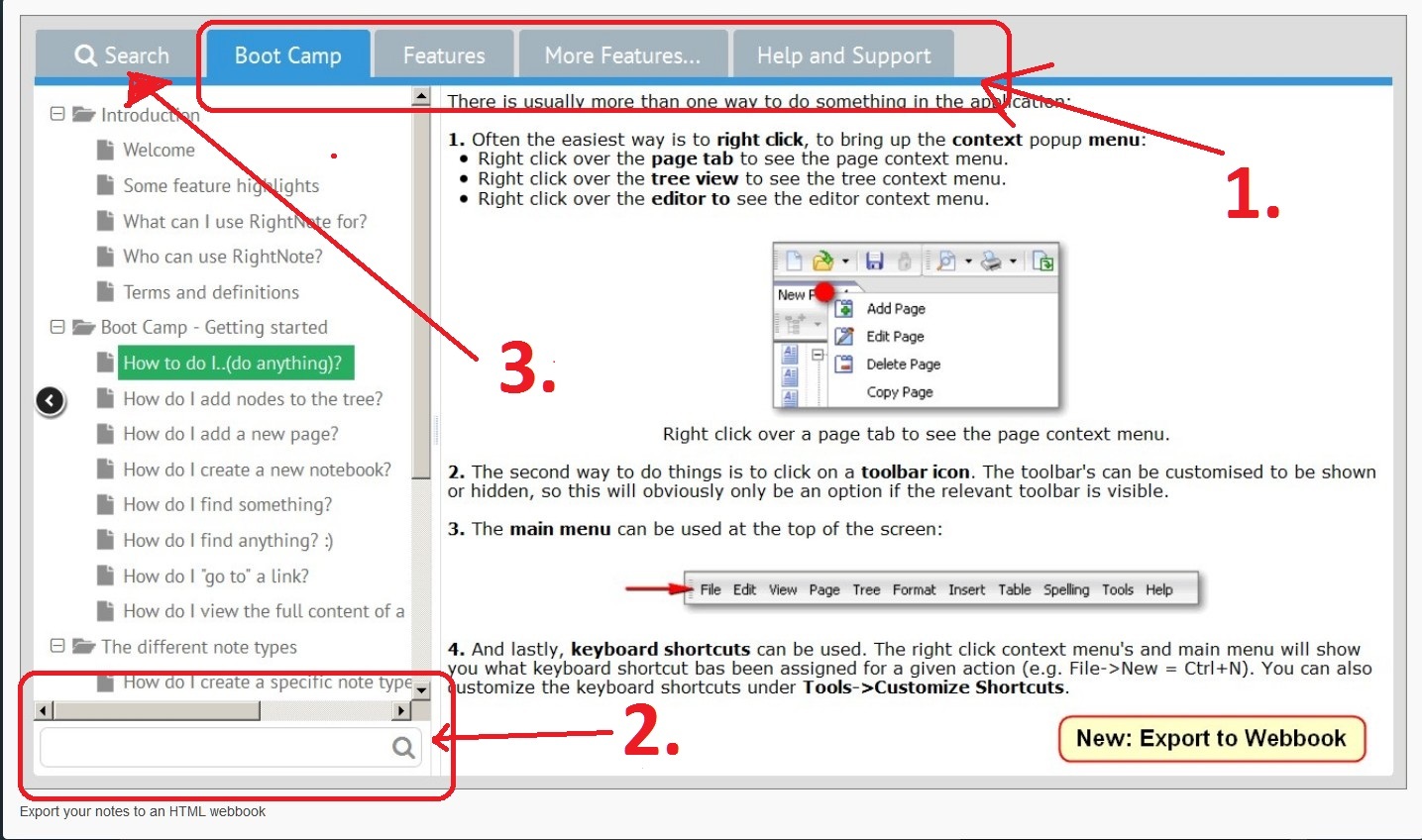
1. In the bar are the buttons with the "pages" of your File/notebook, let's the the chapters of what you would like to present (here: "Boot Camp", "Features", "More Features" etc.).
2. On the bottom of the tree you find a search field (filter) where you can search for the title of a certain note (= the items in the tree above). That's extremely important and useful when you publish for example a dictionary where every note (document / tree item) represents an individual keyword. It works as "Search as you type": When you start typing in the field, the appropriate notes appear in the tree above.
3. The big button "Search" in the bar offers you the possibility to make a full text search within all your notes and pages. (Not so important for someone who publishes a dictionary but surely quite useful for publishers or users with other needs.)
I have tested the webbook feature of RightNote by myself and can confirm that all looks and works as described above. This was the appearance of my own test webbook:
http://abload.de/img/wb29aqkb.jpg
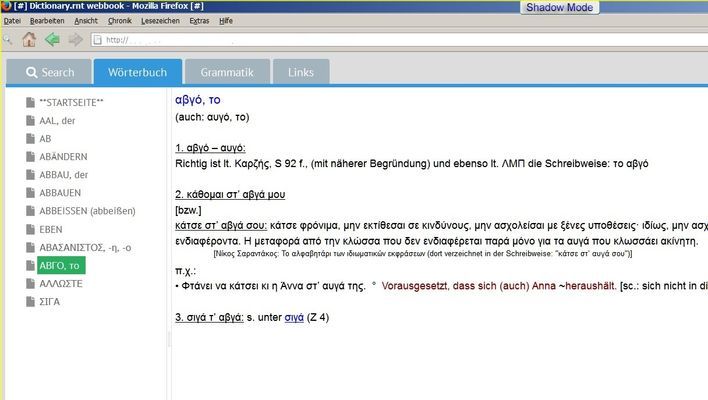
The most important page in this case is called "Wörterbuch" (= Dictionary) with the list of the keywords in the tree. (I tested it only with a few keywords). And I created two other additional pages (called "Grammatik [= Grammar] and "Links").
There is again the search field (filter) for the keywords on the bottom of the tree (not shown on the picture) and of course the full search button in the bar.
Generally the webbook of RightNote is a nice concept I think, even with some shortcomings (which could be easily eliminated, I think).
MadaboutDana
8/17/2015 2:12 pm
Some very interesting examples here, I must say.
There are some interesting options on the Mac, too, such as Growly Notes.
But if I was publishing a database as a website, I'd want a search engine in there. Which definitely limits the options! On the Mac, I can only think of DEVONthink Pro Office.
It does a great job of hosting an entire database on a website, complete with search function; the interface is similar to the classic three-pane browser interface immortalised by Outlook.
But it is, alas, limited; in particular, it doesn't highlight search terms or allow you to move between them, very unlike the desktop version.
On the other hand, it does allow (assuming you give permission) users to upload documents to the server. They're automatically stored in the Inbox. Clearly it's optimised for single-user administration, but with some flexibility.
Cheers,
Bill
There are some interesting options on the Mac, too, such as Growly Notes.
But if I was publishing a database as a website, I'd want a search engine in there. Which definitely limits the options! On the Mac, I can only think of DEVONthink Pro Office.
It does a great job of hosting an entire database on a website, complete with search function; the interface is similar to the classic three-pane browser interface immortalised by Outlook.
But it is, alas, limited; in particular, it doesn't highlight search terms or allow you to move between them, very unlike the desktop version.
On the other hand, it does allow (assuming you give permission) users to upload documents to the server. They're automatically stored in the Inbox. Clearly it's optimised for single-user administration, but with some flexibility.
Cheers,
Bill
Donovan
8/18/2015 7:13 pm
Wow, Tester, what a great post and some interesting examples. I am giving RightNote another shot for a particular project where the Webbooks may come in *very* handy. Thanks for taking your time and offering some excellent information.
Alexander Deliyannis
8/18/2015 8:23 pm
Tester, welcome to the forum (I myself have been missing for a while, so my welcome might be late...)
The work you've done is very interesting and impressive!
I suggest you take a look at Connected Text http://connectedtext.com/index.php
It is a personal wiki, meaning that it is not limited to the hierarchical structure of an outliner like MyInfo (which I think itself can surpass the strict hierarchy thanks to clones) and should well cover your organizational needs. I believe that its HTML export is very powerful--in the past the website itself was made through this export, with only some additional custom CSS. You can see a sample of such export (as Windows HTML help format, but regular HTML is also possible) here: http://connectedtext.com/Bin/Welcome.chm
The work you've done is very interesting and impressive!
I suggest you take a look at Connected Text http://connectedtext.com/index.php
It is a personal wiki, meaning that it is not limited to the hierarchical structure of an outliner like MyInfo (which I think itself can surpass the strict hierarchy thanks to clones) and should well cover your organizational needs. I believe that its HTML export is very powerful--in the past the website itself was made through this export, with only some additional custom CSS. You can see a sample of such export (as Windows HTML help format, but regular HTML is also possible) here: http://connectedtext.com/Bin/Welcome.chm
Tester
8/18/2015 9:51 pm
Donovan and Alexander, thanks for your friendly words. I am happy that my posting and the examples are of interest for you. :-)
Thanks also to Bill for his information about possible solutions for Mac users.
Some time ago (before starting to work with MyInfo) I had also tried various Wikis. Unfortunately I also could not find among them a really satisfactory solution too. The by far best Wiki (for my needs) was - and remained - "PBworks" (http://www.pbworks.com/ It is a hosted Wiki, so you need not install any software on your computer - all takes place directly in the web. But I do not know if they offer any longer the possibility to create a (free) Wiki as it existed when I started to work with it.
In general, with the Wiki of PBworks the result is excellent concerning the speed (o.k. my database there is not very big) and it is - in some fundamental aspects - excellent concerning the search possibility (especially in case that you want to publish a dictionary or something similar where the keyword search pays an important role). But in practice it is also the search feature that has some important shortcomings (perhaps not so interesting for most of you that it is useful to describe them in detail). These shortcomings were the main reason that I decided to stop for the time being the systematic work with this Wiki (though occasionally I still add another keyword). The formatting work is considerably bigger than the procedure MS Word ---> paste into MyInfo (or another outliner) ---> export as html/website. I would be willing to do this additional work, but only if I were fully satisfied with the result respectively the usability of the database/Wiki on the website. And that is not the case.
You can find my Wiki here, but only filled with about 3500 keywords: http://enalexiko.pbworks.com/w/page/60853998/Startseite
The search field is in the top right corner. You can test it for example by typing the letters ABH or ANTR (not case sensitive). A drop down list opens from which you can choose one of the (German) keywords containing these letters. Very comfortable (but unfortunately with some weak points too).
Concerning Connected Text: I had tried it also some time ago but the handling (especially formatting etc.) was by far too complicated for me. ;-)
I had also tested the function to export the data as a website. Instead of a tree Connected Text offers an index with all document titles in alphabetical groups. It can be seen also in the chm file linked by Alexander. As far as I remember there was no additional search feature. So I fear that with a large number of documents (let's say about 20.000) this index page would get monstrous. ;-)
So at the moment on the one hand I still hope for some spectacular changes (concerning web export) in MyInfo's next major upgrade and - as a potentially attractive alternative solution - I will continue to have in mind RightNote with its Webbook feature.
Thanks also to Bill for his information about possible solutions for Mac users.
Some time ago (before starting to work with MyInfo) I had also tried various Wikis. Unfortunately I also could not find among them a really satisfactory solution too. The by far best Wiki (for my needs) was - and remained - "PBworks" (http://www.pbworks.com/ It is a hosted Wiki, so you need not install any software on your computer - all takes place directly in the web. But I do not know if they offer any longer the possibility to create a (free) Wiki as it existed when I started to work with it.
In general, with the Wiki of PBworks the result is excellent concerning the speed (o.k. my database there is not very big) and it is - in some fundamental aspects - excellent concerning the search possibility (especially in case that you want to publish a dictionary or something similar where the keyword search pays an important role). But in practice it is also the search feature that has some important shortcomings (perhaps not so interesting for most of you that it is useful to describe them in detail). These shortcomings were the main reason that I decided to stop for the time being the systematic work with this Wiki (though occasionally I still add another keyword). The formatting work is considerably bigger than the procedure MS Word ---> paste into MyInfo (or another outliner) ---> export as html/website. I would be willing to do this additional work, but only if I were fully satisfied with the result respectively the usability of the database/Wiki on the website. And that is not the case.
You can find my Wiki here, but only filled with about 3500 keywords: http://enalexiko.pbworks.com/w/page/60853998/Startseite
The search field is in the top right corner. You can test it for example by typing the letters ABH or ANTR (not case sensitive). A drop down list opens from which you can choose one of the (German) keywords containing these letters. Very comfortable (but unfortunately with some weak points too).
Concerning Connected Text: I had tried it also some time ago but the handling (especially formatting etc.) was by far too complicated for me. ;-)
I had also tested the function to export the data as a website. Instead of a tree Connected Text offers an index with all document titles in alphabetical groups. It can be seen also in the chm file linked by Alexander. As far as I remember there was no additional search feature. So I fear that with a large number of documents (let's say about 20.000) this index page would get monstrous. ;-)
So at the moment on the one hand I still hope for some spectacular changes (concerning web export) in MyInfo's next major upgrade and - as a potentially attractive alternative solution - I will continue to have in mind RightNote with its Webbook feature.
Tester
8/19/2015 9:10 am
In the meantime I can report some experiences with RightNote (RN) (professional version) concerning bigger amounts of data. My impression is very good!
For better understanding it is useful to know the terminology:
In RN you have a "file" (also called "notebook"). That is in essence your database. (You can have more of them too if you like.) The file/notebook consists of one or more "pages" and every page consists of "notes" (the items which are listed in the tree).
I created a file/database and imported a little more than 7000 html files (into one page). These html files were originally created by MyInfo in order to publish my dictionary in the web. Every html file represents one keyword of the dictionary (= one document in MyInfo respectively one note in RightNote after the import).
I tried it with html files because so I could fill the database in a relatively quick time. (Of course you could also create 7000 new notes directly in RN in order to test the capacity.) My first attempt failed because I tried to import too many html files at the same time. It is advisable to split the imported amount: The procedure was susccessful when I took 7 times about 1000 of the files.
After the import into RN you can immediately start to export your file/database to the webbook. This process lasted about 5 to 10 minutes (for a database of about 23.500 KB - see below).
And the amazing result came when I opened the webbook in the browser: all worked without any noticeable delay: the opening of the webbook/website itself (o.k. perhaps a small delay of 4 or 5 seconds), the opening of the tree with the thousands of items and especially both search functions (full text search and search in the tree). The search for a note respectively the search within the 7000 notes were just as quickly as in my former tests with 5 or 10 notes! That means: you type or you click the button and immediately you see the search result.
To my mind the speed when using the webbook could not be better.
When opening RN itself on your computer there is a certain delay until the file/database loads. I would say it took about 10 to 15 seconds. But this is completely acceptable for me. (I usually once open the database after starting my computer and afterwards it remains opened all the time.)
This delay corresponds with the information in the help file of RN concerning the recommended file / database size:
"A page/tree will load quickly if it only has a few hundred notes. Once there are a few thousand notes, you will see that loading time becomes slower. Bearing this in mind, performance will be best if you spread your notes over a number of pages and notebooks.
As far as file size is concerned you should probably keep your file size in the MB range i.e. less than 300 MB for best performance."
With an amount of 7000 I have clearly hit the "few thousand notes" in my test. ;-) On the other hand many of my notes are relatively small (logical in case of a dictionary where sometimes you have only the keyword and its translation in a note). So the file/database in my test had a size by far smaller than 300 MB, namely about 23.500 KB (as already mentioned), hence only about 23 MB.
With other words: For my needs the capacity of RN seems to be by far sufficient (even considering the further growth of my dictionary or the creation of other additional databases).
Some details in RN need to be improved in any case (e.g. the full text search of the webbook which does not support German Umlaute, obviously a Unicode issue); for some other details an improvement would at least be desirable (e.g. the position and the coordination of the two search features on the interface of the webbook).
But on the whole I have the impression that RN seems to be an attractive solution - especially for people who would like to publish some database contents in the web in a quite userfriendly way. (By the way: the price for the Pro version at the moment is 59,95 $ - see http://bauerapps.com/rightnote-version-comparisons/ and http://bauerapps.com/rightnote-pricing/ .)
For better understanding it is useful to know the terminology:
In RN you have a "file" (also called "notebook"). That is in essence your database. (You can have more of them too if you like.) The file/notebook consists of one or more "pages" and every page consists of "notes" (the items which are listed in the tree).
I created a file/database and imported a little more than 7000 html files (into one page). These html files were originally created by MyInfo in order to publish my dictionary in the web. Every html file represents one keyword of the dictionary (= one document in MyInfo respectively one note in RightNote after the import).
I tried it with html files because so I could fill the database in a relatively quick time. (Of course you could also create 7000 new notes directly in RN in order to test the capacity.) My first attempt failed because I tried to import too many html files at the same time. It is advisable to split the imported amount: The procedure was susccessful when I took 7 times about 1000 of the files.
After the import into RN you can immediately start to export your file/database to the webbook. This process lasted about 5 to 10 minutes (for a database of about 23.500 KB - see below).
And the amazing result came when I opened the webbook in the browser: all worked without any noticeable delay: the opening of the webbook/website itself (o.k. perhaps a small delay of 4 or 5 seconds), the opening of the tree with the thousands of items and especially both search functions (full text search and search in the tree). The search for a note respectively the search within the 7000 notes were just as quickly as in my former tests with 5 or 10 notes! That means: you type or you click the button and immediately you see the search result.
To my mind the speed when using the webbook could not be better.
When opening RN itself on your computer there is a certain delay until the file/database loads. I would say it took about 10 to 15 seconds. But this is completely acceptable for me. (I usually once open the database after starting my computer and afterwards it remains opened all the time.)
This delay corresponds with the information in the help file of RN concerning the recommended file / database size:
"A page/tree will load quickly if it only has a few hundred notes. Once there are a few thousand notes, you will see that loading time becomes slower. Bearing this in mind, performance will be best if you spread your notes over a number of pages and notebooks.
As far as file size is concerned you should probably keep your file size in the MB range i.e. less than 300 MB for best performance."
With an amount of 7000 I have clearly hit the "few thousand notes" in my test. ;-) On the other hand many of my notes are relatively small (logical in case of a dictionary where sometimes you have only the keyword and its translation in a note). So the file/database in my test had a size by far smaller than 300 MB, namely about 23.500 KB (as already mentioned), hence only about 23 MB.
With other words: For my needs the capacity of RN seems to be by far sufficient (even considering the further growth of my dictionary or the creation of other additional databases).
Some details in RN need to be improved in any case (e.g. the full text search of the webbook which does not support German Umlaute, obviously a Unicode issue); for some other details an improvement would at least be desirable (e.g. the position and the coordination of the two search features on the interface of the webbook).
But on the whole I have the impression that RN seems to be an attractive solution - especially for people who would like to publish some database contents in the web in a quite userfriendly way. (By the way: the price for the Pro version at the moment is 59,95 $ - see http://bauerapps.com/rightnote-version-comparisons/ and http://bauerapps.com/rightnote-pricing/ .)
Tester
8/21/2015 12:15 am
In case that someone is interested to see how a webbook created with RightNote looks like in the web, here I discovered a good example. It is the User Guide for Right Note itself. It is not linked on RightNote's homepage (http://bauerapps.com/rightnote/ but you can find it here:
http://www.integritysoftwaresolutions.com/FreedomFiles/RightNoteTest/web.html
(The starting pages of the webbooks are a little bit "ascetic" consisting only of two lines. ;-) You have to click on "RNUserGuide" in order to "enter" the database.)
As mentioned in a former posting, you have in the bar on top a search button for fulltext search and at the bottom of the tree a filter for searching within the note titels.
http://www.integritysoftwaresolutions.com/FreedomFiles/RightNoteTest/web.html
(The starting pages of the webbooks are a little bit "ascetic" consisting only of two lines. ;-) You have to click on "RNUserGuide" in order to "enter" the database.)
As mentioned in a former posting, you have in the bar on top a search button for fulltext search and at the bottom of the tree a filter for searching within the note titels.
Tester
8/29/2015 1:52 am
I just wanted to inform you that according to a note on the website the 50% discount for "RightNote" will end on 31st August (see the message on top of the website / http://bauerapps.com/rightnote/ )! Until then the price is 29,95 $ for the standard version and 59,95 $ for the professional version (see http://bauerapps.com/rightnote-pricing/ ).
I tested the professional version intensely during the last days and my impression of the application is a very good one. The webbook feature is (at least for my needs) the best solution for web publishing I could find in the outliner applications I have tried.
If some technical details can be clarified with the developer I will buy RightNote. Unfortunately this will/would mean a gradual farewell to MyInfo which I like too and which I would prefer not to abandon. But it is simply so vague when the major upgrade to MyInfo 7 will come and if it will bring an improved possibility for web export (something similar to RightNote's webbook).
I tested the professional version intensely during the last days and my impression of the application is a very good one. The webbook feature is (at least for my needs) the best solution for web publishing I could find in the outliner applications I have tried.
If some technical details can be clarified with the developer I will buy RightNote. Unfortunately this will/would mean a gradual farewell to MyInfo which I like too and which I would prefer not to abandon. But it is simply so vague when the major upgrade to MyInfo 7 will come and if it will bring an improved possibility for web export (something similar to RightNote's webbook).
MadaboutDana
8/29/2015 11:42 am
Hi folks,
Well, as a Mac user, I really didn't want to fall in love with RightNote. But you know what? The Web Book feature is A W E S O M E!
And it has its own built-in search engine. And pretty mobile templates (nice, simple, logical design). It's the perfect platform for creating simple (read-only) wikis, in other words.
Damn! So I've just purchased the Pro upgrade (I bought RightNote Pro while I was still a Windows user, back in 2013) and installed it on one of my headless PCs.
It doesn't just create pretty web books - it does so quickly, efficiently, and adds a complete search index (which means searches are very fast). The multi-tabbed interface adds an extra level of usefulness - you can effectively use tabs as chapter headings.
It also works well in a browser if you call up the web book through the file system, so it doesn't need a web server. I have a test book on my Synology NAS, and I can read it (and perform searches) quite happily over a standard CIFS network link. I deliberately didn't put the test book in one of the web server folders.
Now, if I was going to be Mr. Finicky (okay, okay, I am), I would love to see highlighted search terms in Web Book searches (yeah, I did test that through the web server). But you can't have everything! I may hassle Rael about that, however...
Thanks for the recommendation, Tester. Now I must resist the temptation to rush out and acquire a super-cheap Windows tablet just so I can play with RightNote on it... ratz!
Well, as a Mac user, I really didn't want to fall in love with RightNote. But you know what? The Web Book feature is A W E S O M E!
And it has its own built-in search engine. And pretty mobile templates (nice, simple, logical design). It's the perfect platform for creating simple (read-only) wikis, in other words.
Damn! So I've just purchased the Pro upgrade (I bought RightNote Pro while I was still a Windows user, back in 2013) and installed it on one of my headless PCs.
It doesn't just create pretty web books - it does so quickly, efficiently, and adds a complete search index (which means searches are very fast). The multi-tabbed interface adds an extra level of usefulness - you can effectively use tabs as chapter headings.
It also works well in a browser if you call up the web book through the file system, so it doesn't need a web server. I have a test book on my Synology NAS, and I can read it (and perform searches) quite happily over a standard CIFS network link. I deliberately didn't put the test book in one of the web server folders.
Now, if I was going to be Mr. Finicky (okay, okay, I am), I would love to see highlighted search terms in Web Book searches (yeah, I did test that through the web server). But you can't have everything! I may hassle Rael about that, however...
Thanks for the recommendation, Tester. Now I must resist the temptation to rush out and acquire a super-cheap Windows tablet just so I can play with RightNote on it... ratz!
MadaboutDana
8/29/2015 11:57 am
Okay, this is ridiculous. You can copy web books about using e.g. Dropbox and they'll run quite happily as local microsites on mobile devices. I've just used Readdle Documents (the best of the best file management apps on iOS) to copy a web book from my Dropbox account to an iPad, and it runs beautifully (very fast indeed, in fact). And yes, the search function works perfectly, too.
So now I'm going to have to hassle Rael to produce a Mac version of RightNote - I can't go on using it on headless machines. Well, I suppose I can, but still. He's gonna love me!
So now I'm going to have to hassle Rael to produce a Mac version of RightNote - I can't go on using it on headless machines. Well, I suppose I can, but still. He's gonna love me!
MadaboutDana
8/29/2015 3:08 pm
Okay, one more note on RightNote:
it uses iFrames. Bit of a nuisance, especially on mobile devices (due to scrolling issues). Hm. Have to suggest to Rael that he uses a more modern technique, maybe lifted from something like UserPress (for WordPress), a very nice WordPress wiki template that goes together well with the Search & Filter plugin (for those of you who are WP aficionados).
it uses iFrames. Bit of a nuisance, especially on mobile devices (due to scrolling issues). Hm. Have to suggest to Rael that he uses a more modern technique, maybe lifted from something like UserPress (for WordPress), a very nice WordPress wiki template that goes together well with the Search & Filter plugin (for those of you who are WP aficionados).
gunars
8/29/2015 5:27 pm
One thing I noticed in that sample webbook is that internal links aren't working. For example, on the page "Boot Camp > Unique feature highlights", there are several "Details here" links that should take you to a different page in the webbook. Instead, Firefox gives me an error and IE does nothing. However, I just exported the same user guide using the current 3.3.1.0 version of RightNote (I have a Pro license I haven't really started using yet). All is well - the internal links are all working properly.
Tester wrote:
Tester wrote:
In case that someone is interested to see how a webbook created with
RightNote looks like in the web, here I discovered a good example. It is
the User Guide for Right Note itself. It is not linked on RightNote's
homepage (http://bauerapps.com/rightnote/ but you can find it here:
http://www.integritysoftwaresolutions.com/FreedomFiles/RightNoteTest/web.html
(The starting pages of the webbooks are a little bit "ascetic"
consisting only of two lines. ;-) You have to click on "RNUserGuide" in
order to "enter" the database.)
As mentioned in a former posting, you have in the bar on top a search
button for fulltext search and at the bottom of the tree a filter for
searching within the note titels.
Tester
8/29/2015 7:17 pm
gunars wrote:
One thing I noticed in that sample webbook is that internal links aren't
working.
My impression is that those who uploaded the webbook (as mentioned it is not bauerapps.com itself) changed something with the names or the paths of the folders. Usually the internal links should work without problem.
gunars wrote:
However, I just exported the same user guide using
the current 3.3.1.0 version of RightNote (I have a Pro license I haven't
really started using yet). All is well - the internal links are all
working properly.
Yes. The same for me.
And I uploaded temporarily a webbook I created for myself, simply for testing purposes (with some modifications I made in the flat.css-file in order to give the interface a more colorful appearance):
http://kompakt.bplaced.net/index.html/notebooks/enalexiko/notebook.html
Internal links are working fine in this webbook too. (You can find a few such links for example in the keywords "Abbrennen", "Abkürzung", "Absehen" - all in the tab "Wörterbuch".)
The strange thing is that I cannot open some of the external links (see tab "Links"). But it seems that this has to do with the iFrames and my use of NoScript, it is obviously no problem of RightNote itself.
@ MadaboutDana: Thanks for your interesting comments about the webbook.
Alexander Deliyannis
8/30/2015 6:17 am
@Tester and @Madaboutdana
Thanks for the extensive testing of RightNote in respect to web export. I didn't expect to find a better solution from MyInfo for such publishing, which is particularly useful to me. The use of iFrames perhaps limits the possibility for integration under other websites, but the functionality, especially the search, is too good to miss.
As it happens, you also tested the multilingual compliance of the RightNote export which is something that I need and seems to work great!
I've now registered RightNote 3.0 and sent a link to this conversation to Rael Bauer.
Tester wrote:
The internal links under "Abkurzung" work OK for me, not so the one under "Abbrennen", "Absehen" (it's the same link) where I get a 404 error.
I cannot see the page under Links at all; again, I get a 404 error.
One last, fully off-topic, note: As a half-Greek I am particularly interested in your work!
Thanks for the extensive testing of RightNote in respect to web export. I didn't expect to find a better solution from MyInfo for such publishing, which is particularly useful to me. The use of iFrames perhaps limits the possibility for integration under other websites, but the functionality, especially the search, is too good to miss.
As it happens, you also tested the multilingual compliance of the RightNote export which is something that I need and seems to work great!
I've now registered RightNote 3.0 and sent a link to this conversation to Rael Bauer.
Tester wrote:
http://kompakt.bplaced.net/index.html/notebooks/enalexiko/notebook.html
Internal links are working fine in this webbook too. (You can find a few
such links for example in the keywords "Abbrennen", "Abkurzung",
"Absehen" - all in the tab "Worterbuch".)
The internal links under "Abkurzung" work OK for me, not so the one under "Abbrennen", "Absehen" (it's the same link) where I get a 404 error.
The strange thing is that I cannot open some of the external links (see
tab "Links"). But it seems that this has to do with the iFrames and my
use of NoScript, it is obviously no problem of RightNote itself.
I cannot see the page under Links at all; again, I get a 404 error.
One last, fully off-topic, note: As a half-Greek I am particularly interested in your work!
Tester
8/30/2015 7:52 am
Alexander Deliyannis wrote:
It works now again. The 404 error had to to with a sort of stress test I made: I filled the webbook additionally with about 11.000 notes - so there are now about 11.500 altogether. ;-) Until the uploading process was finished the 404 error appeared.
I wanted to test the capacity and so I imported these about 11.000 files into RightNotes as they were created with MyInfo. I did not change their titles and left their numbers. So by typing into the filter (the orange field at the bottom of the tree) any number between 1 and 11.000 it is quite likely that you will get some result. ;-) (In reality some numbers will be missing because sometimes in the past I removed an entry = html file = number from MyInfo which I did no longer need). A lot of numbers can be found under the note/keyword "Afrika" others under "New Note 5315" etc. It simply has to do with the fact that I did not care especially where to place the imported files in the tree of RightNote. As mentioned, it should be simply a quick test of capacity.
And this creates perhaps a certain (but obviously inevitable) disappointment for me: There *is* a noticeable delay now in loading the website. Not so big as in the solution with MyInfo, but noticeable: about 15 to 20 seconds I would say. But unfortunately it seems that I will have to accept such a delay when the number of notes and consequently html files is so big.
In contrary the search speed as far as I tested it is excellent. You can try it by typing into the search field (which opens when clicking the tab in the left corner on top) e.g. the word "Karton". Immediately you will get the result with the 4 notes that contain the word. The same when trying with a more common word like "heute" (= "today" in German). Immediately you get the dozens of notes which contain this word. Phantastic speed I would say.
A remark about the formatting:
You will see correct results when opening notes that have already a word as title/caption (they are the first in the tree). These notes were created by transferring them directly from MyInfo with RightNote's clipper function (= an effective alternative to copy and paste). The notes with numbers (the imported html files) have some shortcomings concerning formatting (especially the line spacing that is smaller than in the Word files and in MyInfo). Anyway, my favourite method of transferring from MyInfo to RightNote would be the clipper (+ usual copy and paste in some special cases) and not the import of html files.
Alexander Deliyannis wrote:
Yes, Unicode works great in RightNote. There *are* a few shortcomings (3 or 4 I think) but they are not of big importance and can be fixed easily I think. I will report them to Rael some other time.
Nice to hear. :-) The dictionary also contains a big number of greek keywords but into this test webbook I only transferred 5 or 6 of them in order to test the Unicode capabilities. You can check e.g. for αγγιζω (typing without stress mark) (or ΑΓΓΙΖΩ), αγαπημενος, αγκαλιασμενος and αγναντευω. (These entries for the time being where transferred from a Word doc and not from MyInfo.)
The internal links under "Abkurzung" work OK for me, not so the one
under "Abbrennen", "Absehen" (it's the same link) where I get a 404
error.
I cannot see the page under Links at all; again, I get a 404 error.
It works now again. The 404 error had to to with a sort of stress test I made: I filled the webbook additionally with about 11.000 notes - so there are now about 11.500 altogether. ;-) Until the uploading process was finished the 404 error appeared.
I wanted to test the capacity and so I imported these about 11.000 files into RightNotes as they were created with MyInfo. I did not change their titles and left their numbers. So by typing into the filter (the orange field at the bottom of the tree) any number between 1 and 11.000 it is quite likely that you will get some result. ;-) (In reality some numbers will be missing because sometimes in the past I removed an entry = html file = number from MyInfo which I did no longer need). A lot of numbers can be found under the note/keyword "Afrika" others under "New Note 5315" etc. It simply has to do with the fact that I did not care especially where to place the imported files in the tree of RightNote. As mentioned, it should be simply a quick test of capacity.
And this creates perhaps a certain (but obviously inevitable) disappointment for me: There *is* a noticeable delay now in loading the website. Not so big as in the solution with MyInfo, but noticeable: about 15 to 20 seconds I would say. But unfortunately it seems that I will have to accept such a delay when the number of notes and consequently html files is so big.
In contrary the search speed as far as I tested it is excellent. You can try it by typing into the search field (which opens when clicking the tab in the left corner on top) e.g. the word "Karton". Immediately you will get the result with the 4 notes that contain the word. The same when trying with a more common word like "heute" (= "today" in German). Immediately you get the dozens of notes which contain this word. Phantastic speed I would say.
A remark about the formatting:
You will see correct results when opening notes that have already a word as title/caption (they are the first in the tree). These notes were created by transferring them directly from MyInfo with RightNote's clipper function (= an effective alternative to copy and paste). The notes with numbers (the imported html files) have some shortcomings concerning formatting (especially the line spacing that is smaller than in the Word files and in MyInfo). Anyway, my favourite method of transferring from MyInfo to RightNote would be the clipper (+ usual copy and paste in some special cases) and not the import of html files.
Alexander Deliyannis wrote:
As it happens, you also tested the multilingual compliance of the
RightNote export which is something that I need and seems to work great!
Yes, Unicode works great in RightNote. There *are* a few shortcomings (3 or 4 I think) but they are not of big importance and can be fixed easily I think. I will report them to Rael some other time.
One last, fully off-topic, note: As a half-Greek I am particularly
interested in your work!
Nice to hear. :-) The dictionary also contains a big number of greek keywords but into this test webbook I only transferred 5 or 6 of them in order to test the Unicode capabilities. You can check e.g. for αγγιζω (typing without stress mark) (or ΑΓΓΙΖΩ), αγαπημενος, αγκαλιασμενος and αγναντευω. (These entries for the time being where transferred from a Word doc and not from MyInfo.)
Tester
8/30/2015 8:03 am
PS:
The speed of the (keyword) search by using the filter (= orange field) is not so good as the speed of full text search (= the tab on top). The delay is noticeable especially when you type quickly. But surely the situation is by far better than the complete missing of a keyword search/filter.
The speed of the (keyword) search by using the filter (= orange field) is not so good as the speed of full text search (= the tab on top). The delay is noticeable especially when you type quickly. But surely the situation is by far better than the complete missing of a keyword search/filter.
Tester
9/2/2015 11:24 pm
I uploaded another sample for a Webbook created with RightNote under the same link as above: http://kompakt.bplaced.net/index.html/notebooks/enalexiko/notebook.html
This time the file/notebook in this sample consists only of about 1000 notes and speed is of course no problem with such a small amount. I wanted to try out how the user of RightNote can influence by himself the appearance and the functionality of the webbook. And though it means quite a lot of work I can say that it was possible to adjust the webbook quite exactly to how I would like to have it.
This concerns on the one hand the colors and other visual details. On the other hand I was also able to change the structure of the elements on the interface and the search mode in the filter in a way that satisfies my needs in a better way than the default parameters. Here a short description of the most important modifications (illustrated in the following picture):
http://abload.de/image.php?img=sample25odx.jpg
1: I transferred the filter (= the field for the tree search, that's in my case the keyword search) from the bottom under the tree to the top over the tree. (I have to thank Rael for his support how to do it.) And I gave this field a distinctive orange color. It is the central part for the user of an online dictionary (or similar databases).
2: In the tab bar I transferred the search tab (which is by default on the left end of the tab bar) to its right end. (And I gave the tab another name: "Volltextsuche" [= "Fulltext search]"). The reason has again to do with the needs of the user of a dictionary: Full text search plays only a subsidiary role compared with the keyword search. So it is sufficient when the fulltext search is positioned a little bit offside. Moreover a search tab directly above the filter would be a little bit confusing for the user (concerning the appropriate choice for his search).
3: That's one of the most pleasant modifications for me. :-) (Again it was Rael who explained me the way to realize it.) The search method in the filter is changed: When you type some characters you will get only results with these characters *at the beginning* of a word (more specific: at the beginning of the first word in a note caption / tree item).
You can try it out by typing the German word "alt" (= old). The search will show you only the keywords consisting of respectively *beginning" with these tree letters ("alt", "Alter" etc.). But you will *not* get as result words as "abhalten", "anhalten", "abschalten", "Anstalt" etc. where the letters "alt" are somewhere *within* the word. Such results usually are completely useless for the user of an ordinary dictionary and ennoying when you think for example of a dictionary with some thousand keywords - and therefore it is good that they are filtered out.
You can see the difference in the results when you make a fulltext search for "alt" (via the tab "Volltextsuche"). In the fulltext search I did not change the default search method and so you can find there all the words mentioned above too - and of course also all occurrences of "alt" within the text of a note.
All changes are made either in the css-file (colors etc.) or in the notebook.html (changes in the position of elements, of the search method etc.). It is quite cumbersome if you do not have much experience with such things but I am so happy with the result that the effort is justified. ;-)
So at the moment for me the only severe problem with the Webbook is the speed factor - especially the delay in loading the website - when the database consists of some thousand notes.
This time the file/notebook in this sample consists only of about 1000 notes and speed is of course no problem with such a small amount. I wanted to try out how the user of RightNote can influence by himself the appearance and the functionality of the webbook. And though it means quite a lot of work I can say that it was possible to adjust the webbook quite exactly to how I would like to have it.
This concerns on the one hand the colors and other visual details. On the other hand I was also able to change the structure of the elements on the interface and the search mode in the filter in a way that satisfies my needs in a better way than the default parameters. Here a short description of the most important modifications (illustrated in the following picture):
http://abload.de/image.php?img=sample25odx.jpg

1: I transferred the filter (= the field for the tree search, that's in my case the keyword search) from the bottom under the tree to the top over the tree. (I have to thank Rael for his support how to do it.) And I gave this field a distinctive orange color. It is the central part for the user of an online dictionary (or similar databases).
2: In the tab bar I transferred the search tab (which is by default on the left end of the tab bar) to its right end. (And I gave the tab another name: "Volltextsuche" [= "Fulltext search]"). The reason has again to do with the needs of the user of a dictionary: Full text search plays only a subsidiary role compared with the keyword search. So it is sufficient when the fulltext search is positioned a little bit offside. Moreover a search tab directly above the filter would be a little bit confusing for the user (concerning the appropriate choice for his search).
3: That's one of the most pleasant modifications for me. :-) (Again it was Rael who explained me the way to realize it.) The search method in the filter is changed: When you type some characters you will get only results with these characters *at the beginning* of a word (more specific: at the beginning of the first word in a note caption / tree item).
You can try it out by typing the German word "alt" (= old). The search will show you only the keywords consisting of respectively *beginning" with these tree letters ("alt", "Alter" etc.). But you will *not* get as result words as "abhalten", "anhalten", "abschalten", "Anstalt" etc. where the letters "alt" are somewhere *within* the word. Such results usually are completely useless for the user of an ordinary dictionary and ennoying when you think for example of a dictionary with some thousand keywords - and therefore it is good that they are filtered out.
You can see the difference in the results when you make a fulltext search for "alt" (via the tab "Volltextsuche"). In the fulltext search I did not change the default search method and so you can find there all the words mentioned above too - and of course also all occurrences of "alt" within the text of a note.
All changes are made either in the css-file (colors etc.) or in the notebook.html (changes in the position of elements, of the search method etc.). It is quite cumbersome if you do not have much experience with such things but I am so happy with the result that the effort is justified. ;-)
So at the moment for me the only severe problem with the Webbook is the speed factor - especially the delay in loading the website - when the database consists of some thousand notes.