
Tree-Outliner with internal EXCEL full-edit ribbon viewer?
Started by donleone
on 7/14/2013
donleone
7/14/2013 2:06 pm
Hello Outliner Experts.
Currently i am using Ultra Recall Professional 5 to fulfill my 2 prime outliner needs of:
1. Having a super elegant Tree Structure (preferable with custom icons, one-click open/close, etc.)
and
2. An internal full-editable native EXCEL viewer implementation (i.e. no external window pop-up via attachments, and please NOT (!) an implementation via Internet Explorer ActiveX Hosting like UR does so far, which crashes left and right with bugs.)
Ultra Recall Professional is "pretty nice" in general, IF IT WERE NOT ONLY for its most horribly bad internal RTF-Editor (scrolling is horrible, no tables row adding/editing nothing possible!)
and likewise their most horrible internal Internet Explorer ActiveX implementation of editing MS Word (with ribbon) and MS Excel (no ribbon possible, IE security limitation!).
Because of that I am looking for an alternative.
but forget all other "spreadsheet-supporting" Outliners, like Rightnote / AM-Notebook / Memomaster etc. of which again all are horribly bad in their spread-sheet capabilities and usabilities compared to EXCEL (as e.g. even the scrolling beyond 100 rows, larger import total crash, no multi sheets, most formulas dont work etc..)
and also forget please all so called "excel addins" like XLNotes, Excel Explorer etc...which likewise totally unstably tend to crash / loose data (in some comments fields forever gone!) etc. etc.... and are no alternative to a "real" free-form database/outliner software.
So my ONLY ALTERNATIVE so far found is TreeProjects which has a full Excel internal editing viewer (but not via an IE implementation like UR does, but directly with Excel itself !).
The only thing with "TreeProjects", is to say the least, its "pretty limited" feature set compared to the far better developed UR (with custom fields, search folders, etc...).
Therefore, does any of you know another Software besides UR and TreeProjects that can likewise FULL internally edit Excel files, and does but NOT go via Internet Explorer to accomplish it ??? If so, then please let me know.
Thanks all.
Currently i am using Ultra Recall Professional 5 to fulfill my 2 prime outliner needs of:
1. Having a super elegant Tree Structure (preferable with custom icons, one-click open/close, etc.)
and
2. An internal full-editable native EXCEL viewer implementation (i.e. no external window pop-up via attachments, and please NOT (!) an implementation via Internet Explorer ActiveX Hosting like UR does so far, which crashes left and right with bugs.)
Ultra Recall Professional is "pretty nice" in general, IF IT WERE NOT ONLY for its most horribly bad internal RTF-Editor (scrolling is horrible, no tables row adding/editing nothing possible!)
and likewise their most horrible internal Internet Explorer ActiveX implementation of editing MS Word (with ribbon) and MS Excel (no ribbon possible, IE security limitation!).
Because of that I am looking for an alternative.
but forget all other "spreadsheet-supporting" Outliners, like Rightnote / AM-Notebook / Memomaster etc. of which again all are horribly bad in their spread-sheet capabilities and usabilities compared to EXCEL (as e.g. even the scrolling beyond 100 rows, larger import total crash, no multi sheets, most formulas dont work etc..)
and also forget please all so called "excel addins" like XLNotes, Excel Explorer etc...which likewise totally unstably tend to crash / loose data (in some comments fields forever gone!) etc. etc.... and are no alternative to a "real" free-form database/outliner software.
So my ONLY ALTERNATIVE so far found is TreeProjects which has a full Excel internal editing viewer (but not via an IE implementation like UR does, but directly with Excel itself !).
The only thing with "TreeProjects", is to say the least, its "pretty limited" feature set compared to the far better developed UR (with custom fields, search folders, etc...).
Therefore, does any of you know another Software besides UR and TreeProjects that can likewise FULL internally edit Excel files, and does but NOT go via Internet Explorer to accomplish it ??? If so, then please let me know.
Thanks all.
Dr Andus
7/14/2013 4:09 pm
donleone wrote:
This is probably not the answer you're looking for, but if you can't find the right software for both, alternatively you could use one software for the tree structure, and just link to your Excel etc. files, so you could edit them in Excel.
E.g. this could be done using Freeplane (in mind map or outline mode), where you can drag and drop external files into the hierarchy, which then can be launched with one click. Nodes can be formatted, annotated, marked with icons, linked to each other etc.).
1. Having a super elegant Tree Structure (preferable with custom icons,
one-click open/close, etc.)
2. An internal full-editable native EXCEL viewer implementation
This is probably not the answer you're looking for, but if you can't find the right software for both, alternatively you could use one software for the tree structure, and just link to your Excel etc. files, so you could edit them in Excel.
E.g. this could be done using Freeplane (in mind map or outline mode), where you can drag and drop external files into the hierarchy, which then can be launched with one click. Nodes can be formatted, annotated, marked with icons, linked to each other etc.).
donleone
7/15/2013 2:29 pm
thanks. Appreciate your out-of-the-box thinking.
It brought me down to the idea, that given the lack of a "perfect combo-software" it seems best to accomplish the Excel in-line-editing/view in Microsoft's OneNote 2013, since that has at somewhat a hierarchical tree, and since its 2013 version allows now full Excel embeds inside, with instant synced-previews visible, albeit you'd still have to do 1 CLICK (so be it then) and open it in an external full Excel window to edit (what can i do, at least got thus the full screen space to work with that way, and no error messages ever).
Then after saving, instantly the onenote preview is synced and thats about as best it gets in 2013 today.
I'll probably stick with that solution, and am discovering some extra power-user features of OneNote i never knew of, like all embedded audio & videos are auto-search indexed by speech etc...
here a good power-user video for those ever in the same problem as me:
http://www.youtube.com/watch?v=YuTBdonbYZo
Thanks all.
It brought me down to the idea, that given the lack of a "perfect combo-software" it seems best to accomplish the Excel in-line-editing/view in Microsoft's OneNote 2013, since that has at somewhat a hierarchical tree, and since its 2013 version allows now full Excel embeds inside, with instant synced-previews visible, albeit you'd still have to do 1 CLICK (so be it then) and open it in an external full Excel window to edit (what can i do, at least got thus the full screen space to work with that way, and no error messages ever).
Then after saving, instantly the onenote preview is synced and thats about as best it gets in 2013 today.
I'll probably stick with that solution, and am discovering some extra power-user features of OneNote i never knew of, like all embedded audio & videos are auto-search indexed by speech etc...
here a good power-user video for those ever in the same problem as me:
http://www.youtube.com/watch?v=YuTBdonbYZo
Thanks all.
Slartibartfarst
7/15/2013 2:31 pm
Heh. Ashton-Tate's Framework IV used to have something like this. I was well-integrated, and also had native word processing and database (.dbl) capabilities, and modem auto-dialup AT functionality. In 1989 or thereabouts. Ran under DOS though...
It would be nice to find something as powerful and well-integrated for the current Windows OSes. Things like TreeSheets or XLNotes just are/were not up to it.
MS OneNote 2013 has some decent integration with Excel, but it's not necessarily ideal. So much for OLE.
It would be nice to find something as powerful and well-integrated for the current Windows OSes. Things like TreeSheets or XLNotes just are/were not up to it.
MS OneNote 2013 has some decent integration with Excel, but it's not necessarily ideal. So much for OLE.
Slartibartfarst
7/16/2013 12:54 am
@donleone: By the way, thankyou - I just took a look at that link that you gave: http://www.youtube.com/watch?v=YuTBdonbYZo
It's a superb OneNote overview. There may be better ones out there, but this one is probably the best that I have seen to date, and I intend to use it as a point of reference for anyone requiring a OneNote introduction.
The guy giving it (Adam Smith) seems to be an experienced OneNote 2010+2013 user, rather than a OneNote developer, so he has some good "use case" examples to refer to.
In the video he gives a link to a website "Office OneNote Gem Add-Ins" at http://www.onenotegem.com/
- which looks to be potentially pretty useful.
It's a superb OneNote overview. There may be better ones out there, but this one is probably the best that I have seen to date, and I intend to use it as a point of reference for anyone requiring a OneNote introduction.
The guy giving it (Adam Smith) seems to be an experienced OneNote 2010+2013 user, rather than a OneNote developer, so he has some good "use case" examples to refer to.
In the video he gives a link to a website "Office OneNote Gem Add-Ins" at http://www.onenotegem.com/
- which looks to be potentially pretty useful.
donleone
7/16/2013 10:05 am
Slartibartfarst wrote:
By the way, thankyou - I just took a look at that link that
you gave: http://www.youtube.com/watch?v=YuTBdonbYZo
It's a superb OneNote overview.
Yes, indeed, the best I've seen as-well.
First, i must admit that i totally under-estimated MS OneNote 2013 power-user capabilities, so here is a quick summary of my new findings so far, in trying to find the "ideal" outliner with the best possible Excel ingretation:
THE GOOD
_____________________
1. You can get OneNote 2013 at the Microsoft Store for just $69.90 as a direct download (so no need to buy the full office or any "365" subscription package.) so price is definitely "okay". See here:
http://www.microsoftstore.com/store/msusa/en_US/pdp/productID.259322100
2. You can thankfully DISABLE the always "hovering-note-box-container" over every selected item in the Options/Display/Show Note containers on pages (by checking that one off! - so it feels now like a "real" outliner editor, very calm. )
3. there is a hidden tree-navigation view which gets enabled only in FULL-SCREEN that is far more organized seeming than the regular view, see here (and plus you get the full screen blank for added focus & concentration. See here:
http://blogs.msdn.com/cfs-filesystemfile.ashx/__key/communityserver-blogs-components-weblogfiles/00-00-00-63-17/8686.normal_2D00_dropdown.png

4. and of course the Excel Intregration with One-click-editing and auto-sync-changes-Preview is great, and working even with Excel 2007 perfectly integrated
5. Everything (Attachments, pictures, videos etc.) is stored inside in a single-database, and all changes are auto-synced after edited/saved.
6. There is literally no official microsoft limit set on a OneNote Database size (unlike e.g. Outlook PST files with have a 20GB limit), so a 100GB or greater database is totally possible (e.g. with many attachments, videos etc.) needing only some decent RAM (for previews) to keep it smooth.
7. The possibility to extend the program via ADD-INS is a huge (!) possibility (that sadly not many programmers have taken up yet), by which one can "custom expand" OneNote's interface & functionality tremendously!
Therefore, after searching google like crazy for OneNote Addin Suppliers, here are some quick best found power-user OneNote Add-ins so far:
- this one adds a Calendar Module, Auto-filling Table fields (!), and an easy do-it-yourself drag-&-drop Macro-Editor), and the add-is is FREE
http://www.omeratay.com/onetastic/
- then to show just how far one could go in Add-in programming, here is a full-blown Database Add-in, with entry-forms, contact management etc. which but is way over-priced, but nevertheless. See here:
http://www.abletfactory.com/EMRSuite.html
- And here also a useful add-in for better batch-import & Export of large files/attachments (as the native import/export implementation is fairly limited, as Microsoft likes you to stay inside OneNote forever)
http://www.onenotegem.com/onenote-batch.html
THE BAD OF ONENOTE
_____________________
-There is no way to password protect & encryt the WHOLE OneNote, only "section by section" at least you can. So then i thought to put everything under just 1 Section, and pass-word protect, but that limits my tree-view navigation quite a bit (albeit you still can have 2 sub-levels for organization, by making them sub-pages)
- no custom icons possible in tree (but alternatively i am thinking to make 1 page a full-fleged "index" navigation page, and use all other sub-pages as linked to that, then you could outline your perfect navigation yourself, without even needing any tree-anymore, i know its not perfect, but just to show you how far i am considering to sacrifice for great excel data-sheet integration.
cant think of anything else, but thats about as best as OneNote gets.
donleone
7/16/2013 10:30 am
oh wow just discovered !!
With this "favorites-to-ribbon" add-in you can even have "stored searches" saved to the ribbon bar, as a kind of replacement for my missing "saved searches" feature of Ultra Recall...
http://www.onenotegem.com/uploads/8/5/1/8/8518752/5926742_orig.jpg
features are starting to come together slowly ;-)
greetings
With this "favorites-to-ribbon" add-in you can even have "stored searches" saved to the ribbon bar, as a kind of replacement for my missing "saved searches" feature of Ultra Recall...
http://www.onenotegem.com/uploads/8/5/1/8/8518752/5926742_orig.jpg

features are starting to come together slowly ;-)
greetings
donleone
3/30/2014 9:41 pm
Found this most amazing Old Goodie, called "Info Rapid Card File System" !
which has the best Excel-in-place-editing ability of any Outliner i have seen so far
see example:
https://dl.dropboxusercontent.com/u/12285943/Screenshot_Excel_Inplace_Editing.jpg
Thus you amazingly get
- Hierarchical Spreadsheets !! (this is soo rare)
+
- integrated Document management (of whatever format you can preview PDF, Word, whatever) = all internally stored + indexed + full preview-able + change updated internally saved.
+
- an super-fast search engine with in-results preview, of even all attachment-indexed documents/excels too (!)
see here: http://www.inforapid.de/assets/images/cfscreen1.gif
+
- MULTIPLE WINDOWS workspace
greetings!
link:
http://www.inforapid.de/html/cfscreenshots.htm
which has the best Excel-in-place-editing ability of any Outliner i have seen so far
see example:
https://dl.dropboxusercontent.com/u/12285943/Screenshot_Excel_Inplace_Editing.jpg

Thus you amazingly get
- Hierarchical Spreadsheets !! (this is soo rare)
+
- integrated Document management (of whatever format you can preview PDF, Word, whatever) = all internally stored + indexed + full preview-able + change updated internally saved.
+
- an super-fast search engine with in-results preview, of even all attachment-indexed documents/excels too (!)
see here: http://www.inforapid.de/assets/images/cfscreen1.gif
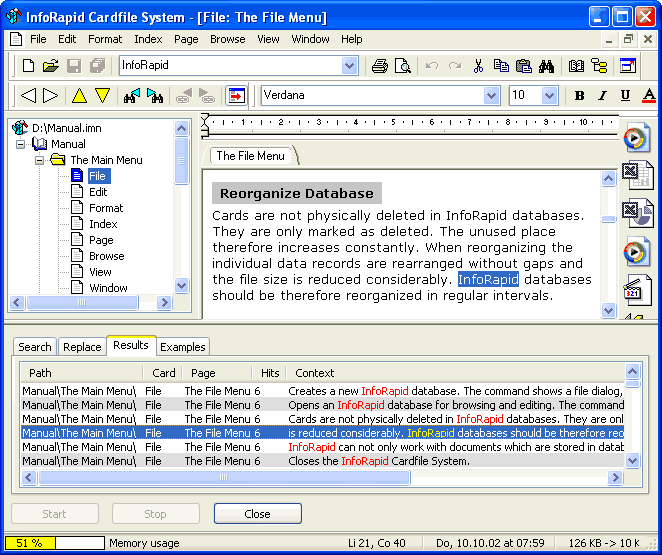
+
- MULTIPLE WINDOWS workspace
greetings!
link:
http://www.inforapid.de/html/cfscreenshots.htm
donleone
3/30/2014 11:13 pm
ADDITION:
this software also has a most amazing integration !!
YOZO OFFICE 2012 = the only true integrated office suite in a single application = but cleverly usable, a power-outliner capable!!
be smarter,
don't think "custom fields" = think cells
don't think "search folders" = think table filters (and one click trigger-buttons)
+
likewise MULTIPLE WINDOWS simultanous working, so amazing !
see screenshot:
https://dl.dropboxusercontent.com/u/12285943/Sreenshot_Yozo_Office_Integrated_Editing.JPG
official site:
http://www.yozooffice.com
and PS: here another power screenshot showing the same concept, but using again the just previous mentioned software - InfoRapid Cardfile System:
https://dl.dropboxusercontent.com/u/12285943/InfoRapid_CardFile_System_Excel-multi-windows2.jpg
greetings!
this software also has a most amazing integration !!
YOZO OFFICE 2012 = the only true integrated office suite in a single application = but cleverly usable, a power-outliner capable!!
be smarter,
don't think "custom fields" = think cells
don't think "search folders" = think table filters (and one click trigger-buttons)
+
likewise MULTIPLE WINDOWS simultanous working, so amazing !
see screenshot:
https://dl.dropboxusercontent.com/u/12285943/Sreenshot_Yozo_Office_Integrated_Editing.JPG

official site:
http://www.yozooffice.com
and PS: here another power screenshot showing the same concept, but using again the just previous mentioned software - InfoRapid Cardfile System:
https://dl.dropboxusercontent.com/u/12285943/InfoRapid_CardFile_System_Excel-multi-windows2.jpg

greetings!
MadaboutDana
3/31/2014 1:36 pm
Yozo Office reminds me of good ole' StarOffice 5, which had a similar totally integrated interface. Alas, it died (or rather, was transformed into OpenOffice). I've also thought it was a shame nobody else picked up that paradigm - and now, clearly, they have!
Alexander Deliyannis
3/31/2014 8:23 pm
MadaboutDana wrote:
And long before that, Ashton-Tate's Framework for DOS. Those were the days of innovation--not standardisation (or 'normalisation' as the French and Italians would say...)
Yozo Office reminds me of good ole' StarOffice 5, which had a similar
totally integrated interface.
And long before that, Ashton-Tate's Framework for DOS. Those were the days of innovation--not standardisation (or 'normalisation' as the French and Italians would say...)
MadaboutDana
4/1/2014 7:59 am
Framework's one - fairly significant - limitation being that it ran entirely in RAM. Which made it very fast, but very inflexible, and unable to deal with large data sets (especially in view of the max. 640 KB of RAM back in the day). It could handle extended RAM, mind you, but that really didn't mean much (from memory, ca. 1.5 MB)!
But it had a great interface (for a DOS app).
But it had a great interface (for a DOS app).
Alexander Deliyannis
4/1/2014 7:33 pm
donleone wrote:
Thanks for the heads up on this. I'll have to check the compatibility with MS Office files, but the programme itself looks impressive.
What I found really brilliant is a horizontal arrow at the top right, next to the vertical arrow to hide/show the ribbon: click to switch to 'classic'--Office 2003 and earlier--menu bar, click again to switch to ribbon! Now why couldn't Microsoft have offered that in Office 2007?
YOZO OFFICE 2012 = the only true integrated office suite in a single
application = but cleverly usable, a power-outliner capable!!
Thanks for the heads up on this. I'll have to check the compatibility with MS Office files, but the programme itself looks impressive.
What I found really brilliant is a horizontal arrow at the top right, next to the vertical arrow to hide/show the ribbon: click to switch to 'classic'--Office 2003 and earlier--menu bar, click again to switch to ribbon! Now why couldn't Microsoft have offered that in Office 2007?
donleone
4/4/2014 5:31 pm
and here found another of this kind rarity!
an ALL-IN-ONE software which has:
- an integrated spreadsheet
- integrated word app
- integrated process drawing app
- integrated database
- and even more strange things,
ALL in a MULTIPLE WINDOWS workspace!
see screenshots:
https://dl.dropboxusercontent.com/u/12285943/Piwi_Suite_Integration.jpg
+
http://www.matschke.at/wp-content/gallery/minisuite/minisuite_overview.jpg
greetings!
an ALL-IN-ONE software which has:
- an integrated spreadsheet
- integrated word app
- integrated process drawing app
- integrated database
- and even more strange things,
ALL in a MULTIPLE WINDOWS workspace!
see screenshots:
https://dl.dropboxusercontent.com/u/12285943/Piwi_Suite_Integration.jpg

+
http://www.matschke.at/wp-content/gallery/minisuite/minisuite_overview.jpg

greetings!
donleone
4/5/2014 10:26 am
continuing on the Extreme Excel Integration (EEI) exploration:
SPbinder (supporting Excel, Word and Outlook in-place editing).
http://youtu.be/Uip_LPzzYMg?t=58s
source:
http://corp.sureprep.com/solutions/software/spbinder
greetings!
SPbinder (supporting Excel, Word and Outlook in-place editing).
http://youtu.be/Uip_LPzzYMg?t=58s
source:
http://corp.sureprep.com/solutions/software/spbinder
greetings!
Slartibartfarst
4/6/2014 7:12 am
donleone wrote:
Many thanks for the links. SurePrep's SPbinder looks like it could be amazingly useful in general working document management and workflow management.
I couldn't figure out whether it was Cloud-based or PC/Client-based.
Has anyone here had any experience of using it?
continuing on the Extreme Excel Integration (EEI) exploration:__________________________
SPbinder (supporting Excel, Word and Outlook in-place editing).
http://youtu.be/Uip_LPzzYMg?t=58s
source: http://corp.sureprep.com/solutions/software/spbinder
Many thanks for the links. SurePrep's SPbinder looks like it could be amazingly useful in general working document management and workflow management.
I couldn't figure out whether it was Cloud-based or PC/Client-based.
Has anyone here had any experience of using it?
donleone
4/6/2014 6:30 pm
another Extreme Excel Integration (EEI) Software !!
MindJet MindManager (i never knew ! )
see for Excel:
https://dl.dropboxusercontent.com/u/12285943/Mindjet_Excel_Integration.png
see for Word:
https://dl.dropboxusercontent.com/u/12285943/MindJet_Word_Integration.png
see for PowerPoint:
https://dl.dropboxusercontent.com/u/12285943/MindJet_PowerPoint_Integration.png
that's powerful.
Greetings!
MindJet MindManager (i never knew ! )
see for Excel:
https://dl.dropboxusercontent.com/u/12285943/Mindjet_Excel_Integration.png

see for Word:
https://dl.dropboxusercontent.com/u/12285943/MindJet_Word_Integration.png

see for PowerPoint:
https://dl.dropboxusercontent.com/u/12285943/MindJet_PowerPoint_Integration.png

that's powerful.
Greetings!